Offline AI inference means running a trained model on hardware you control, using locally stored model weights and a local runtime, with no call to an outside server. Nothing leaves the machine or the network, and nothing needs the internet to answer. The phrase also has a second meaning in machine learning: “offline” can describe batch jobs that run on a schedule. This guide covers both, then focuses on the first, because that is what enterprises with sensitive data usually need.
TL;DR
- Offline inference in the sovereignty sense: the model, the runtime and the data all sit inside your perimeter, and the system works with the network cable unplugged.
- In ML engineering, “offline” can also mean batch inference, which favors throughput over speed of response. The two ideas overlap but are not the same.
- You need three things: model weights, enough memory to load them, and an inference runtime. Air-gapped sites add a controlled way to move artifacts in.
- Offline fits regulated, high-security and connectivity-poor environments. Cloud still fits bursty, non-sensitive work.
- Forge AI Deployment designs, deploys and operates these systems on webAI’s local-first platform.
Table of Contents
- What offline AI inference actually means
- How a model answers with no internet
- What you need to run inference offline
- Keeping offline inference secure
- Limits you should plan for
- Where enterprises use offline inference
- Offline or cloud: how to decide
- Our perspective on offline inference
- Plan an offline deployment with Forge
- A practical checklist before you start
- FAQ
- Sources
What offline AI inference actually means
Inference is the stage after training. Training shows a model curated datasets so it can learn patterns. Inference is when the finished model recognizes patterns in new data and makes predictions. Every chatbot answer, document summary or anomaly flag is an inference.
Two different things get called “offline”:
1. Offline as in no network. The model runs entirely on a device or inside a private, air-gapped network. Weights live on local storage, and a local engine does the math. No API call goes out, and no vendor sees your prompts or documents.
2. Offline as in batch. Batch inference, also called offline inference, processes a large set of observations together, prioritizing throughput and computational efficiency over low latency. Google’s machine learning course describes the same idea as static inference, where the model makes predictions on common examples and caches them.
The vLLM project uses the word in this second sense too: its LLM class is the main interface for offline batched inference on a list of prompts, without a separate API server.
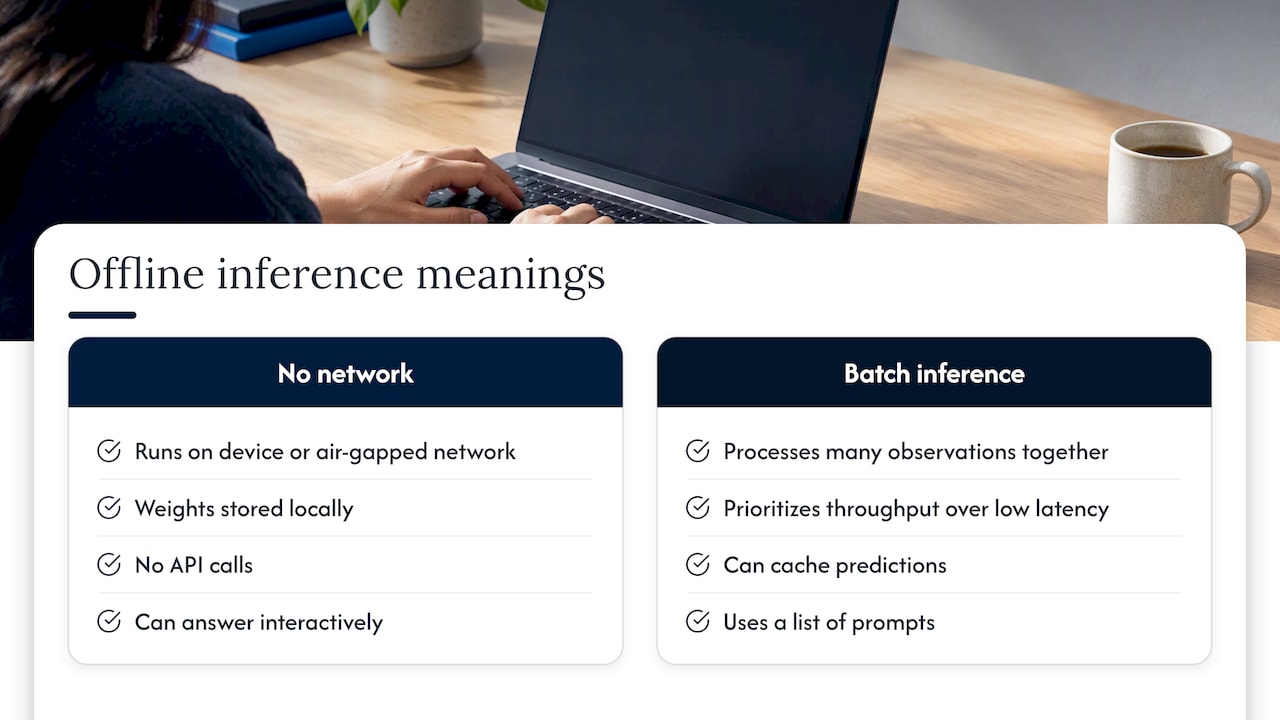
The two meanings can combine. A bank can run overnight batch scoring on a server with no internet path at all. But a disconnected system can also be fully interactive, answering a technician’s question in a second. When security teams say “offline AI,” they almost always mean the first definition. The rest of this guide does too, and flags batch where it matters.
How it differs from training and from cloud inference
| Training | Cloud inference | Offline (no network) inference | |
|---|---|---|---|
| What happens | Model learns from data | Model answers via a remote API | Model answers on your own hardware |
| Where data goes | Wherever the training set lives | Out to a provider’s servers | Stays inside your perimeter |
| Internet needed | Usually no | Yes | No |
| Main constraint | Compute and data quality | Trust, cost per request, availability | Local hardware and operations |
Most enterprises never train a foundation model. They take an existing model, adapt it, and run inference. That is why the operating model for inference matters so much.
How a model answers with no internet
There is no magic. A model is a large file of numerical weights. To answer offline, the system loads those pre-downloaded weights into the device’s memory, either system RAM or GPU VRAM. A local inference engine then performs the calculations on the device, with no network callbacks or external API calls.
In practice the flow looks like this:
- A user or application sends a prompt to a local service.
- The runtime tokenizes the text and runs it through the model layers held in memory.
- The runtime generates output one token at a time and returns it.
- If the system is grounded in your documents, a retrieval step first finds the relevant passages from a local index, so the answer cites your own sources.
Step 4 is where many offline projects succeed or fail. A model alone knows only what it was trained on. The value for an enterprise comes from pairing it with your manuals, policies, contracts or maintenance records, all searched locally. Our guide to offline embedding models covers how to choose the retrieval side.
What you need to run inference offline
The minimum stack is short. To run a model locally you need model weights, memory to load them, and a runtime such as Ollama, llama.cpp or vLLM. Enterprise deployments add more around that core.
Hardware
Memory is the first constraint. The weights must fit in VRAM, with extra room for the context window and concurrent users. Undersizing is the most common budgeting mistake, and it is cheap to avoid on paper. Our walkthrough on sizing GPU memory for LLMs shows how to estimate it before you buy.
Hardware also spans a wide range. A single workstation can serve a small team. A rack of GPU servers can serve a plant or a division. Edge devices can serve one technician on a flight line or in a substation.
Models
Open-weight models can be downloaded once, scanned, approved and then run indefinitely. Model choice depends on the task: a document question-answering assistant needs different strengths than a code assistant or a classifier. Smaller, well-tuned models often beat larger general ones for narrow, domain-specific work, and they need far less hardware.
Runtime and orchestration
The runtime is the engine. Orchestration is everything around it: scheduling, scaling, health checks, logging, updates. On a laptop you can skip it. In production you cannot. Many teams run inference in containers on Kubernetes, which raises its own question in disconnected sites: how do you verify that every image and artifact is the one you approved? We cover that in air-gapped Kubernetes artifact verification.
Getting artifacts in
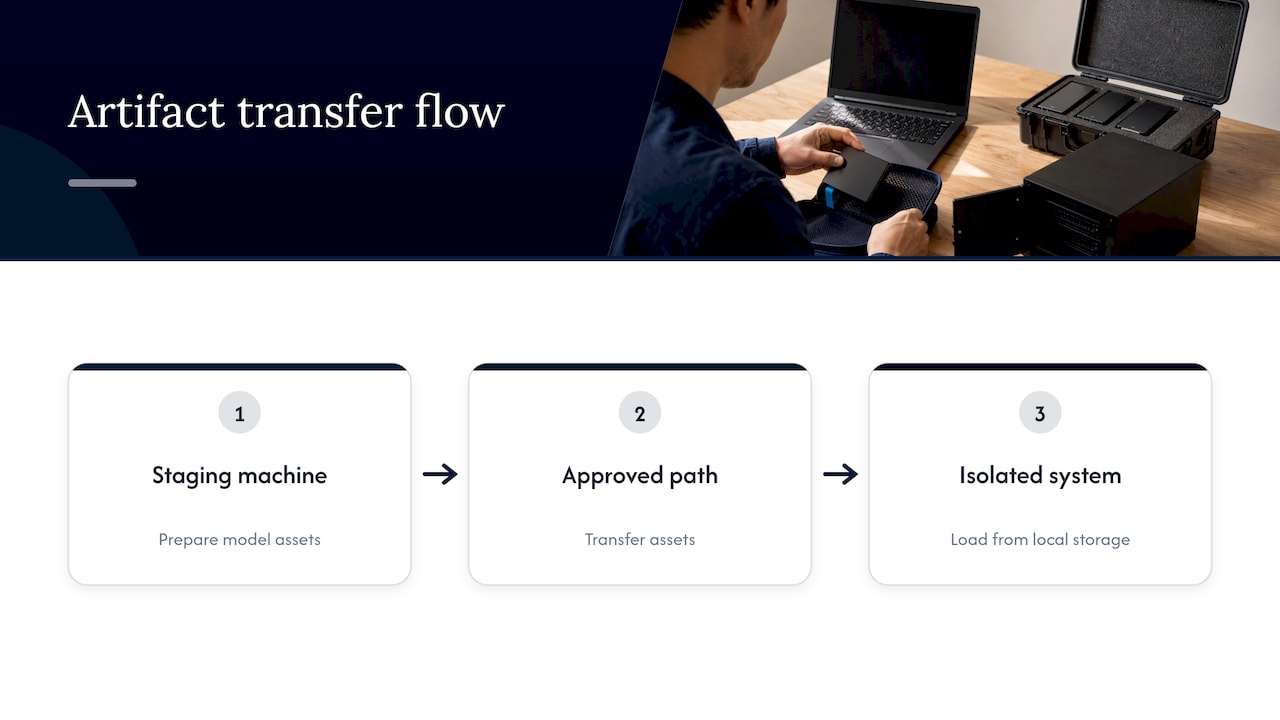
An air-gapped system has no pull from a public registry. The usual pattern is to prepare model assets on a connected staging machine, transfer them through an approved path, and load them from local storage on the isolated system. NVIDIA documents exactly this for its inference microservices: air-gap deployment lets the service run without an internet connection once assets are prepared and loaded from local storage. The same discipline applies whatever runtime you pick.
Keeping offline inference secure
Disconnecting a system removes the biggest exposure, which is data traveling to a third party. It does not remove every risk. Insiders, poisoned artifacts, over-permissive access to documents and unlogged usage all remain.
A workable security baseline has five parts:
- Artifact integrity. Hash and sign model files, containers and dependencies before they cross the gap, and verify them on arrival.
- Isolation. Run models in hardened containers so a compromised process cannot reach the host. Red Hat describes using Podman or Docker-based runtimes to isolate AI models in hardened, air-gapped environments, preventing host access.
- Document-level permissions. The assistant should only retrieve what the asking user may already see.
- Audit logging. Record who asked what and which sources backed the answer.
- A risk framework. NIST’s AI Risk Management Framework is voluntary guidance for managing risks to individuals, organizations and society from AI, and it gives security and compliance teams a shared vocabulary. NIST has said the current version is being revised, so check its page for the latest.
If your assistant will take actions rather than just answer, add controls on what it may do. Guidance on guardrails, telemetry and red teaming for AI agents is a good starting point for that layer.
Data leakage deserves its own look even in a closed system. We map the routes in six enterprise AI data leakage paths, including ones that survive a network disconnect, such as copy-paste and over-broad retrieval.
Limits you should plan for
Offline inference trades the convenience of a managed service for control. The trade is a good one for the right workloads, and these are the points to plan for from day one.
Capacity is fixed by what you buy. A cloud API scales on demand. A local cluster serves what its GPUs can serve. Size for peak concurrent use, and decide what happens at the peak: queueing, a smaller fallback model, or priority lanes.
You own updates. Improved models, security patches and runtime fixes do not arrive automatically. They arrive through your controlled transfer process, on your schedule. That is a feature for change-controlled industries, and it needs an owner and a calendar.
You own operations. Monitoring, rollback, capacity tuning and incident response are yours. Teams that treat a local model as a one-time install find quality and speed drifting. Teams that treat it as a service stay ahead.
Cost modeling differs. Capital goes up front on hardware, and per-request cost drops with utilization. Our piece on the total cost of LLM inference walks through how request shapes change the math.
None of these are reasons to avoid offline deployment. They are the work list, and a good integrator hands you a plan for each.
Where enterprises use offline inference
The pattern is consistent: the data is sensitive, the documents are large, and the answer needs a source.
- Aerospace and defense. Maintenance and technical manuals run to thousands of pages. A technician on a flight line or in a secure facility needs the right procedure fast, with the page it came from, often with no network.
- Financial institutions. Internal policy lookup, contract review and analyst research over material that cannot be sent to an outside processor.
- Manufacturing. Shop-floor assistants that answer from equipment manuals and quality records, on sites where connectivity is patchy or deliberately restricted.
- Logistics. Document-heavy operations such as customs paperwork, carrier contracts and exception handling, where shipment and customer data are commercially sensitive.
- Energy and critical infrastructure. Remote sites and operational networks that are separated from the corporate internet by design.
In each case the test is the same: would sending this prompt and its context to a third party create a risk you would have to explain to an auditor?
Offline or cloud: how to decide
Ask these questions in order.
- Can the data leave your perimeter? If regulation, contract or policy says no, the decision is made.
- Must it work without connectivity? Edge, field and isolated sites say yes.
- Is the workload steady? Predictable, high-volume use favors owned hardware. Rare, spiky use can favor rented capacity.
- Do you have people to run it, or a partner who will? Operations are the hidden half of the project.
- Is a hybrid acceptable? Many organizations keep sensitive workloads local and use cloud tools only for public, non-sensitive tasks.
If the first two answers are yes, plan for offline from the start rather than retrofitting. For the broader picture of running inside your own facilities, see our practical guide to on-premise AI deployment, and for sites with no connection at all, disconnected operations AI.
Our perspective on offline inference
We see the same mistake repeatedly: teams treat offline inference as a model-download problem. Getting a model to answer a question on a laptop takes an afternoon. Getting a system that a regulated organization can trust, audit and keep running for years is a different job.
At Forge AI Deployment, our leadership brings more than 20 years in high-consequence and Fortune 100 environments, and that shapes how we work. We start from the perimeter: where the data lives, who may see it, how artifacts cross the gap, and how you will prove afterward that nothing left. Then we design the deployment so that all data, models and domain intelligence remain inside your infrastructure. Our approach is built around operational discipline, not software resale.
We do this as an official webAI systems integrator. webAI’s local-first platform is the foundation, and we bring it into production: architecture, secure deployment, model integration and ongoing operation. That includes specialized AI Personas shaped around a role or domain, webAI’s Intelligence Delivery Network, and webAI Frontline, which gives frontline teams fast, source-backed answers from large technical document libraries, fully offline on a single device. You can read more about the platform on our webAI partnership page.
Our view is simple. If the data is too sensitive for someone else’s servers, the AI should live where the data lives, and someone should be accountable for keeping it healthy. That accountability, not the download, is what we deliver.
— John Ezzell, Founder
Plan an offline deployment with Forge
If you are weighing an offline or air-gapped rollout, we can help with the parts that take the most time: architecture, secure deployment, model integration and optimization, private assistant rollout, sovereign MLOps and orchestration, and ongoing operations and tuning. Engagements are scoped to your environment, so there is no published price list. Start with our solutions overview or talk to us through Forge AI Deployment.
Bring your constraints: the sites, the document libraries, the security requirements. We will tell you what a deployment inside your perimeter looks like.
A practical checklist before you start
Use this list to scope a first project.
- Pick one workflow. Choose a narrow, valuable use such as technical document question answering for one team.
- Inventory the documents. Know the formats, volume, sensitivity levels and who may access each set.
- Define the environment. Data center, edge site or fully air-gapped network, and the approved path for moving artifacts.
- Size the hardware. Estimate memory for the model, context and concurrent users before purchasing.
- Set acceptance criteria. Accuracy on real questions, response time, source citation quality and uptime.
- Assign operations. Name who patches, monitors, updates models and handles incidents.
- Plan the audit trail. Decide what is logged and how long it is kept.
- Pilot, then expand. Prove it with one team, then roll out to more sites and use cases.
FAQ
Does offline AI inference need any internet connection at all?
Not to run. Once the weights, runtime and your documents are on local storage, the system answers without a network. You need a controlled way to bring in the initial files and later updates, usually through a staging machine and an approved transfer path.
Is offline inference the same as batch inference?
No, though the terms overlap in ML vocabulary. Batch inference processes many inputs together when an immediate response is not required. Offline in the security sense means no external network, and such a system can still answer interactively in real time.
What hardware do I need to run a model with no internet?
You need enough GPU or system memory to hold the model weights plus working room for context and users, along with a runtime. A single workstation can serve a small team, and larger deployments use GPU servers. Estimate memory first, because it drives the rest of the budget.
Is offline AI more secure than cloud AI?
It removes the largest exposure, which is your data going to a third party. You still need artifact verification, access controls and audit logging, since insiders and tampered files remain risks. Frameworks such as NIST’s AI Risk Management Framework help structure that work.
Can offline AI answer questions from my own documents?
Yes. A local retrieval layer indexes your manuals, policies or records and feeds the relevant passages to the model, so answers can point back to a source. This is how tools like webAI Frontline give teams source-backed answers from large technical libraries on a single offline device.
Sources
- What is batch inference? How does it work? (Google Cloud)
- Production ML systems: Static versus dynamic inference (Google for Developers)
- What Is AI Inference? (Oracle)
- Quickstart (vLLM documentation)
- What Is a Local LLM?
- Air-Gap Deployment (NVIDIA NIM for LLM and VLM)
- How to run AI models in cloud development environments (Red Hat Developer)
- AI Risk Management Framework (NIST)
- Guardrails, Telemetry and Red Teaming for AI Agents