Disconnected operations AI means an AI system that keeps working when the network does not: at a remote site, on a ship or aircraft, in a plant with no outbound traffic allowed, or inside a fully air-gapped enclave. It is possible because inference needs nothing from the network once the model and runtime are local. The hard part is everything around the model: updates, monitoring, security, and what happens when something fails and nobody can phone a vendor.
Forge AI Deployment designs, deploys, and operates private AI inside infrastructure our customers control. This guide covers how disconnected AI is built and where it goes wrong, so you can scope it before you commit.
TL;DR
- Running AI without internet is the easy part. Operating it for months with no cloud telemetry, no vendor console, and no live threat feeds is the real engineering.
- “Disconnected” is a spectrum, from intermittently connected sites to physically air-gapped networks. Design for the longest isolation you expect, not the average.
- A local model does not guarantee sovereignty. Consoles, updaters, and web interfaces can still call out unless the network blocks them.
- Plan for local model registries, buffered logs, pre-written incident responses, and a manual fallback before go-live.
- Forge deploys and operates webAI’s local-first platform, including Personas, the Intelligence Delivery Network, and webAI Frontline, inside your perimeter.
Table of Contents
- What disconnected operations actually means
- The connectivity spectrum: pick your tier first
- Architecture for AI that runs with no internet
- A local model is not the same as sovereignty
- Operating without the cloud’s safety net
- Our perspective
- What this looks like with Forge
- A readiness checklist before you commit
- Common mistakes
- FAQ
- Sources
What disconnected operations actually means
People search for “AI without internet” and usually mean one of two things. The first is a hobbyist running a chat model on a laptop. The second is an organization that must keep a system useful when connectivity is lost, denied, or forbidden. This article is about the second.
The technical premise is simple. As one practical guide to offline models puts it, once the weights are on disk and the runtime is installed, generating text is computation in your own memory. The server answers whether or not the machine has a route to the internet.
The enterprise question is different: can you deploy, update, monitor, audit, and recover that system with no outside help? That is what separates a demo from an operation.
Why cloud-first systems fail here
Central systems break when links break. A 2021 GAO report on Army logistics examined the Army’s web-based logistics system and the need to make sure it operates in all situations, including degraded or disrupted networks. The lesson reaches well beyond defense. If your answers, search, or decision support live in someone else’s data center, your operation is only as available as the link to it.
The same logic applies to a refinery control room, a port terminal, a factory floor with strict network segmentation, or a bank’s isolated analytics enclave. In each, the network is either unreliable or deliberately closed.
The connectivity spectrum: pick your tier first
Disconnected is not binary. Before choosing architecture, place each site on a spectrum and write down the longest period it could be isolated.
| Tier | Typical situation | What moves in and out | Design implication |
|---|---|---|---|
| Intermittently connected | Remote sites, vehicles, vessels with scheduled links | Updates and logs sync when a link appears | Queue everything, tolerate partial syncs |
| Restricted egress | Plants and enterprise zones with tight firewall rules | Approved, inspected transfers only | Mirror artifacts internally, deny by default |
| Fully air-gapped | Classified, safety-critical, or highly regulated enclaves | Physical media only, after inspection | Verify every artifact before it enters, operate locally for the long term |
Most organizations have all three tiers. A single design for all of them usually fails at the strictest one, so we plan for the tightest tier and let looser sites inherit it.
Architecture for AI that runs with no internet
A disconnected deployment moves the control plane inside your environment. That changes what you must own.
Compute and models
Size hardware for the workloads you will actually run, including peak use and the second model you will want in a year. Edge sites often mean a single workstation-class device, while a data center can host a shared inference cluster. Models, prompts, retrieval indexes, and domain knowledge all live on that hardware.
A local registry and a clean supply chain
You need an internal registry for models, container images, and dependencies, with versioning and rollback. Everything arrives from outside at some point, so provenance matters. MIT Lincoln Laboratory, in comments to NIST, points out risks in the deployment phase of AI systems, which is where a tampered model or dependency would enter. We cover the verification side in our pieces on AI supply chain security and air-gapped Kubernetes.
Retrieval over your own documents
Most disconnected use cases are about getting a correct answer out of a large pile of technical documents: maintenance manuals, procedures, regulations, engineering records. Retrieval has to run locally too, with answers that cite their source passage so a person can check them. That is the idea behind webAI Frontline, which gives frontline teams fast, source-backed answers from large technical document libraries, fully offline on a single device.
Identity, logging, and update paths
Authentication cannot depend on a cloud identity provider that you cannot reach. Logs need a local home. Updates need a defined, inspected path in. Each of these is a place where “offline” quietly becomes “offline except for this one thing.”
A local model is not the same as sovereignty
A common mistake is to assume that running a model locally settles the privacy question. It does not. The Local AI Zone guide to keeping everything offline is a useful reminder that the surrounding software, such as management consoles, monitoring tools, and web interfaces, can include update checks or telemetry that reach out unless they are disabled.
The practical rule: enforce isolation at the network, not only in application settings. A toggle in a settings menu can be reset by an update. A firewall rule denying egress cannot be reset by a vendor patch. Then test it: capture traffic during normal operation and confirm nothing leaves. We go deeper on the leak paths in our article on enterprise AI data leakage.
Operating without the cloud’s safety net
Monitoring and logs
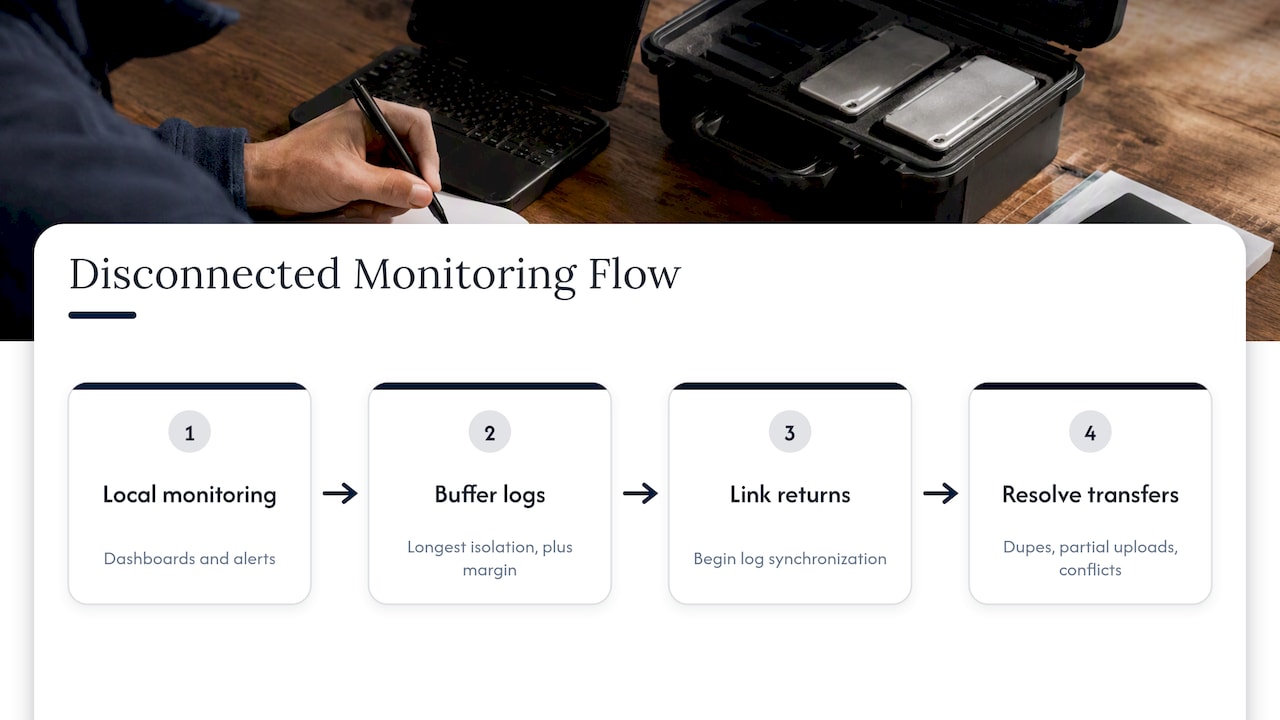
Standard cloud monitoring assumes a persistent connection. In a disconnected site, you need local dashboards, local alerting, and enough storage to buffer logs through the longest expected isolation, with margin. When a link returns, a sync process has to handle duplicates, partial uploads, and conflicts rather than assume a clean transfer.
Teams that already run structured test and issue reporting can borrow the discipline. AI tools in test reporting shows how duplicate detection and clear ticketing keep a backlog usable, and the same habit helps when a batch of site reports arrives all at once.
Watch for model-quality signals as well as system health: drift in inputs, rising rates of unanswered questions, and answers that fail source checks.
Risk management does not pause offline
The NIST AI Risk Management Framework is voluntary and designed to be flexible and measurable. Disconnection does not exempt a system from it. Testing before deployment, monitoring in operation, and a response plan all still apply. For a practical walk-through, see our six steps to operationalize NIST AI risk management.
The ENISA report on good cybersecurity practices for AI takes a lifecycle view, from concept to decommissioning, including the infrastructure around the model. Treat AI security as an extension of your existing security program, not a separate island.
Content that feeds the system also drifts. If your assistant answers from training manuals or procedures, a review process that flags outdated material and keeps an audit trail matters, as in this piece on NIST-aligned AI content review.
Write the failure response before go-live
The MIT Lincoln Laboratory comments make a point that is especially important offline: a response plan should be developed before deployment, so that if unexpected behavior or an adversarial attack is detected, the plan can be put into action. Options include taking the system offline, reverting to a backup system, or continuing with stated restrictions.
In a disconnected site, nobody can open a vendor ticket at 2 a.m. Decide in advance:
- Who can pull the model from service, and how.
- What the manual procedure is, and whether people still know it.
- Which previous model version is staged for rollback.
- How an incident gets documented for later review.
Our three-stage AI incident response playbook lays out this structure in more detail.
Our perspective
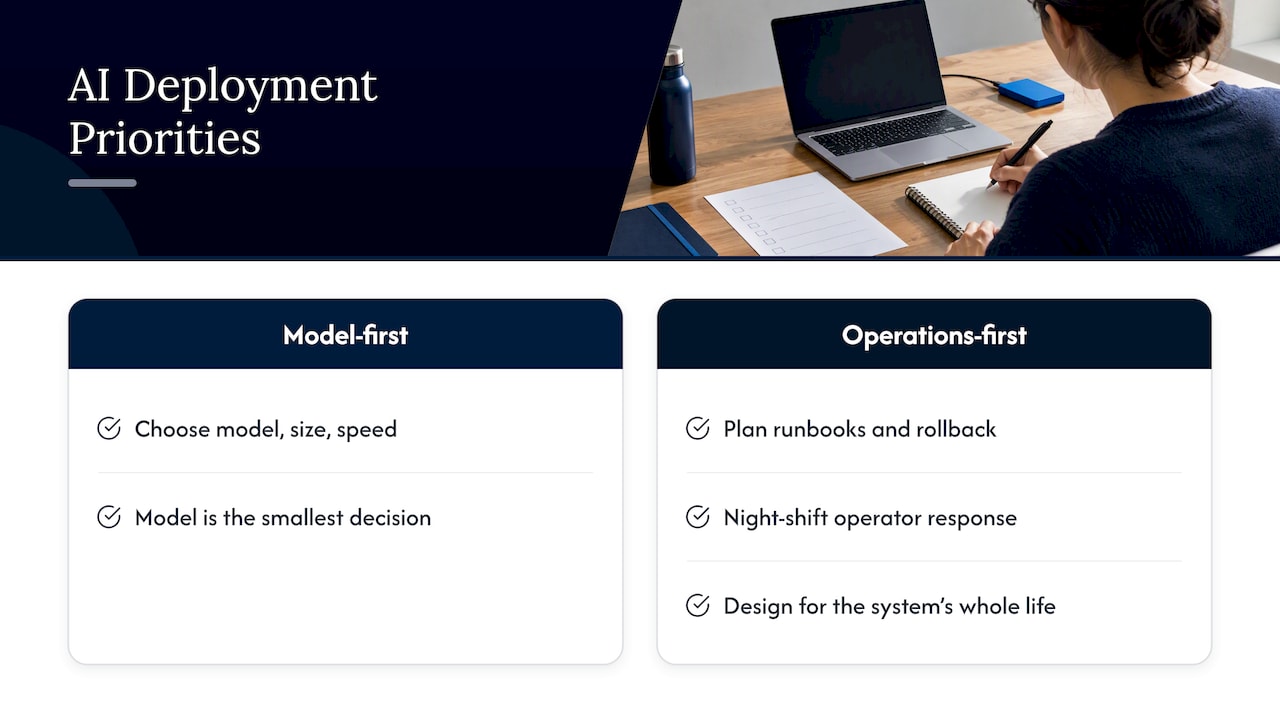
We have seen the same pattern in how organizations approach this. They start with the model: which one, how big, how fast. Then they discover that the model was the smallest decision.
Our view is that disconnected AI is an operations problem first. Forge’s leadership brings more than 20 years in high-consequence and Fortune 100 environments, and that background shapes our method: we care about runbooks, rollback, and what a night-shift operator does when something looks wrong. We do not treat deployment as software handoff. We design for the whole life of the system.
We also hold a firm line on perimeter. In a Forge deployment, data, models, and domain intelligence stay inside infrastructure you control, and we validate that for privacy and auditability. That means checking the network, not trusting a setting.
One more opinion: start narrow. Pick one document library and one team, get source-backed answers working on a single offline device, and measure whether people trust them. Expansion is far easier from a proven first use than from a broad platform nobody asked for.
— John Ezzell, Founder
What this looks like with Forge
Forge AI Deployment is an official webAI systems integrator. We bring webAI’s local-first platform into production: architecture, secure deployment, model integration, and ongoing operation. webAI’s technology is theirs; we deploy and operate it for you. You can read more about the webAI partnership.
For disconnected environments, the relevant pieces are:
- Private and air-gapped deployment inside your data center, edge site, or isolated network.
- webAI Personas, specialized AI assistants for particular roles and domains.
- The Intelligence Delivery Network, for delivering models and intelligence to your sites.
- webAI Frontline, fast, source-backed answers from large technical document libraries, fully offline on a single device.
If you are scoping a disconnected deployment, our solutions page describes the engagements, from deployment to sovereign MLOps and ongoing operations. Pricing is scoped per engagement.
A readiness checklist before you commit
Use these questions with any team, ours included.
- What is the longest isolation you must survive? Hours, weeks, or permanently? This sets storage, update cadence, and sync design.
- What does the network actually allow today? Test for egress rather than relying on documentation.
- How do artifacts enter? Define inspection, signing, and verification for models and dependencies.
- Where do logs go, and for how long? Size local storage with margin beyond expected downtime.
- Who owns the runbook? A named person, with a rollback they have practiced.
- What is the manual fallback? If the model is wrong or offline, work must continue.
- How will you judge answer quality? Source citations and spot checks beat impressions.
- Which governance framework applies? Map your obligations, such as NIST AI RMF, to the system, and see our guide to zero trust for AI for runtime controls.
Before going live, run through the agency-level checks in our sovereign AI deployment article as well.
Common mistakes
- Designing for the connected case and subtracting. Systems built around cloud services rarely survive the removal of those services. Start disconnected and add connectivity where it is safe.
- Forgetting the humans. Teams that stop practicing manual procedures cannot fall back to them when needed.
- Treating the first deployment as finished. Models, documents, and threats change. Without an update path, the system ages in place.
- Skipping adversarial thinking. Isolation reduces exposure but removes live threat feeds. Monitor for odd inputs and tampered artifacts yourself.
- Over-trusting a toggle. As above, enforce at the network.
FAQ
Can AI really work with no internet connection?
Yes. Once the model weights and runtime are installed locally, inference runs on your own hardware without any network route. What you lose is anything that depended on the cloud, such as live data, hosted updates, and vendor monitoring, so those must be replaced with local equivalents.
What is the difference between disconnected and air-gapped AI?
Disconnected covers a range, from sites that sync when a link is available to fully isolated networks. Air-gapped sits at the strict end, where data moves only by inspected physical media. Most organizations need a design that handles several points on that range.
Does running a model locally keep my data private?
Not automatically. Supporting software such as consoles, updaters, and web interfaces may try to contact outside services. Block egress at the network and verify with traffic captures, rather than relying on application settings alone.
How do you monitor and update an AI system that never connects?
You run monitoring locally, buffer logs on local storage, and bring updates in through an inspected, verified path. When connectivity exists intermittently, a sync process transfers logs and updates in batches and resolves duplicates and conflicts.
Sources
- GAO-21-313, Defense Logistics: Army Should Ensure New System Operates in All Situations
- AI RMF RFI comments, MIT Lincoln Laboratory (NIST)
- Launch of the NIST AI Risk Management Framework
- Running AI models offline, Local AI Zone
- Working Offline: AI Without an Internet Connection, Build with AI Today