
An LLM needs enough GPU memory to hold its weights, plus a KV cache that grows with context length and concurrent users, plus runtime overhead. A fast first estimate is parameters in billions × bytes per parameter × 1.2. A 70B model at 16-bit precision lands near 168 GB, and the same model at 4-bit lands near 42 GB. The rest of this guide shows where those numbers come from, where they break, and how to turn them into a hardware order you will not regret.
TL;DR
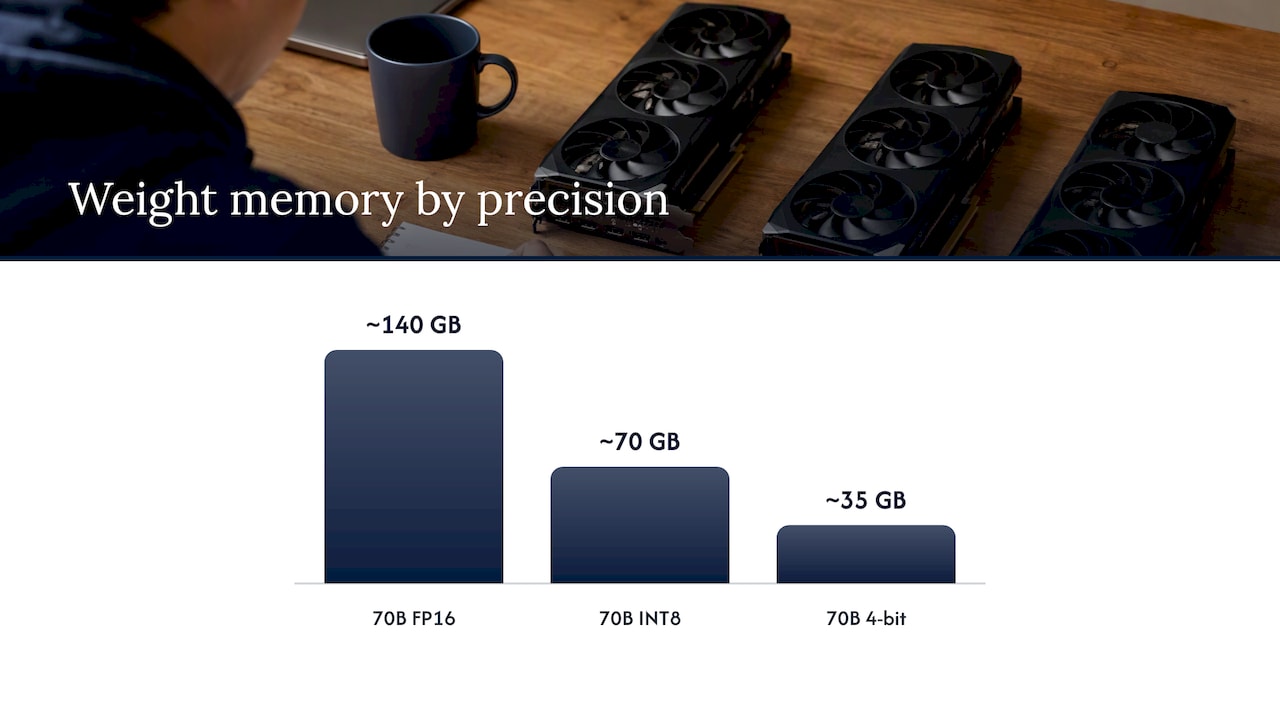
- Weights cost about 2 bytes per parameter at FP16 or BF16, 1 byte at INT8 and roughly half a byte at 4-bit. Multiply by billions of parameters to get gigabytes.
- The KV cache is the part that surprises people. It scales with context length and with the number of simultaneous requests, and it is the usual cause of out-of-memory errors in production.
- Reserve headroom: a 20% overhead factor is a common starting point, and many teams also cap usable VRAM below 100%.
- CPU offloading works but is much slower, so plan for the model and cache to fit in VRAM for anything user-facing.
- Size for peak concurrency and your longest realistic prompt, not for the demo.
Table of Contents
- The memory budget: four things compete for VRAM
- Step one: weights by precision
- Step two: the KV cache
- The quick formula, and what it hides
- Worked example: how much VRAM for a 70B model
- How much headroom to reserve
- CPU versus GPU for LLMs
- A sizing checklist you can run this week
- Our perspective: size for the environment you actually control
- Sizing and deploying inside your own perimeter
- FAQ
- Sources
The memory budget: four things compete for VRAM
Everything the GPU touches during inference has to sit in its memory. That breaks into four buckets:
- Model weights. Fixed and predictable. Set by parameter count and numeric precision.
- KV cache. The stored attention keys and values for every token in every active sequence. It grows as conversations get longer and as more requests run at once.
- Activations. Temporary tensors used while computing each step. They vary with the inference engine and batch size.
- Framework overhead. CUDA context, memory fragmentation, buffers, and whatever the serving engine reserves for itself.
Vendor deployment guidance puts the rule plainly: for FP16, allow about 2 bytes per parameter for weights, then add KV cache, activations and system overhead on top. The same guidance says FP16 uses half the memory of FP32 and INT8 uses one quarter.
The weights are the part you can compute exactly. The cache is the part you have to reason about, which is why most bad sizing decisions come from stopping the math after step one.
Step one: weights by precision
Hugging Face’s optimization guide gives the shortcut: loading a model with X billion parameters needs roughly 4 × X GB in float32 and 2 × X GB in bfloat16 or float16. For prompts under about 1,024 tokens, weight storage dominates inference memory.
That gives you a quick table for the weights alone:
| Model size | FP16 / BF16 (2 bytes) | INT8 (1 byte) | 4-bit (about 0.5 byte) |
|---|---|---|---|
| 7B | about 14 GB | about 7 GB | about 3.5 GB |
| 13B | about 26 GB | about 13 GB | about 6.5 GB |
| 34B | about 68 GB | about 34 GB | about 17 GB |
| 70B | about 140 GB | about 70 GB | about 35 GB |
These are raw arithmetic. Real checkpoints run a little larger, which we cover in the 70B section below.
A published example makes the effect of precision concrete. Hugging Face loaded a code model that needed about 32 GB in bfloat16, about 15 GB at 8-bit and just over 9 GB at 4-bit. The same guide is clear that quantization trades memory for accuracy and sometimes inference time. A 2024 academic survey of low-bit LLMs says the same: lower bit-width shrinks the memory footprint and compute needs, generally at some cost in accuracy.
So precision is a lever, not a free lunch. If you plan to quantize, validate quality on your own tasks before you commit hardware to the smaller footprint. Our guide on LLM quantization and reproducible shipping covers how to make that choice repeatable.
Step two: the KV cache
The KV cache is where context length and concurrency show up on your bill of materials. Deployment guidance estimates it at roughly 150 to 300 MB per 1,000 tokens, depending on the model, and notes that longer sequences and larger batches require more.
Do not use one blanket number. Compute it from your own traffic:
KV cache = peak concurrent requests × (prompt tokens + output tokens) × cache cost per token
The per-token cost depends on the architecture: layers, KV heads, head dimension and cache precision. One engineering analysis calculates that Llama 3.3 70B costs about 0.33 MB per token, so a single 8,192-token conversation uses about 2.7 GB, while 32 such conversations use about 85.9 GB. That is the point to internalize: after the weights are loaded, concurrency and context can consume as much memory as the model itself.
The serving documentation for one widely used inference engine describes the same pressure from the other side. It can move KV cache blocks between GPU memory and pinned CPU memory, and its tuning guide says a larger CPU tier raises cache hit rates but should leave headroom for other host processes. Offloading cache helps, but it is a mitigation. It does not replace sizing correctly.
Another practical note: weight memory is fixed, while the KV cache is the variable that causes unexpected out-of-memory errors as contexts lengthen during a run. If a system passed testing and then fell over in week three, long prompts are the first suspect.
The quick formula, and what it hides
When you need a number in five minutes, use the overhead formula:
VRAM (GB) ≈ parameters (billions) × (bits ÷ 8) × 1.2
The 1.2 covers the KV cache, activations and framework overhead at a modest context length. It is a screening tool. A published serving guide uses the same 20% idea and says the extra covers additional allocations such as key-value caching.
It fails in two situations:
- Long context. A 32K or 128K window can add far more than 20%.
- High concurrency. Dozens of simultaneous sessions multiply the cache.
In both cases, switch to the explicit KV cache calculation above.
Worked example: how much VRAM for a 70B model
70B is the size most enterprise teams ask about, because it is the point where one consumer-class card stops being an option. Here is how the estimates line up from different sources:
| Scenario | Estimate | Source basis |
|---|---|---|
| 70B weights, bfloat16 | about 140 GB | Hugging Face example for Llama 2 70B |
| 16-bit with 20% overhead | 168 GB | Overhead formula |
| 4-bit with 20% overhead | 42 GB | Same formula |
| Raw weights: FP16 / INT8 / INT4 | 130.4 / 65.2 / 32.6 GiB | Illustrative calculator |
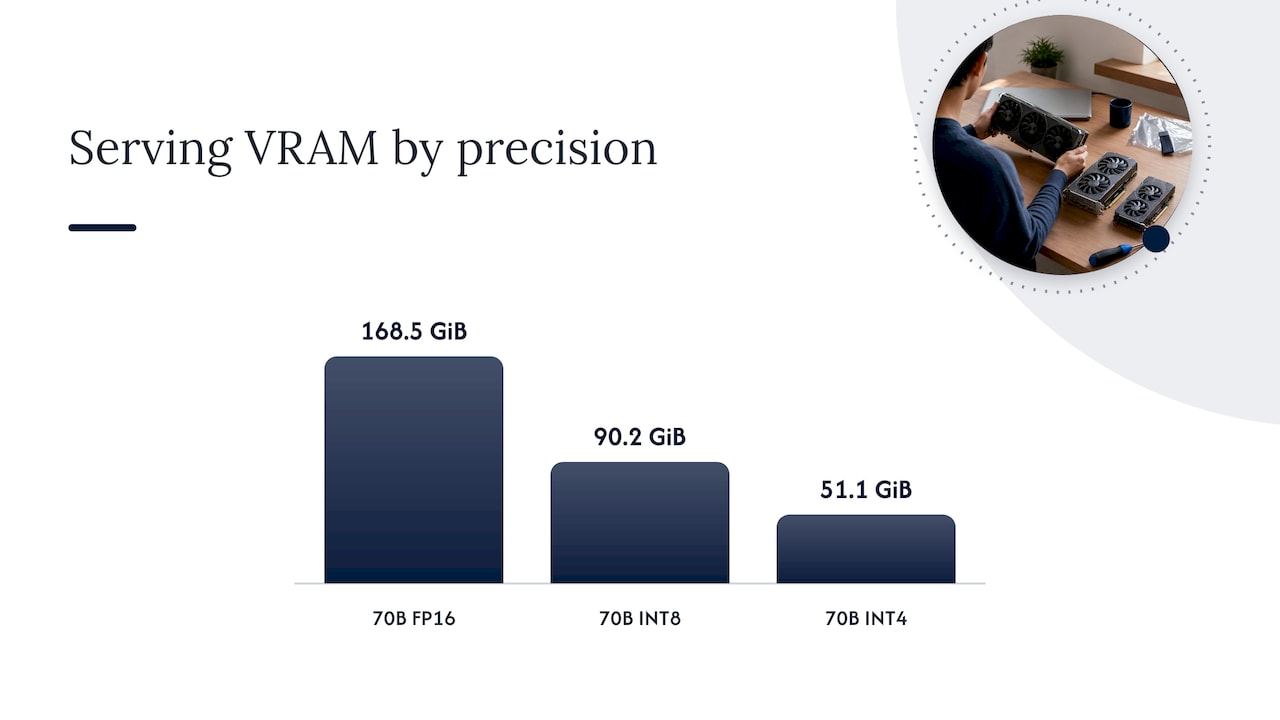
| Serving at 32,768 tokens, one sequence, 16-bit cache, 20% headroom, 90% usable VRAM: FP16 / INT8 / INT4 | 168.5 / 90.2 / 51.1 GiB | Same calculator |
| Actual Llama 3.3 70B checkpoints: BF16 / FP8 / AWQ INT4 | 141.1 / 72.7 / 39.8 GB | Engineering analysis, 2026 |
Two lessons sit in that table.
First, real checkpoints run bigger than the arithmetic. The analysis behind the last row attributes the gap to higher-precision embedding and output layers and to quantization metadata. Use real file sizes when you have them.
Second, the same model can need anywhere from about 40 GB to well over 160 GB depending on precision, context and concurrency. “How much VRAM for a 70B model” has no single answer. It has an answer for your precision, your context window and your user count.
In practice that means a 4-bit 70B model for light internal use can fit on a single 48 GB-class accelerator with a short context, while a 16-bit deployment with long context needs multiple 80 GB-class GPUs sharded together. Check the exact memory of the cards you are considering, because the same model name ships in several memory configurations.
How much headroom to reserve
Headroom is the question most guides skip. The sources above give you a workable pattern:
- Start with a 20% overhead factor on top of weights for screening, as in the formulas above.
- Cap usable VRAM below 100%. The 70B calculator assumes only 90% of VRAM is usable, and its serving figures already include 20% runtime headroom. Engines commonly reserve their own slice too, so a card’s printed capacity is never your budget.
- Size the cache from peak load. Use peak concurrent requests × prompt-plus-output tokens × per-token cost, rather than a flat percentage on top of weights.
- Leave room on the host. If you offload cache to CPU memory, keep enough free system RAM that other processes are not starved.
- Test at the worst case. Run your longest realistic prompt at your highest realistic concurrency and watch for memory growth, not just the first response.
If you run a dedicated on-premises system, the right headroom is the amount that lets your slowest, longest day finish without paging or crashing. That is usually more than a spec sheet suggests.
CPU versus GPU for LLMs
Can an LLM run without a GPU? Yes. Models can run on the CPU or with partial offloading, where some layers sit on the GPU and the rest run on the CPU. The cost is speed: CPU-side inference is significantly slower because of lower memory bandwidth than VRAM.
With llama.cpp-style engines, partial offloading is controlled by the --n-gpu-layers flag, which places a subset of layers on the GPU and processes the remainder from system RAM. Maintainers of that project have noted that manual tuning of layer counts and tensor splits is being overtaken by automated fitting that tests against your actual memory limits. Deployment guidance is blunter: offloading reduces performance so much that it is never cost effective for serious workloads.
Our read:
- CPU or partial offload suits a single developer testing a prompt, a batch job nobody waits on, or a proof of concept.
- Full GPU residency suits anything a person or a downstream system waits for.
Speed is its own measurement. Once the model fits, tokens per second and latency targets decide whether the hardware is adequate. Memory capacity tells you what fits. Bandwidth tells you how fast it answers.
A sizing checklist you can run this week
- Pick the model and precision. Compute weights, then replace the estimate with the real checkpoint size.
- Define context. Use the 95th percentile prompt length plus expected output, not the average.
- Define concurrency. Count peak simultaneous requests, including batch jobs and agents that fan out.
- Compute the KV cache with the formula above, using your model’s per-token cost.
- Add 20% overhead and cap usable VRAM at about 90% of the card’s capacity.
- Choose the topology. One card, several cards on one server, or multiple nodes. Splitting a model across GPUs adds interconnect considerations.
- Load test at peak and watch memory over time.
- Price the result. Memory choices drive cost, so run them through a total cost of ownership view before you order.
If your model can be quantized without hurting your task, the memory savings often change which class of hardware you need. That is a bigger lever than any tuning flag.
Our perspective: size for the environment you actually control
Most sizing guides assume you can rent whatever GPU you need by the hour and resize next week. Many of the organizations we work with cannot. Their models run inside a data center, on an edge site, or on a network with no outside connection at all. There, hardware is bought, certified, racked and then lived with for years.
That changes how we approach memory. We treat the VRAM budget as a design constraint set before model selection is final, not a detail resolved afterward. We ask for the longest document set the system will be asked about, the number of people who will use it at the same moment, and what the answer time has to be. Then we choose the model, precision and serving setup that fit inside that envelope with real headroom.
We also push back on one habit: sizing for the average. An assistant that works for ten users on Tuesday and fails for forty on quarter-end is a failed deployment, however good the demo was. Because the data and models never leave the customer’s perimeter, there is no cloud burst to fall back on. The memory plan has to be right the first time.
When a deployment is a fit, we also prefer to leave capacity visible. A system with measured headroom is easier to audit, easier to extend and easier to run quietly. Our notes on on-premises LLM gateways for regulated teams and performance tuning on prem follow the same logic.
— John Ezzell, Founder
Sizing and deploying inside your own perimeter
Forge AI Deployment designs, deploys and operates private AI systems inside infrastructure you control, including enterprise data centers, edge sites and air-gapped networks. As an official webAI systems integrator, we bring webAI’s local-first platform into production: private and air-gapped deployment, specialized AI Personas, the Intelligence Delivery Network, and webAI Frontline, which gives frontline teams fast, source-backed answers from large technical document libraries, fully offline on a single device.

If you are working out how much GPU memory a private deployment needs, we can help turn your context, concurrency and latency requirements into an architecture. See our deployment and operations services or learn how the webAI platform fits into Forge deployments.
FAQ
How much VRAM do I need for an LLM?
Multiply the parameter count in billions by the bytes per parameter (2 for FP16, 1 for INT8, about 0.5 for 4-bit), then multiply by about 1.2 for overhead. A 7B model at 16-bit needs roughly 17 GB by that formula, and a 70B model at 4-bit needs roughly 42 GB. Long contexts and many simultaneous users can push the total higher.
How much VRAM does a 70B model need?
About 140 GB for weights at 16-bit, and roughly 168 GB once you add 20% overhead. At 4-bit, the same model needs about 42 GB by the same formula, and published checkpoint sizes land near 40 GB for weights alone. Add the KV cache for your own context length and concurrency on top of those figures.
Does a local LLM require a GPU?
No. A model can run on a CPU or with some layers offloaded, but it will be much slower because system memory bandwidth is lower than VRAM. That is fine for testing or offline batch work. For interactive use, plan for the model and cache to fit on the GPU.
Can I use VRAM as normal RAM?
Not in a general sense. VRAM is dedicated high-bandwidth memory on the accelerator, and the model and cache must live there to run at full speed. You can spill some data to system RAM through offloading, but you pay for it in speed.
Sources
- Accelerator management | Deployment guides
- Optimizing LLMs for Speed and Memory, Hugging Face
- A Survey of Low-bit Large Language Models
- vLLM KV cache offload worker
- KV Offloading Usage Guide, vLLM
- Memory sizing and offloading
- How much VRAM do I need for LLM inference?
- 70B LLM GPU Requirements: INT4, INT8 and FP16
- How much VRAM do you need to run or fine-tune a 70B model?
- Automation for GPU layers, tensor split, tensor overrides (llama.cpp discussion)