On-prem meeting summarization means the whole chain, from recording to transcript to summary and action items, runs on infrastructure you control. No audio, transcript or summary goes to a third-party cloud. For most enterprises the real work is not picking a model. It is sizing the hardware, controlling who can read the output, and deciding how long recordings and summaries live.
This guide covers how the pipeline works, what it takes to run it in your data center or an air-gapped network, how to judge accuracy, and how to govern it.
TL;DR
- On-prem summarization runs speech-to-text, speaker labeling and a language model entirely inside your perimeter, so meeting content never reaches an outside vendor.
- The pipeline has four stages: audio capture, transcription with speaker diarization, LLM extraction of summary, decisions and action items, and an index for search.
- Hardware ranges from a CPU server for small pilots to dedicated GPUs for organization-wide use. Plan around concurrent meetings, not total headcount.
- Treat recordings, transcripts and summaries as three separate records, each with its own access rules and retention period.
- Test on your own meeting audio, because accuracy on clean benchmarks drops in real rooms with overlapping voices.
Table of Contents
- What on-prem meeting summarization actually means
- How the pipeline turns audio into a summary
- What you need to run it on your own infrastructure
- Judging accuracy, speed and fit
- Governing recordings, transcripts and summaries
- A rollout plan for enterprises
- Common operational risks and how to manage them
- Our perspective
- Bring meeting summarization inside your perimeter
- FAQ
- Sources
What on-prem meeting summarization actually means
Most meeting AI products are cloud services. Audio is streamed or uploaded to the vendor, transcribed and summarized on the vendor’s servers, and then stored there under the vendor’s terms. That is convenient, but it puts your board discussions, deal terms, incident reviews and engineering decisions on infrastructure you do not operate.
On-prem flips that arrangement. The speech recognition model, the speaker identification, the language model and the storage all sit in infrastructure you own or control: a data center, a private cloud tenancy you manage, an edge site, or a network with no internet connection at all. Staff still get a transcript, a summary and a list of next steps. The difference is where the data goes while that happens: nowhere outside.
This matters most for organizations with a clear reason to keep content inside:
- Financial institutions discussing client positions or material non-public information.
- Aerospace and defense teams working with controlled technical data.
- Manufacturers and logistics operators reviewing proprietary processes, routes or contracts.
- Legal, HR and board settings where the meeting itself is sensitive.
If you are comparing the privacy posture of cloud and local tools more broadly, this overview of the Australian Privacy Act and AI tools shows how audio handling, vendor access and storage differ, and what staff should and should not feed into outside services. It is written around Australian law, so apply the same questions to the rules that govern your own jurisdiction.
How the pipeline turns audio into a summary
Whatever software you choose, an on-prem meeting summarizer follows the same four stages.
1. Audio capture and ingestion
Audio arrives from one of three places: a recording of a virtual meeting, a room microphone array for in-person meetings, or files uploaded afterward. Capture is often the weakest link. A single laptop microphone in a boardroom will give a poor transcript no matter how good the model is. Decide early whether you need room hardware, a bot or recorder that joins calls, or post-meeting upload only.
2. Transcription and diarization
Automatic speech recognition converts speech to text with timestamps. Diarization then works out who spoke when, so the summary can attribute decisions and tasks to people instead of producing an anonymous wall of text. Open speech models and commercial speech engines can both be self-hosted. Speaker identification can go a step further by matching voices to known employees, which has privacy implications we cover below.
3. LLM extraction
A language model reads the transcript and produces the outputs people actually want: a short summary, key decisions, open questions and action items with owners. Long meetings usually need the transcript split into topic segments first, because a single pass over two hours of text tends to miss detail. Prompting per speaker or per topic generally helps recall of action items. One engineering team reported lifting action-item recall from 62% to 89% on its own test set by segmenting topics in two passes and prompting per speaker, but that is one team’s result on its own data, so treat it as a direction to test, not a promise.
4. Indexing and search
The final stage stores transcripts and summaries in a searchable index so people can ask, “What did we decide about the vendor contract in March?” and get an answer with a link back to the source passage. This is where meeting summarization starts to overlap with a private knowledge assistant, and where good retrieval design matters. Our guide to offline embedding models explains how to choose and run the embedding layer that powers this kind of search without an internet connection.
What you need to run it on your own infrastructure
Requirements scale with concurrency: how many meetings finish and need processing in the same window. A pilot and an enterprise rollout are very different sizing exercises.
Small pilot: a CPU server
A published air-gapped meeting-minutes workflow shows the low end: Docker Compose with offline speech-to-text, speaker diarization and a local language model. It needs a PC, Mac or Linux server with Docker and 8 GB or more of RAM, runs on a standard CPU, and is reported to run 5 to 10 times faster with an Nvidia GPU. That is enough to prove the workflow with one team. It is not enough to serve a company whose meetings all end at the top of the hour.
Enterprise scale: dedicated GPUs
At organizational scale, GPUs do the heavy lifting. NVIDIA’s reference design for automated meeting minutes uses a two-GPU on-premises configuration: an A100 for speech recognition and diarization, and an H100 or A100 for the language model, with no meeting audio or discussion content leaving the organization’s infrastructure. Treat that as a starting point for one pipeline, then multiply by your peak concurrency and add redundancy.
A useful sizing exercise looks like this:
- Count meetings per day and the share you actually want summarized.
- Find your peak: how many finish within the same 30 minutes.
- Decide your acceptable turnaround, whether minutes, an hour, or overnight.
- Size the transcription tier and the LLM tier separately, since they stress hardware differently.
- Add headroom for re-processing when you upgrade a model.
Turnaround is often more forgiving than people expect. Summaries delivered within 15 minutes of a meeting ending rarely need real-time hardware, which can cut the GPU bill sharply.
Air-gapped environments
When the network has no outside connection, everything must be brought in and updated deliberately: model weights, container images, operating system patches, and any speech vocabulary files. Plan a controlled transfer process for updates and a way to validate models before they go live. We cover the operating side in our guide to disconnected operations AI and the mechanics in offline AI inference.
Judging accuracy, speed and fit
Vendor benchmarks and your own meetings will disagree. Here is how to evaluate.
Measure word error rate on your audio
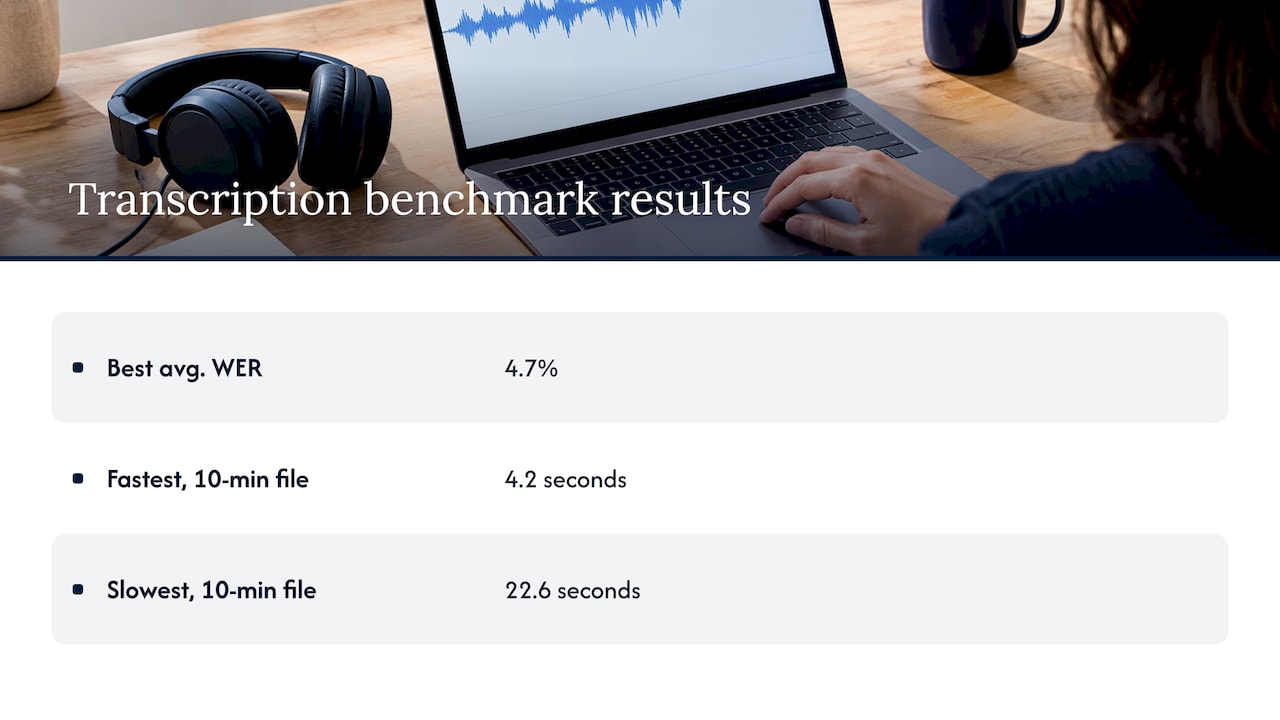
Word error rate (WER) is the standard measure for transcription. Published comparisons show wide spread between engines. In one comparison of eight transcription providers, the best average WER was 4.7%, with a 10-minute file processed in 4.2 seconds, while the slowest took 22.6 seconds. The same comparison notes that self-hosted Whisper on an A100 can be faster but means paying for GPU time rather than API fees. That tradeoff is exactly the on-prem equation: you swap per-minute fees for capital and operating cost, and in return you keep the data.
Be careful with clean-audio benchmarks. Studio-quality recordings score far better than real meetings with crosstalk, accents, speakerphones and jargon. Your own recordings are the only benchmark that counts.
Build a small evaluation set
Pick 15 to 25 representative meetings across teams: a quiet one-on-one, a large video call, an in-person room with a conference mic, and one heavy with acronyms. Have a person produce a reference transcript and a reference list of decisions and action items for a subset. Then score:
- Transcript accuracy: WER, plus how often names, part numbers and product terms are right.
- Speaker attribution: how often the right person gets the right statement.
- Action-item recall and precision: did it catch the real tasks, and did it invent any?
- Summary usefulness: would an absent attendee make the right decision from it?
- Latency: time from meeting end to summary delivery.
Expect errors to compound
In a pipeline, each stage inherits the mistakes of the one before. A misheard part number becomes a wrong action item, which becomes a wrong summary. That is why the best deployments add custom vocabulary for your terminology, keep a link from every summary line back to the transcript passage, and make it easy for attendees to correct a summary. Summarization is less about compressing text than about picking what is relevant to the reader, so tune prompts by role: an executive summary, an engineer’s technical notes and a compliance record are different documents from the same meeting.
Check integration with your meeting tools
List where meetings happen: video platforms, telephony, room systems, in-person recorders. For each, define how audio reaches your servers without leaving your control, where the summary is delivered (email, ticketing system, wiki, chat), and how identity ties to your directory so permissions follow people.
Governing recordings, transcripts and summaries
A recording, its transcript and its summary are three different records. Each can contain personal or confidential information, and each needs rules.
Access, encryption and auditing
Start with least privilege. By default, attendees see their own meetings; managers do not automatically see their reports’ meetings. Encrypt at rest and in transit, even inside the perimeter, and log every access to a recording or transcript. Law-firm guidance from Canada on recording and transcribing meetings recommends safeguards such as encryption, access controls, secure storage and regular audits. It is framed around Canadian privacy law, so confirm what your own jurisdiction requires.
Retention
The same guidance says organizations should define and document retention periods for recordings and for derivatives such as transcripts and summaries, keep data only as long as needed for the stated purpose, then securely delete or anonymize it. In practice that means a policy like:
- Raw audio: shortest retention, often deleted once the transcript is verified.
- Transcripts: kept for a defined period tied to the meeting type.
- Summaries and decisions: kept longest, since they are the business record.
- Legal hold: a mechanism to suspend deletion when counsel requires it.
Because an on-prem system is yours, you can enforce deletion across the audio store, transcript database and search index. That is far harder to verify with an outside vendor.
Consent and notice
Recording and voiceprint identification touch consent laws that vary by state, country and sector. US states differ on whether one party or all parties must consent to a recording. Have counsel set the notice and consent approach for each meeting type, and keep voice-based speaker identification off until legal and HR have approved it.
A rollout plan for enterprises
A phased approach keeps risk low and builds evidence for the next phase.
- Define scope and owners. Choose which meeting types qualify (for example, project reviews and customer calls) and which are excluded (for example, HR matters or legal privilege). Name an owner for the policy and an owner for the platform.
- Classify the data. Decide the sensitivity level of each meeting type and the environment it requires, from standard data center to air-gapped enclave.
- Run a pilot with one or two teams. Use real meetings, collect corrections, and measure against your evaluation set.
- Harden the platform. Set up identity integration, encryption, logging, backup and a model update procedure.
- Set review rules. Decide which summaries need a human check before distribution. Notes that trigger commitments, spending or customer communication should have a named reviewer who approves them.
- Expand in waves. Add teams and meeting types, watch GPU utilization, and revisit sizing at each stage.
- Operate it. Monitor quality drift, patch the stack, retire old models carefully and re-run your evaluation set whenever a model changes.
The point of step 5 is simple: AI meeting notes need an owner. Without one, errors in a summary can quietly become decisions.
For the broader infrastructure picture, see our practical guide to on-premise AI deployment, and for how assistants are staged across different security postures, the four deployment postures for private AI assistants.
Common operational risks and how to manage them
- Poor audio. Fix at the source with better microphones and clear capture rules before tuning models.
- Jargon and names. Maintain a custom vocabulary for product names, part numbers and people, and update it as the business changes.
- Hallucinated action items. Require every action item to link to a transcript passage and show who said it.
- Multiple languages. Meetings that switch languages need models tested on each one. Our piece on multilingual private AI covers this.
- Model drift after updates. Keep a frozen evaluation set and run it before promoting any new model.
- Over-sharing. Summaries are easy to forward. Apply the same access controls to summaries as to the meeting itself, and send links to the secured system rather than attachments where you can.
- Capacity crunch at peak hours. Queue jobs and set turnaround targets instead of buying hardware for the worst five minutes of the day.
Our perspective
Meeting content is some of the most candid information a company produces. People say things in meetings that they would never put in a document. That is exactly why we think summarization belongs inside the perimeter, not in a service you cannot inspect.
At Forge AI Deployment, we design, deploy and operate private AI systems inside infrastructure our customers control, from enterprise data centers to edge sites and air-gapped networks. As an official webAI systems integrator, we bring webAI’s local-first platform into production, including specialized AI Personas, the Intelligence Delivery Network and webAI Frontline, which gives teams fast, source-backed answers from large technical document libraries, fully offline on a single device.
What we have learned from more than 20 years in high-consequence environments is that the model is the easy part. The hard parts are the operating discipline: who can see which summary, how long audio lives, how updates cross an air gap, and who owns the notes. We design deployments so that data, models and domain intelligence stay inside your infrastructure, validated for privacy and auditability, and we stay on to operate them.
If meeting summarization is your first private AI use case, treat it as the start of a platform. The same pipeline, retrieval layer and governance will serve document search, assistants and frontline support next.
John
Bring meeting summarization inside your perimeter
Forge AI Deployment designs, deploys and operates private AI inside your own data center, edge sites or air-gapped network. Our engagements cover secure local and air-gapped deployment, custom model integration and optimization, private AI assistant rollout, sovereign MLOps and runtime orchestration, and ongoing operations, all built on the webAI platform as an official systems integrator.
If you are scoping a meeting summarization project, explore our deployment and operations services and tell us your environment, meeting volume and sensitivity requirements. We will help you size it, secure it and run it.
FAQ
Can meeting summarization run fully offline?
Yes. Speech recognition, speaker diarization and the language model can all run on local servers with no internet connection. Air-gapped setups need a controlled way to bring in model files and updates. Plan that transfer process before launch.
Do we need GPUs for on-prem meeting summarization?
Not for a small pilot. A published offline workflow runs on a standard CPU server with 8 GB or more of RAM, though a GPU can make it several times faster. For many concurrent meetings, dedicated GPUs are the practical choice. Size them for peak concurrency and your turnaround target.
How accurate are on-prem meeting summaries?
It depends on audio quality, vocabulary and prompt design more than on where the system runs. Benchmarks on clean audio overstate what you will see in a crowded meeting room. Measure word error rate and action-item accuracy on your own recordings, and keep a human reviewer for notes that drive commitments.
How long should we keep recordings and summaries?
Set separate retention periods for audio, transcripts and summaries, and document them. Keep raw audio the shortest time and summaries the longest. Then delete or anonymize on schedule, with a legal-hold exception. Ask your counsel to confirm the periods your jurisdiction and sector require.
Is on-prem summarization only for regulated industries?
No, but regulated and high-security sectors such as finance, defense, logistics and manufacturing gain the most. Any organization whose meetings contain trade secrets, client data or strategy can have a good reason to keep that content inside its own infrastructure.
Sources
- Automated Meeting Minutes with NVIDIA Nemotron Speech System
- Build an Air-Gapped Private Meeting Minutes Pipeline
- Transcription Accuracy: 8 Providers Compared
- Recording and transcribing meetings (Norton Rose Fulbright)
- Privacy Act AI Tools Australia: What Staff Can Paste In