An on-prem email assistant is an AI system that reads, searches, summarizes and drafts email using models that run on hardware you control, so message content never goes to a third-party cloud. To build one you need four things: a local model runtime, secure access to your mail platform, strict permission controls, and a staged rollout with a human approving anything irreversible. This guide covers each, in the order you will meet them.
We wrote it for security, IT and operations leaders at banks, defense contractors, manufacturers and logistics firms, where inbox content is often the most sensitive data the company holds.
TL;DR
- “On-prem” only counts if inference, embeddings, search indexes and logs all stay inside your infrastructure. One cloud call for embeddings breaks the promise.
- Give the assistant the narrowest mailbox access that works: scoped, revocable grants, read-only by default, and human approval before anything is sent.
- Treat every email and attachment as untrusted input. A message can carry instructions meant to hijack the assistant.
- Roll out in stages: plan, build, test with a golden set, pilot with a small group, then expand in waves.
- Forge AI Deployment designs, deploys and operates private and air-gapped AI systems on webAI’s platform, including assistant rollouts.
Table of Contents
- What an on-prem email assistant actually does
- On-prem, cloud and hybrid: where your email content goes
- What you need to build it
- Securing the assistant
- Rolling it out in stages
- Running it after launch
- Our perspective
- Put a private assistant to work in your environment
- FAQ
- Sources
What an on-prem email assistant actually does
Most popular inbox assistants are cloud services that plug into Gmail or Outlook. They are convenient, but your message content is processed on someone else’s servers. An on-prem assistant does the same jobs with the processing moved inside your walls.
The core capabilities are consistent across implementations. Microsoft’s open-source local-email-agent is a useful reference: it demonstrates semantic search across mail, draft creation, sending, and calendar operations, with human approval for sensitive actions. That list is a fair picture of the practical feature set:
- Search by meaning, not just keywords: “the supplier thread where we discussed the revised delivery window.”
- Summarize long threads and surface the open questions.
- Draft replies in your organization’s tone, for a person to review.
- Triage and route messages to the right team or queue.
- Calendar actions tied to what the email says.
What changes on-prem is where each step runs. The model, the vector index of your mail, the attachments pipeline and the audit trail all live on infrastructure you operate: a data center, an edge site, or a fully air-gapped network.
On-prem, cloud and hybrid: where your email content goes
The real question is not “is there a server in our building.” It is: at each step, does message content cross your boundary?
| Step | Cloud assistant | Hybrid | On-prem |
|---|---|---|---|
| Reading mail from the mailbox | Provider connector | Connector, local processing | Local connector inside your network |
| Model inference (summaries, drafts) | Vendor’s cloud | Some tasks remote | Local runtime on your hardware |
| Embeddings and search index | Vendor’s cloud | Often remote | Local index on your storage |
| Attachments | Uploaded to vendor | Mixed | Parsed locally |
| Logs and audit trail | Vendor-held | Split | Yours, under your retention rules |
The hybrid column is where leaks hide. Documentation from one open-source email tool shows the pattern clearly: it offers embedded local inference, a local endpoint, or an explicitly enabled remote API, and it states that remote inference sends email content to a third party while local inference does not. Good design makes that choice explicit and defaults to local. Bad design buries it.
Microsoft’s reference project offers a caution of a different kind. Its README describes email blobs stored locally, but embeddings generated through a cloud embedding model. That is a fine choice for a demo. For a regulated deployment, it is exactly the kind of component you would replace with a local embedding model, because embeddings are derived from your message content.
A simple audit works for any design: draw the data flow for one email, from mailbox to answer, and mark every hop that leaves your network. For a sovereign deployment the number of marked hops should be zero. Our guide to on-premise AI deployment walks through that boundary thinking for enterprise AI generally.
What you need to build it
Model runtime and hardware
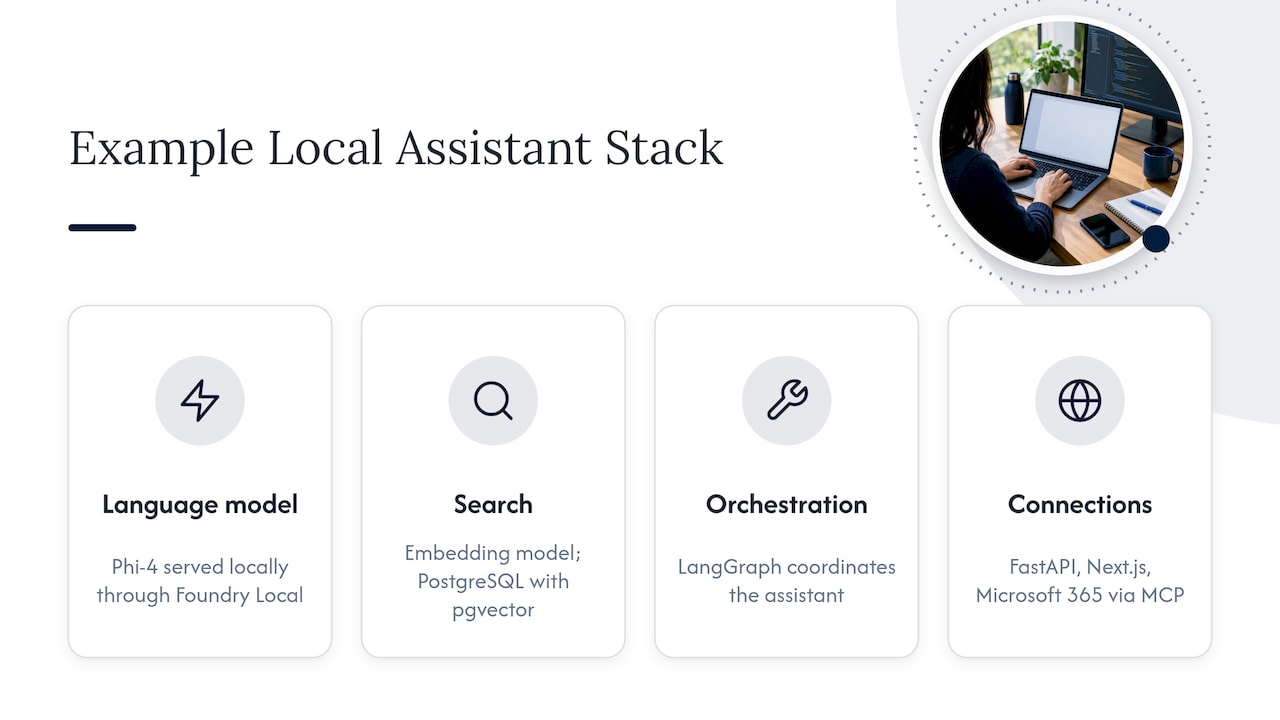
The assistant needs a language model served locally, an embedding model for semantic search, and a place to store vectors. Microsoft’s reference stack shows one concrete combination: Phi-4 running locally through Foundry Local, PostgreSQL with pgvector for semantic search, LangGraph orchestration, FastAPI, a Next.js interface and Microsoft 365 connectivity through MCP. Treat it as one example, not a prescription. Your model choice should follow your languages, your mail volume and the GPU or CPU capacity you can allocate.
One detail from that project is worth carrying into any design. Its model configuration lacked native tool calling, so the team used structured JSON output with middleware to make actions reliable. Smaller local models often need this kind of scaffolding to call tools consistently, so budget engineering time for the action layer, not just the model.
If your environment has no internet at all, the runtime, model weights and updates must all be deliverable through your own transfer process. We cover that in disconnected operations AI and offline AI inference.
Mail platform access
The assistant needs a connector to your mail system, whether Exchange Server, a hybrid setup, or another on-prem platform. Decide early:
- Which mailboxes. Individual users, shared mailboxes, or functional queues such as a claims or dispatch inbox. Shared queues are often the best first target because the value is high and the privacy surface is easier to define.
- Which identity system. The assistant should act through your existing identity provider and honor the same group memberships and mailbox visibility users already have.
- Which workflows. Ticketing, CRM, document repositories and approvals. Each integration is another door, so each gets its own scoped credential.
Integration details differ by platform and version, so confirm connector options and supported APIs against your mail vendor’s current documentation before design is locked. This is also where an integrator earns its keep: the work is rarely the model, it is wiring it into identity, mail flow and approval processes without widening anyone’s access.
Securing the assistant
An email assistant is an unusual security object. It holds read access to private correspondence and may have the ability to send as a person. Design for the failure case.
Least privilege is the main containment boundary
Guidance on authenticating AI agents to email recommends delegated OAuth with scoped, revocable grants, no passwords or raw provider tokens, and read-only scopes for agents that only read. The same guidance frames least privilege as the primary defense against prompt injection: because inbox content can influence an agent, a read-only grant means a poisoned message cannot gain the ability to send, and human approval should guard irreversible actions.
In practice that means three tiers:
- Read and summarize: read-only access, no side effects.
- Draft: creates drafts in the user’s drafts folder, never sends.
- Act: sends, forwards, deletes or schedules, only after a named person approves each action.
Most deployments should live in tiers one and two for months before anyone considers tier three.
Check authorization on every request
Do not rely on login alone. Before the assistant retrieves a message or invokes the model on it, check who the user is now, whether they are still active, whether they can see that mailbox, and what their role permits. Search is the common failure point: a vector index that ignores mailbox permissions will happily surface a executive’s thread to an intern. Filter retrieval by permissions at query time, and keep each team’s data logically isolated.
Treat every message as hostile input
Email is the most open input channel your company has, because anyone on earth can send into it. Attachments and text can contain instructions aimed at the model. Practical controls:
- Keep the model’s instructions separate from message content, and limit how much text is passed in.
- Never let model output trigger an action directly; route actions through a rules layer that validates them.
- When a classifier or action decision is missing, malformed or ambiguous, default to human review rather than proceeding.
- Redact sensitive values before logs leave the system.
Data protection and retention
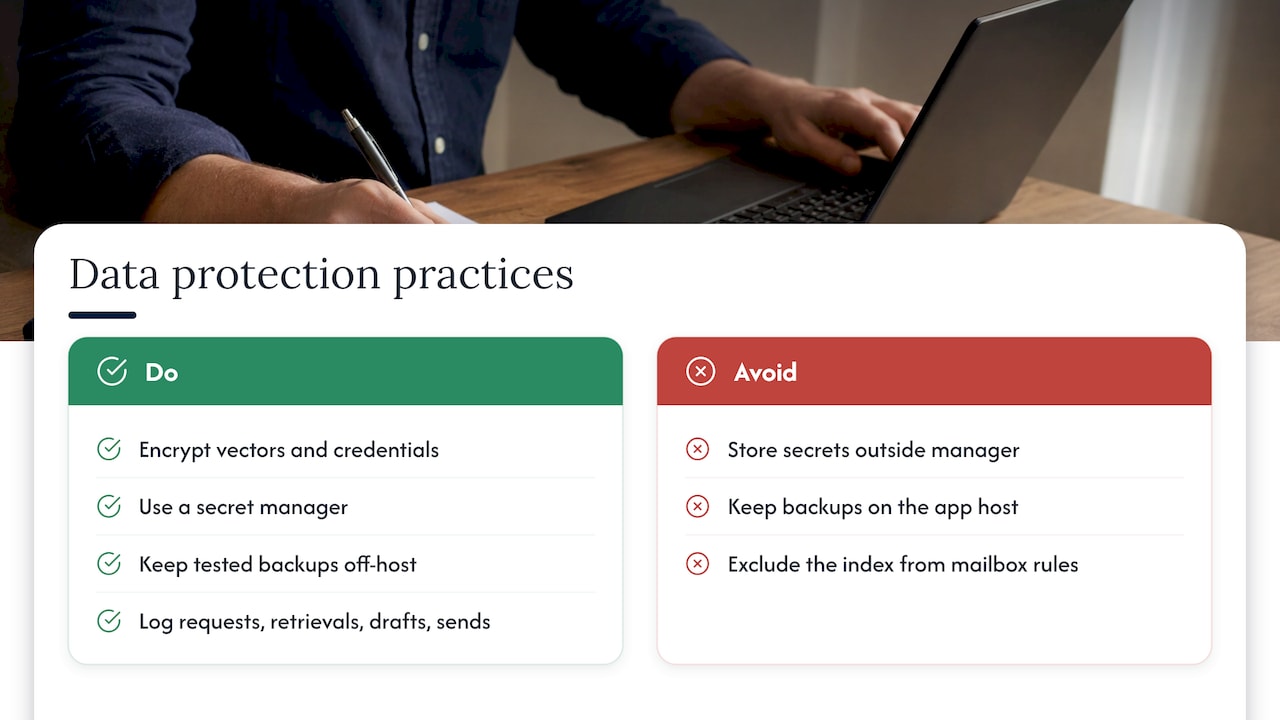
Encrypt the vector database and any stored credentials at rest and in transit, keep secrets in a secret manager, and keep tested backups off the application host. Set retention for the index, drafts and logs deliberately. The assistant’s index of your mail is itself sensitive data and should fall under the same legal hold, deletion and eDiscovery rules as the mailbox. Log who asked what, which messages were retrieved, and what was drafted or sent, so an auditor can reconstruct any interaction.
Rolling it out in stages
A staged plan keeps risk contained and gives you evidence at each gate. Microsoft’s deployment playbook for enterprise agents recommends separate planning, development, test, production-pilot and expansion stages, and that structure fits an on-prem email assistant well.
- Plan. Pick one or two workflows, name a business owner, set success measures (time to first draft, search success, reviewer acceptance rate) and define what the assistant must never do.
- Build in a development environment. Stand up the runtime, connector and permission model on non-production mailboxes with synthetic or scrubbed mail.
- Validate in test. Build a golden set of real-style questions and expected answers. The playbook pairs automated evaluations with business-owner review, then iterative refinement. Add adversarial emails with embedded instructions to confirm your guardrails hold.
- Pilot in production. The same playbook suggests piloting with roughly 5 to 10 percent of employees across regions and roles. Review usage and feedback weekly.
- Expand in waves. Add teams based on pilot results, not on enthusiasm. Move from drafting to action tiers only with sign-off from security and the business owner.
A worked example: a logistics operator might start with a shared customs-queries mailbox. The assistant summarizes each thread and drafts a reply from the shipment documents, while a coordinator approves every outgoing message. After a pilot period with measured acceptance of drafts, the team extends it to a second queue. The first workflow proves the security model; the second proves it generalizes.
Running it after launch
Go-live is the start of the operating work. Plan for:
- Reliability. Monitor model-serving latency, queue depth, connector health and failed actions. Define a fallback so users can still work in the mailbox when the assistant is down.
- Quality drift. Re-run the golden set whenever you change the model, the prompts or the retrieval settings. Track how often reviewers edit or reject drafts.
- Privacy. Review access logs on a schedule, and test that permission filters still hold after identity or org changes.
- Resilience. Cisco’s lab-validated on-premises AI design uses observability, workload controls and model-layer controls, and is explicit that redundancy gaps and failure-injection tests remain before production. Run your own failure tests: pull a node, drop the connector, corrupt an index, and see whether the system fails closed.
- Updates. New model versions need a controlled path into your environment, particularly if it is air-gapped.
Our perspective
We see the same pattern in regulated organizations. The first request is “an email assistant.” The real requirement underneath is that nothing about the business’s correspondence is ever visible outside its perimeter, and that someone can prove it.
That changes how you build. You do not start with a model and add controls later. You start with the boundary, decide where inference, indexes and logs live, and design the assistant to fit inside it. Private and air-gapped deployment is the foundation, not an add-on.
This is why we work as an official webAI systems integrator. webAI’s local-first platform gives us specialized AI Personas, the Intelligence Delivery Network, and webAI Frontline, which gives teams fast, source-backed answers from large technical document libraries, fully offline on a single device. Our job is the part around it: architecture, secure deployment, model integration and ongoing operation inside infrastructure you control. Our leadership brings more than 20 years in high-consequence and Fortune 100 environments, and we design each deployment so data, models and domain intelligence stay inside the client’s environment.
For an email assistant, our advice is to start narrow, with a shared queue and read-only access, prove the controls, and expand. The organizations that do this well treat the assistant as an operated system, not a one-time install.
John
Put a private assistant to work in your environment
If you want an email assistant that runs inside your data center, edge site or air-gapped network, Forge AI Deployment handles the full path: architecture, secure local deployment, model integration, assistant rollout, runtime orchestration and ongoing operations. Our private AI assistant approach lays out four deployment postures regulated enterprises use, and the platform behind our work is described on the webAI partnership page.
Ready to scope a deployment? See our sovereign AI deployment services and tell us which mailboxes and workflows you want to start with.
FAQ
Can an email assistant run fully offline?
Yes, if the model runtime, embedding model, index and connector are all deployed inside your network and updates arrive through your own transfer process. The mail server itself must be reachable from the assistant, but nothing needs to reach the internet. Air-gapped designs take more planning for model updates and monitoring.
Is on-prem always more secure than a cloud assistant?
On-prem gives you control over where message content goes, which is what data sovereignty requires. Security still depends on the design: scoped access, per-request authorization, hostile-input handling and audit logs. Build those in from the start and the control you gain is real and demonstrable.
Should the assistant be allowed to send email on its own?
Start with drafts only. Sending, forwarding and deleting are irreversible, so guidance on agent access recommends human approval for those actions. Many teams keep a person in the loop permanently for external recipients.
Who should own the project?
Pair a business owner for the workflow with security and IT for the platform. The business owner defines what a good answer looks like and reviews the golden set. Security signs off on access, retention and logging before each stage expands.
Sources
- Microsoft local-email-agent README
- Microsoft local-email-agent architecture
- AI features documentation, EmailOps
- Authenticate an AI agent to email, Nylas
- Deployment playbook, Microsoft Learn
- Cisco Secure AI Factory case study