An on-prem code assistant keeps every part of the coding loop inside a boundary your organization controls: the prompts, the retrieved source code, the generated output, the logs and the model weights. Buying the software is the easy part. The hard part is proving that nothing leaves, then keeping that true through updates, plugins and agents. Forge AI Deployment designs, deploys and operates private AI systems inside customer-controlled infrastructure, including air-gapped networks, so the boundary is engineered and operated as one system rather than assumed.
TL;DR
- “On-prem” is defined by the whole data path, not by where the server sits. A rack in your data center that sends telemetry or crash dumps to a vendor is not fully on-premises.
- Plan for five layers: the editor or terminal client, the model, a gateway, repository context and documentation context. Each one can leak or stay home.
- An air-gapped assistant needs mirrored images and models, verified hashes, disabled telemetry and an offline update path. Plan the operations work before you plan the hardware.
- The highest-value runtime control is an egress allowlist. Pair it with a filesystem boundary, short-lived credentials and an immutable command log.
- Pilot with your own model, your own repositories and your own concurrency before you size hardware for the full developer population.
Table of Contents
- What “on-prem” really means for a code assistant
- Where your code can still leave
- The five layers to design
- Choosing models and sizing hardware
- Running it air-gapped
- Security controls that matter
- A pilot plan that produces real answers
- Where a systems integrator earns its place
- Our view: the boundary is an operating discipline
- Plan your deployment with Forge
- FAQ
- Sources
What “on-prem” really means for a code assistant
Most vendors use the word loosely. One engineer’s definition of an on-premise assistant covers prompts, retrieved code, generated output, logs, model weights and operational metadata, and it notes that the server’s physical location matters less than the complete data path. That is the test to apply to every product you evaluate.
Three arrangements get blurred together in sales conversations:
- Local inference on each developer’s workstation. Simple, but you have thousands of small endpoints to patch and govern.
- Self-hosted inference on shared infrastructure. One cluster in your data center serves all developers. This is what most regulated enterprises mean by on-prem.
- Private managed inference in an isolated tenant or cloud account. Your data is separated, but someone else operates the runtime.
The difference decides who can inspect prompts, who patches the runtime, where logs land and whether a support engineer can reach memory or storage. Write those answers down before you compare models. For a bank, a defense supplier or a plant with export-controlled designs, arrangement two or a fully air-gapped variant of it is usually the only one that passes review.
The trade-off against hosted tools is worth stating plainly. Hosted services offer strong models and little setup, while local models give you direct control over network boundaries, logs, storage and model access in exchange for hardware and operational work. Your task is to make that operational work predictable.
Where your code can still leave
A product labeled “self-hosted” can still send data out. One enterprise guide lists seven categories that can cross the boundary even on-premises: license checks, telemetry, model calls to external hosts, agent steps, documentation and web search queries, outbound calls from tool servers (MCP), and updates from extension marketplaces, package registries and model downloads.
The second trap is agentic tooling. An agent loop sees everything it reads, because it has to pass that content to the model. If only the machines move into your network while the model endpoint stays outside, your code still leaves it. Ask a single question of every component: where is the model that receives this text running, and who operates it?
A clean flow looks like this. The editor client asks your internal context service for relevant code, combines the request and that context into a prompt, and sends it to a completions API that you host, which calls a model that you host. Documented designs show the completions service retaining no inputs or outputs, and usage can be logged by key, team and model without storing prompt bodies. Your policy decides whether bodies are stored for audit; the architecture should let you choose.
The five layers to design
One guide breaks the stack into five layers, each of which can sit at a different deployment level:
| Layer | What it does | What to decide on-prem |
|---|---|---|
| Client | Editor plugin or terminal agent that talks to the developer | Which IDEs you support, how updates are delivered, whether telemetry is off |
| Model | Writes the code | Which open-weight model, what size, what license |
| Gateway | Controls which models and tools each person can use | Authentication, per-developer keys, rate limits, audit |
| Repository context | Finds relevant code | Which repositories are indexed, enforcing each developer’s read permissions |
| Documentation context | Supplies internal standards and API docs | Where the library is stored and how it is refreshed |
A reference build from an open-source platform vendor shows the typical shape: inference served by vLLM, an optional gateway with per-developer API keys, deployment through GitOps charts, and at minimum one NVIDIA GPU with enough memory for the model plus 50 to 100 Gi or more of storage. Another architecture description gives the same four working parts: an inference server, an authentication and rate-limiting gateway, a context engine that indexes the codebase, and plugins for VS Code, JetBrains IDEs and Neovim.
The documentation layer is where enterprises gain the most beyond generic autocomplete. Engineering standards, runbooks and interface control documents are exactly the large technical libraries that a private assistant should answer from with sources. That is the use case webAI Frontline addresses: fast, source-backed answers from large technical document libraries, fully offline on a single device.
Choosing models and sizing hardware
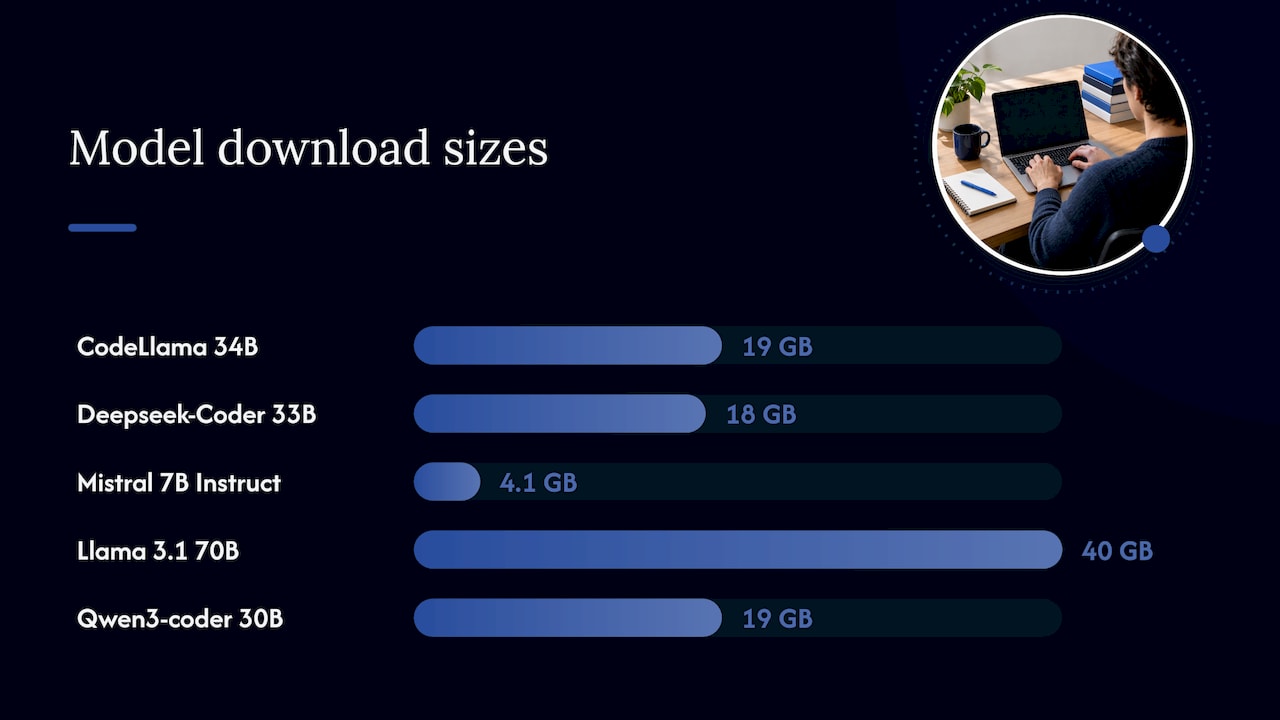
Model choice is a balance of quality, memory and license. One technical write-up lists common on-premises coding models and their download sizes: CodeLlama 34B at 19 GB, Deepseek-Coder 33B at 18 GB, Mistral 7B Instruct at 4.1 GB, Llama 3.1 70B at 40 GB and Qwen3-coder 30B at 19 GB. The same piece stresses that the right pick depends on use case and available hardware, and that open-source license terms must be reviewed before deployment. Treat the list as a starting set for evaluation, not a ranking.
A few sizing rules hold regardless of model:
- Size for concurrency, not headcount. Vendor guidance for on-prem assistants sizes deployments by model, context length, concurrency target and workload, and some configurations for 501 to 1,000 users can call for multiple H100 or B200 GPUs.
- Memory bandwidth matters as much as core count. If you are planning CPU hosts for indexing, gateways and developer workspaces, it helps to understand how memory channels affect server throughput.
- Plan the orchestration layer early. Serving several models to many developers is a scheduling problem. Our guide to Kubernetes for LLM inference covers it for private deployments.
Broader infrastructure decisions, from power to networking, are in our practical guide to on-premise AI deployment.
Running it air-gapped
An air gap removes the internet path entirely. It also removes the conveniences that assume one: automatic updates, model downloads, package installs and license pings. Published air-gap guidance lists eight steps, which we restate here as a working sequence:
- Mirror approved artifacts. Container images, packages, model files and vulnerability data are copied in through a controlled transfer.
- Verify before import. Check hashes and signatures on everything crossing the boundary.
- Keep an inventory and a software bill of materials. You must know what runs where.
- Disable automatic updates, telemetry and connectors that expect internet access.
- Stand up offline registries for packages and models.
- Define a signed export path for patches, reports and anything else that must leave.
- Schedule offline security updates and an emergency revocation procedure.
- Test for routes you forgot, including DNS, proxies, management interfaces and model tooling.
These come from a guide to self-hosted coding agents, which also warns that an air gap raises the update and operational burden and does not remove insider risk, malicious dependencies, unsafe imported documents or model mistakes. Expect to need a local container registry, storage for model weights, internal networking of 10 Gbps or better and several terabytes of preferably SSD storage.
Two details trip up first deployments. Operational metrics and logs must go to an internal metrics server and log aggregator, and administrators should confirm that optional feedback, model-provider and attribution features create no external connection. And in an air-gapped model, you are the one bringing updates in, so the import process is part of the product you run. Our explainer on offline AI inference covers how that works and when it fits.
Security controls that matter
A code assistant reads source, executes suggestions and, in agent mode, runs commands. Treat it as an endpoint. Four runtime controls are a good baseline:
- Filesystem boundary: the agent sees only the repository it works on.
- Egress allowlist: only your package registries, your git remote and your model API are reachable.
- Secret-free environment: no long-lived credentials where the agent runs, only short-lived tokens issued through OIDC.
- Reviewable command log: every command, file write and URL fetch is kept somewhere the agent cannot edit.
Of these, the egress allowlist earns top priority. One security team argues it is the single highest-value control because it works without knowing anything about the attack: if everything not listed is denied, a successful prompt injection cannot send your code out.
Add output guardrails too: licensing filters, filters for known insecure code patterns, internal TLS certificates for traffic in transit, and audit logging and usage reports turned on in air-gapped mode. Finally, keep a human in the loop. A safe start uses an isolated test repository, a non-admin sandbox, restricted egress, a right-sized local model and human approval for every consequential write.
A pilot plan that produces real answers
Benchmarks from a vendor page tell you little about your monorepo. Run a pilot that tests your own conditions:
- Pick two or three teams with different languages and codebases, ideally including one with the strictest data classification.
- Fix the boundary first. Complete the egress test and the data-path review before any developer touches the tool.
- Use your exact candidate model and your real repositories. Latency and throughput should be validated with the exact model and a representative internal workload before procurement.
- Measure what your leadership will ask about: suggestion acceptance, time to first token, behavior at peak concurrency, review findings on generated code and security-scan results.
- Record the operating cost: how long an offline model update took, how many tickets the gateway generated, who was on call.
- Decide on scale only after the pilot’s operating data, not just its quality scores, is in.
The last two steps are where programs stall. A pilot that works for 20 developers on a lab GPU says nothing about patching, capacity planning or incident response for 800. This is also why who operates the system matters as much as which model it runs.
Where a systems integrator earns its place
The decisions above cross networking, GPU infrastructure, security review, model integration and long-term operations. Few enterprises have all of those skills on one team, and a gap in any one of them reopens the boundary. Integration is also not a one-time event: models change, plugins change and the import process must be run again and again.
Forge AI Deployment is an official webAI systems integrator. We bring webAI’s local-first platform into production inside infrastructure you control, covering architecture, secure deployment, model integration and ongoing operation. The same platform includes specialized AI Personas, the Intelligence Delivery Network and webAI Frontline, so the engineering knowledge your developers rely on can be served privately next to the code assistant. For how this fits a wider assistant strategy, read our piece on deployment postures for private AI assistants, and for the platform itself, our webAI partnership page.
Our view: the boundary is an operating discipline
Most failed “private” code assistant projects did not fail on the model. They failed on the edges: a telemetry flag nobody turned off, a plugin that fetched an update, an agent step that called an outside endpoint.
Our leadership brings more than 20 years in high-consequence and Fortune 100 environments, and that shapes how we work. We design deployments so that all data, models and domain intelligence stay inside your infrastructure, validated for privacy and auditability, and we treat the build as the start of an operating relationship, not a hand-off.
That is why we lead with private and air-gapped deployment. The assistant is one workload. The perimeter, the update path, the logs and the people who run them are the system. Get those right and the choice of model becomes a swap you can make with confidence.
John
Plan your deployment with Forge
If your code, designs or models cannot touch a public endpoint, Forge AI Deployment can architect, deploy and operate the private system inside your data center, edge site or air-gapped network. Our services include secure local and air-gapped deployment, custom model integration and optimization, private AI assistant rollout, sovereign MLOps and runtime orchestration, and performance tuning with ongoing operations. See the solutions overview to start an engagement conversation.
FAQ
What is the difference between an on-prem code assistant and a cloud one?
An on-prem assistant runs the model, the context service and the logs inside infrastructure you control, so prompts and source code do not cross your network edge. A cloud assistant sends them to a provider’s servers. Hybrid designs exist: local processing handles indexing and secret filtering, and only a narrowly scoped prompt goes to a managed model. Regulated teams usually choose the fully local path.
Can an on-prem code assistant work with no internet at all?
Yes, if the container images, packages and model files are mirrored internally and automatic updates, telemetry and online connectors are disabled. You then bring updates in through a verified, signed process. Test that no route remains through DNS, proxies or management interfaces before developers start.
What hardware does an on-prem code assistant need?
It depends on the model, context length and how many developers use it at once. A small deployment can start with a single data-center GPU that has enough memory for the chosen model; larger populations may need several. Validate with your real model and workload before buying.
Which security controls should we put in place first?
Start with an egress allowlist, then add a filesystem boundary, short-lived credentials and an immutable command log. Keep human approval on every consequential write, and keep audit logging on.
Sources
- On-premise AI coding assistants for regulated teams
- AI coding privacy: cloud assistants versus local models
- Self-hosted AI coding assistants: an enterprise guide
- Self-hosted AI coding agents: VPC, on-prem and air-gapped
- Code assistant security and legal whitepaper
- Private AI code assistant reference quickstart
- How to implement an on-premises coding assistant
- Enterprise AI code assistants for air-gapped environments
- Self-hosted AI coding agent: complete guide
- Runtime security for coding agents
- DDR5 versus DDR4 for server memory channels