AI assistant access control means deciding, outside the model, who can ask what, which documents the assistant may retrieve for that person, which tools it may call and which actions need a human to approve. The model never makes those decisions. Your identity system, your retrieval layer and your downstream applications do, and they are far easier to enforce, log and audit when the assistant runs inside infrastructure you control. That is how Forge AI Deployment builds private assistants for regulated enterprises: permissions are enforced before the model sees anything, in your data center, edge site or air-gapped network.
TL;DR
- Give the assistant the permissions of the person asking, not a broad service account of its own.
- Filter retrieval by each user’s existing entitlements at query time, so unauthorized content never reaches the model’s context.
- Scope tool access per tool and per task, with short-lived credentials, and require human approval for high-impact actions.
- Log every request, authorization decision, action and result, and keep a way to revoke access fast.
- Running the assistant on-premises or air-gapped keeps identity, data and logs inside your perimeter.
Table of Contents
- What access control for an AI assistant actually covers
- Why over-permissioned assistants are the core risk
- Layer 1: identity for people and for the assistant
- Layer 2: retrieval that respects existing permissions
- Layer 3: tools, APIs and scoped credentials
- Layer 4: human approval for sensitive actions
- Layer 5: test, monitor, audit and revoke
- Why the deployment model decides how much of this you control
- A rollout order that works
- What a private deployment from Forge AI Deployment includes
- Our perspective
- FAQ
- Sources
What access control for an AI assistant actually covers
A traditional application has users and screens. An assistant has users, a body of connected data, a set of tools and, increasingly, the ability to act. Each is a separate surface to control:
- Users and identity: who is asking, and how they were authenticated.
- Data: which documents, records and indexes the assistant can retrieve on that user’s behalf.
- Tools and APIs: which systems it can call, and with what scope.
- Actions: the difference between reading, and writing, deleting, sending or approving.
- Other agents: what one assistant may ask another to do.
The UK National Cyber Security Centre’s guidelines for secure AI system development ask organizations to apply access controls to APIs, models, data and the pipelines that train and process them. They also call for controls on the query interface to detect and prevent attempts to access, modify or exfiltrate confidential information. In other words, the assistant’s front door and its back-end plumbing both need rules.
Why over-permissioned assistants are the core risk
The Canadian Centre for Cyber Security’s guidance on careful adoption of agentic AI treats privilege as the central issue: the privileges you assign to an agent determine how much risk it can introduce. Its examples are plain. A calendar bot that can see all meeting data, or an email assistant with write access to any inbox, has more reach than its job needs. That is scope creep.
The same guidance describes the confused deputy problem. A low-privileged user manipulates a high-privileged agent into doing something the user could not do directly. Because the agent performed the action, the audit logs look legitimate, and detection is delayed.
The UK NCSC makes a related point in its blog on thinking carefully before adopting agentic AI: agents can be permitted to reach external systems, data and tools in ways that non-agentic AI is not, and their goals can be interpreted in ways a human would not expect.
For a bank, a defense supplier or an energy operator, the practical lesson is simple. A shared, all-seeing service account behind a friendly chat window turns every user into an administrator.
Layer 1: identity for people and for the assistant
Start with who is acting. ISACA’s 2026 recommendations for securing AI agents call for:
- a distinct identity per agent and per workload, with no shared accounts or long-lived tokens;
- workload identity and federated access in place of static credentials;
- short-lived credentials that rotate automatically;
- role-based and attribute-based access with just-in-time elevation;
- multi-factor authentication for operators and administrators.
Australia’s cyber.gov.au publication on careful adoption of agentic AI services goes further on machine identity. It recommends treating each agent as its own principal with a cryptographically anchored identity, authenticating agent-to-service calls with mutual TLS, and keeping a trusted registry that rejects any agent or key not on it.
France’s ANSSI, in its guide Securing an agentic AI system, adds a rule about secrets: keep them out of model context, memories and logs, hand them to a vault or proxy, and give agents only short-lived, least-privilege tokens scoped to operational needs.
In an air-gapped or on-premises deployment, this layer connects to your own directory and single sign-on, not to an outside identity service. Nothing about who your people are needs to leave the building.
Layer 2: retrieval that respects existing permissions
Most enterprise assistants answer from internal documents. If retrieval ignores document permissions, the assistant becomes a search engine that bypasses every folder restriction you have. Two principles prevent that.
Filter before the model, not after
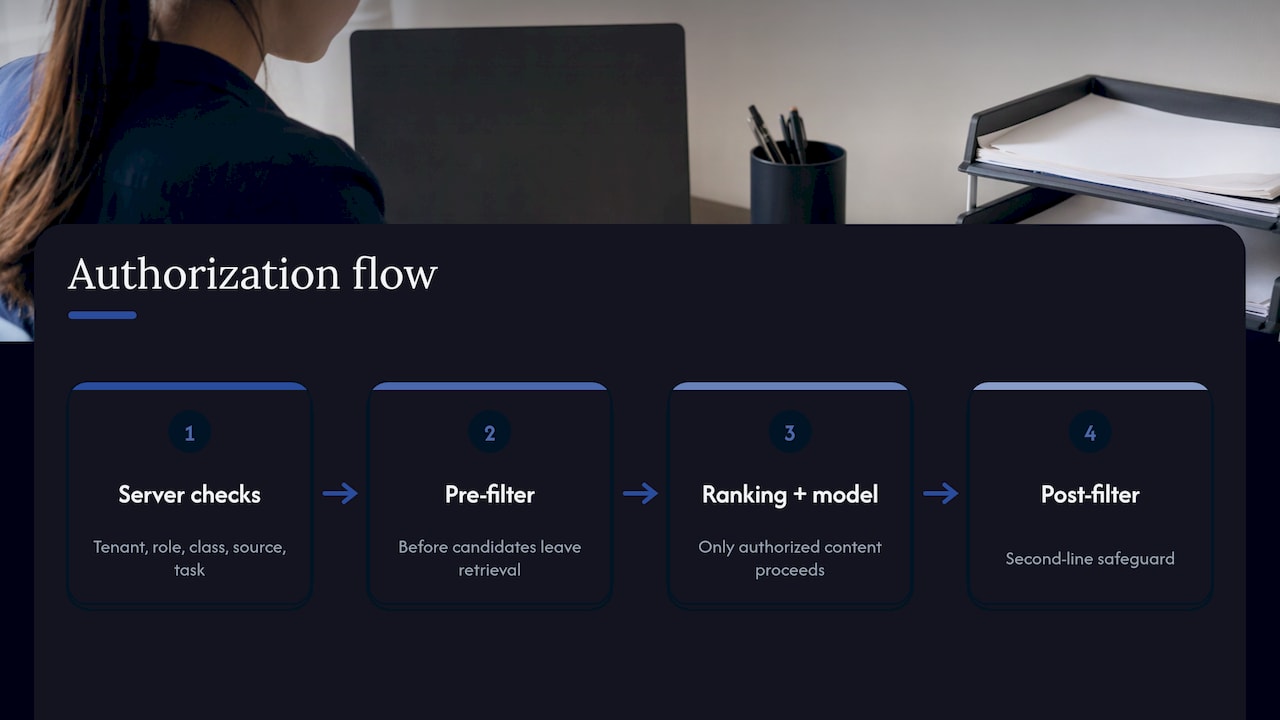
The OWASP AI Security Verification Standard’s research chapter on access controls for memory and RAG recommends a default-deny retrieval path. The caller’s tenant, role, data-classification clearance, source-system permissions and task scope are computed on the server and injected into the query. The client is never allowed to choose its own authorization filter. Pre-filtering keeps unauthorized content out of ranking and out of the model’s context, while post-filtering is only a second line of defense. The same chapter notes that a document’s existence or title can itself be sensitive, so the policy check must finish before candidates leave the retrieval layer.
Let a policy engine answer “can this user view this?”
OpenFGA’s documentation on RAG authorization describes the pattern. The retriever pulls candidate documents, then a policy engine checks whether the user can view each one, or lists everything the user may read and intersects that with the candidates. Only surviving documents reach the model. Two users asking the same question get different, correct answers.
A worked example. An analyst in a bank’s compliance team and a branch manager both ask, “What changed in the sanctions escalation procedure?” The compliance analyst’s entitlements include the restricted case-handling manual, so the assistant cites it. The branch manager’s do not, so that manual is never retrieved, never ranked and never summarized. The assistant answers from the general policy summary only. No prompt trick can extract the manual, because the model never held it.
For a deeper walk-through of this idea, see our piece on LLM access control and enforcing permissions before the model. Personal data adds another layer of care, covered in our guide to PII handling in AI.
Layer 3: tools, APIs and scoped credentials
When an assistant can call systems, the permission question moves from “what can it read?” to “what can it change?” The practical rules from the official guidance:
- Inventory first. ANSSI asks organizations to inventory the system’s accesses, resources and capabilities, and to justify that each is strictly necessary to operational needs.
- Scope narrowly. ISACA asks for least-privilege controls on tools, APIs, knowledge sources and data stores. Read access to one table is a different grant from write access to a database.
- Use deterministic controls. ANSSI states that securing an agentic system relies on isolation, access control and deterministic controls that agents cannot override. A prompt that says “do not delete anything” is not a control. A credential that cannot delete is.
- Carry identity in the call context. The user’s identity should travel with the tool call through the system, not as an argument the model fills in. If the model can write a user ID into a request, a manipulated model can write someone else’s.
An industrial example: a maintenance assistant at a manufacturer can read work orders for the plant where the technician works and can draft a parts request. It cannot submit the purchase, and it cannot see another plant’s supplier pricing. Each limit is enforced by the downstream system, not by the assistant’s good behavior.
Layer 4: human approval for sensitive actions
Not every action should run on its own. ANSSI’s guide sorts actions into three groups: autonomous execution, mandatory human approval and prohibited. It requires human approval for critical actions, access to sensitive data, changes to identity or permissions, and production deployments. Two details matter in practice. The approval mechanism must sit outside the agent’s reach, and only the exact approved action is executed.
A workable policy table looks like this:
| Action type | Example | Treatment |
|---|---|---|
| Read, within the user’s entitlements | Summarize a manual the user can already open | Autonomous, logged |
| Low-impact write | Draft a ticket or an email | Autonomous, user reviews before sending |
| High-impact write | Change a record, release a payment, push to production | Human approval required |
| Permission or identity change | Grant access, add a user to a group | Human approval required, or prohibited |
| Out of mission | Anything outside the documented tasks | Prohibited |
If the approval step can be bypassed by the assistant itself, it is a suggestion, not a control. Build it into the workflow system, not the prompt.
Layer 5: test, monitor, audit and revoke
Access rules drift as people change roles and documents move. ANSSI directs organizations to test the system before deployment and regularly afterward, and to monitor agent actions against the documented mission and authorized tools. Logs should be protected well enough to reconstruct the full sequence: request, authorization, action, result. It also calls for an emergency stop that revokes access and can be triggered by monitoring when processing looks abnormal.
Two habits keep this layer honest:
- Test with real permission boundaries. Ask the assistant, as a low-privileged test user, for things only a high-privileged user should get. The right answer is a refusal or a general answer, never a leak.
- Rehearse revocation. Know how long it takes to cut an assistant’s credentials, and who is allowed to do it at 2 a.m.
Because chunks of content inherit permissions from their source documents, permission changes also need to flow into the retrieval index. Plan for that when you design ingestion, not after the first audit finding.
Why the deployment model decides how much of this you control
Every layer above depends on something you must trust: the identity provider, the retrieval index, the policy engine, the logs. With a hosted assistant, those live partly or wholly in someone else’s environment, and your prompts, retrieved documents and audit records travel to it. With a private deployment, they stay where your existing security team already operates.
That matters most where the stakes are highest:
- Financial institutions can keep client data and entitlement checks inside the same boundary as the systems of record.
- Aerospace and defense programs can run assistants in air-gapped networks where outbound connections are not an option.
- Energy and logistics operators can keep operational and shipment data inside controlled sites. Our article on energy sector AI security covers the threat picture.
- Manufacturers can run assistants at the edge, on the plant floor, without depending on a cloud connection.
Access control also has an availability side. An assistant that your people rely on needs a recovery plan that preserves its permissions and logs, which we cover in AI backup and disaster recovery for private AI systems.
A rollout order that works
- Map the surfaces. List the users, data sources, tools and actions the assistant will touch, and justify each.
- Connect identity. Tie the assistant to your directory and single sign-on, with a per-workload identity for the assistant itself.
- Classify and tag content. Carry source permissions and data classification onto every indexed chunk.
- Enforce at query time. Compute entitlements server-side and apply them in the retrieval query, failing closed when nothing resolves.
- Scope tools. Grant per-tool, short-lived credentials and enforce authorization in the downstream system.
- Set approval tiers. Decide what runs on its own, what needs a human and what is prohibited.
- Turn on logging and revocation. Make sure the full request-to-result chain is recorded and an emergency stop exists.
- Test as a low-privileged user, then keep testing.
What a private deployment from Forge AI Deployment includes
Forge AI Deployment designs, deploys and operates private AI systems inside infrastructure you control, including enterprise data centers, edge sites and air-gapped networks. As an official webAI systems integrator, we bring webAI’s local-first platform into production: architecture, secure deployment, model integration and ongoing operation. That covers specialized AI Personas, webAI’s Intelligence Delivery Network, and webAI Frontline, which gives frontline teams fast, source-backed answers from large technical document libraries, fully offline on a single device.
The access-control work described in this article sits inside that scope: secure local and air-gapped deployment, private AI assistant rollout, sovereign MLOps and runtime orchestration, and ongoing sovereign operations. Our leadership brings more than 20 years in high-consequence and Fortune 100 environments, and our deployments are designed so that data, models and domain intelligence stay inside your infrastructure. See the Forge solutions for the full list of services.
If you are planning an assistant that must respect existing permissions from day one, start on the Forge AI Deployment home page and tell us which systems it needs to reach.
Our perspective
Access control for an assistant fails when it is treated as a prompt problem. We see it as an architecture problem, and the answer is placement. Identity, retrieval filtering, tool scopes and approvals belong in systems your security team already owns, enforced before the model ever receives a token of context.
That is why we build private assistants inside the customer’s perimeter. When the index, the policy checks and the logs all sit in your data center or on an air-gapped network, you can show an auditor exactly which documents a person’s question could reach and exactly what the assistant did next. Nothing has to be taken on trust from an outside service.
Our approach comes from operational discipline in high-consequence environments: inventory what the assistant touches, grant the minimum, enforce it deterministically, log it completely and rehearse the shutdown. As an official webAI systems integrator, we deploy webAI’s local-first platform, including Personas and Frontline, so teams get fast, source-backed answers without sensitive data leaving the site.
John
FAQ
Should an AI assistant use its own service account or the user’s permissions?
It should act with the requesting user’s permissions. A broad service account lets anything that influences the assistant, such as an ambiguous request or an instruction hidden in a retrieved document, spend authority the downstream systems treat as legitimate. Delegating the user’s scoped identity keeps your existing permission checks working.
Is filtering the assistant’s answer enough to protect restricted documents?
No. OWASP’s AI Security Verification Standard research recommends pre-filtering, so unauthorized content never enters ranking or the model’s context. Filtering the output afterward is defense in depth, not the primary control, and even a document’s title can be sensitive.
Which actions should need human approval?
Following ANSSI’s guidance: critical actions, access to sensitive data, identity or permission changes and production deployments. The approval step must sit outside the assistant’s reach, and only the exact approved action should run.
Does an air-gapped assistant still need access control?
Yes. Isolation limits outside exposure, but people inside the network still hold different clearances and roles. Per-user retrieval filtering, scoped tool credentials, approvals and audit logs apply on an air-gapped network exactly as they do elsewhere.
Sources
- Guidelines for secure AI system development (UK NCSC)
- Careful adoption of agentic AI (Canadian Centre for Cyber Security)
- Thinking carefully before adopting agentic AI (UK NCSC)
- Cybersecurity recommendations for securing AI agents (ISACA)
- Careful adoption of agentic AI services (cyber.gov.au)
- Securing an agentic AI system (ANSSI)
- Access controls for memory and RAG (OWASP AISVS)
- RAG authorization (OpenFGA)