Handling PII in AI means controlling personal data at every point where an AI system touches it: the prompt, the retrieved documents, the model, the output and the logs. You do that by sending the model only what the task needs, redacting identifiers before they reach it, restricting who can query it, deleting what you no longer need, and testing for leaks. The most reliable way to keep PII from leaving your control is to run the AI inside infrastructure you own.
This guide walks through where PII hides in AI systems, the controls that work, how to test them, and what to do when something leaks.
TL;DR
- PII can sit in prompts, retrieved documents, fine-tuning data, agent memory, outputs, logs and telemetry, not just in the model.
- Minimize first: pass on only the fields and pages the workflow needs, then redact identifiers before the model sees them.
- Treat retention as a control: delete or anonymize prompts, caches, session memory and traces once they are no longer needed.
- Test for leakage on a schedule and keep an incident plan that covers every copy of the data, including vector stores and caches.
- Running AI inside your own perimeter, including air-gapped networks, removes the question of what an outside provider retains.
Table of Contents
- What PII means in an AI system
- Can you put PII into an AI tool?
- Where PII is exposed or retained
- Minimize, redact and de-identify before the model sees data
- Access, encryption, retention and monitoring
- Privacy obligations depend on where you operate
- Testing for PII leakage
- What to do when PII leaks
- Our perspective: bring the AI to the data
- Private AI for teams that cannot send data out
- A starting checklist
- FAQ
- Sources
What PII means in an AI system
Personally identifiable information is any information that can identify a person, alone or combined with other data. Direct identifiers include a Social Security number, passport number or phone number. Quasi-identifiers, such as a name together with a date of birth, identify someone only in combination. Arthur’s documentation on PII leakage describes how, in LLM applications, PII may be included in prompts, supplied as context through retrieval or fine-tuning, and appear in responses.
That last point matters. An AI system does not need to be “given” PII on purpose. A support transcript pasted into a chat, a contract pulled in by a retrieval pipeline, or an employee spreadsheet in a fine-tuning set all count.
Three layers of risk
The Responsible AI Playbook splits PII risk into three layers, which is a useful way to organize your own review:
| Layer | What goes wrong | Example |
|---|---|---|
| Data | Training datasets contain names, phone numbers, addresses or private emails without explicit consent | A fine-tuning set built from customer emails |
| Model | The model memorizes training data or learns correlations that can be exploited to reverse-engineer sensitive data | A model that reproduces a record when prompted the right way |
| Application | Users put PII into prompts, and the application logs or trains on those interactions | An employee pastes a client file into an assistant |
Most enterprise incidents start at the application layer, because it is where people and systems meet.
Can you put PII into an AI tool?
Sometimes, but only after you answer three questions: does the content contain sensitive or proprietary information, do any restrictions apply to it, and do you have permission to upload it? The University of Chicago’s guidance on appropriate generative AI use advises against putting PII into public AI tools.
The reason is where the data goes next. Arthur’s documentation notes that externally hosted models may retain inputs, use them for training, or expose them across contexts. The European Data Protection Board’s April 2025 report on privacy risks in LLMs adds that providers can log input queries and outputs for debugging or model improvement, potentially storing sensitive data without explicit user consent.
In practice, the rule for an enterprise is simple. Public tools get no PII. Anything that handles PII runs in an environment where you know where every copy lives and who can reach it.
Where PII is exposed or retained
Teams often protect the prompt and forget everything around it. According to Questa’s practical guide to PII in AI pipelines, PII can be exposed or retained across the whole pipeline: user prompts, documents retrieved for RAG, model outputs, fine-tuning datasets, agent memory stores, and application logs or telemetry traces that often capture input and output data by default.
The OWASP GenAI Security Project’s entry on sensitive information disclosure lists an even wider set of surfaces: tool-call arguments, reasoning traces, retrieved chunks, multimodal output, logs, telemetry, embeddings, and observable properties such as timing, token length and cache-hit behavior.
Microsoft’s catalog of AI attack techniques makes a point worth remembering. Real-world data exposure increasingly comes from memory, context and retrieval artifacts rather than from coaxing a model into reciting training data. An enterprise assistant that keeps working summaries, retrieved snippets, vector-store entries or cached grounding data can leak sensitive context even though the base model never trained on it, if that data is scoped wrongly or kept longer than intended.
A quick map for your own system
Walk through these checkpoints and write down, for each, whether PII can be present:
- Input: prompts, uploaded files, form fields, voice transcripts.
- Retrieval: document stores, vector databases, search indexes.
- Model: base weights, fine-tuned weights, adapters.
- Memory: session state, agent scratchpads, KV caches.
- Output: responses, citations, tool calls, downstream messages.
- Operations: logs, traces, error messages, backups, analytics.
If you cannot answer “where is it stored and for how long” for any line, that line is your first project.
Minimize, redact and de-identify before the model sees data
The cheapest PII to protect is the PII you never send.
Minimize. Drop features, columns or records that add nothing to the task. The GovTech Singapore practices portal on mitigating privacy risks recommends exactly this. For retrieval workflows, Questa’s guide puts it as passing on only the fields and pages the workflow needs. A claims summarizer rarely needs a full date of birth. A maintenance assistant needs the manual, not the technician’s home address.
Redact. The same GovTech guidance recommends using named entity recognition and NLP to redact PII from text before it reaches the model’s tokenizer. Redaction sits in front of the model so that nothing downstream, including logs, ever holds the raw value.
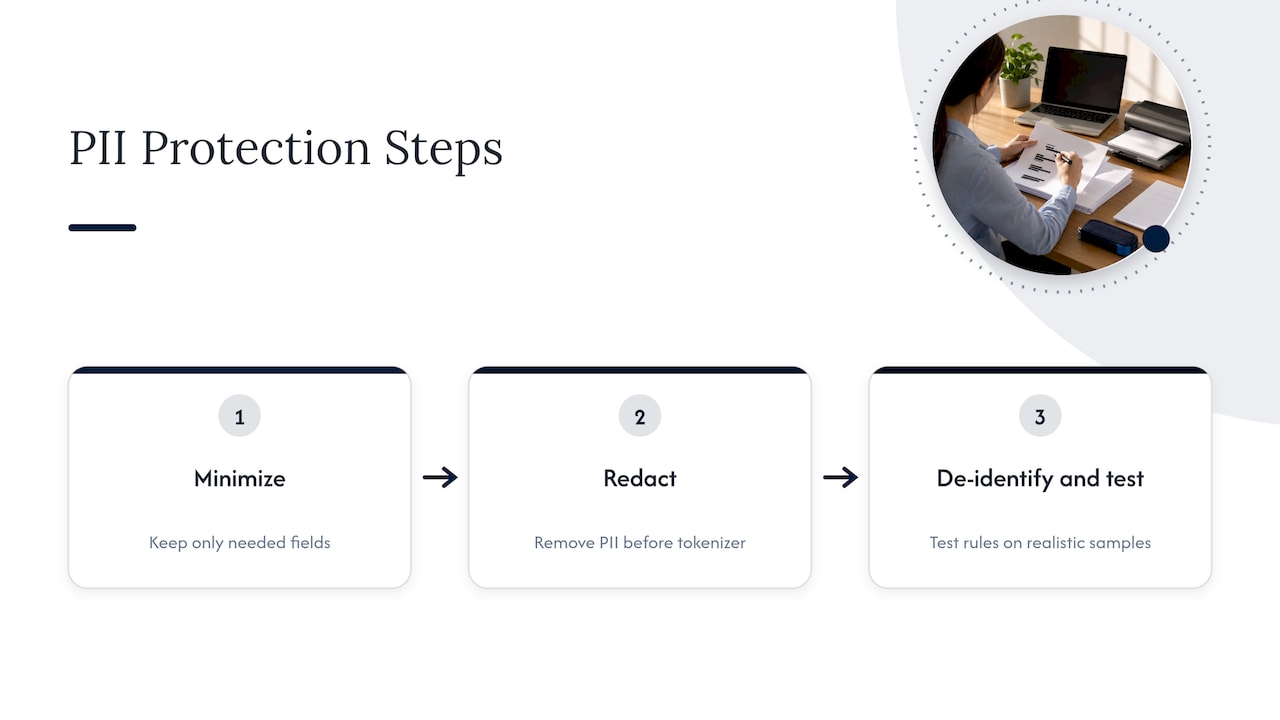
De-identify and test it. The EDPB report stresses that inadequate anonymization or filtering could put identifiable user data into training datasets. It recommends robust anonymization, regular testing of how well it works, and automated tools that find and remove identifiable data before training. Treat your redaction rules like code: version them, test them on realistic samples, and review misses.
Redaction choices at a glance
| Approach | Good for | Watch for |
|---|---|---|
| Remove the field entirely | Data the task does not need | Loss of context the model needs |
| Mask with a placeholder | Names, IDs in free text | Missed variants, such as nicknames or typos |
| Tokenize with a lookup held outside the model | Workflows that must re-attach identity afterward | Securing the lookup table |
| Keep it all inside your perimeter | Regulated data that cannot be stripped | Needs real infrastructure and operations |
The last row is where many regulated teams land. When the work depends on the sensitive data itself, such as a case file or a technical record, stripping it defeats the purpose. Better to bring the AI to the data.
Access, encryption, retention and monitoring
Redaction lowers what is exposed. These controls limit what remains.
Limit who and what can reach PII
Restrict access to AI systems that process PII, using role-based controls that grant or deny permissions by user role. This also applies to the AI itself. OWASP’s GenAI data security guidance points out that the context window puts distinct trust domains into a single flat namespace, so strict isolation is needed. In plain terms: a user’s query should never pull in another user’s documents, and the system prompt, retrieved text and user text should not be treated as one equally trusted blob.
Set retention on purpose
The same OWASP guidance says to delete or anonymize prompts, contexts, KV caches, session memory, and logs or traces as soon as they are no longer needed. Many teams set retention for the database and forget the cache, the trace store and the vector index. Give each store an owner and a deletion rule.
Harden outputs and logs
The OWASP AI Testing Guide (AITG-DAT-02) specifies that AI infrastructure should restrict inference outputs so PII from other contexts is not exposed, automatically mask or anonymize sensitive data in logs, caches and error messages, and return generic error messages that do not leak internal state or other users’ data.
Secure the whole lifecycle
The UK NCSC’s guidelines for secure AI system development recommend security through design, development, deployment, and operation and maintenance. That last stage is where PII programs most often decay, as new connectors, new users and new log destinations appear. Teams that need help applying security measures across that lifecycle can also read this overview of security system integration.
Write the rules down
People cause most application-layer leaks, so a short written policy matters. It should say which tools are approved, which data classes may never go into them, and who to ask. A practical AI acceptable use policy template and rollout checklist can speed up drafting. Pair it with an approved internal assistant, because staff paste data into public tools mostly when no good alternative exists. The risks of unmanaged AI use inside a company are a good reason to offer that alternative early.
Privacy obligations depend on where you operate
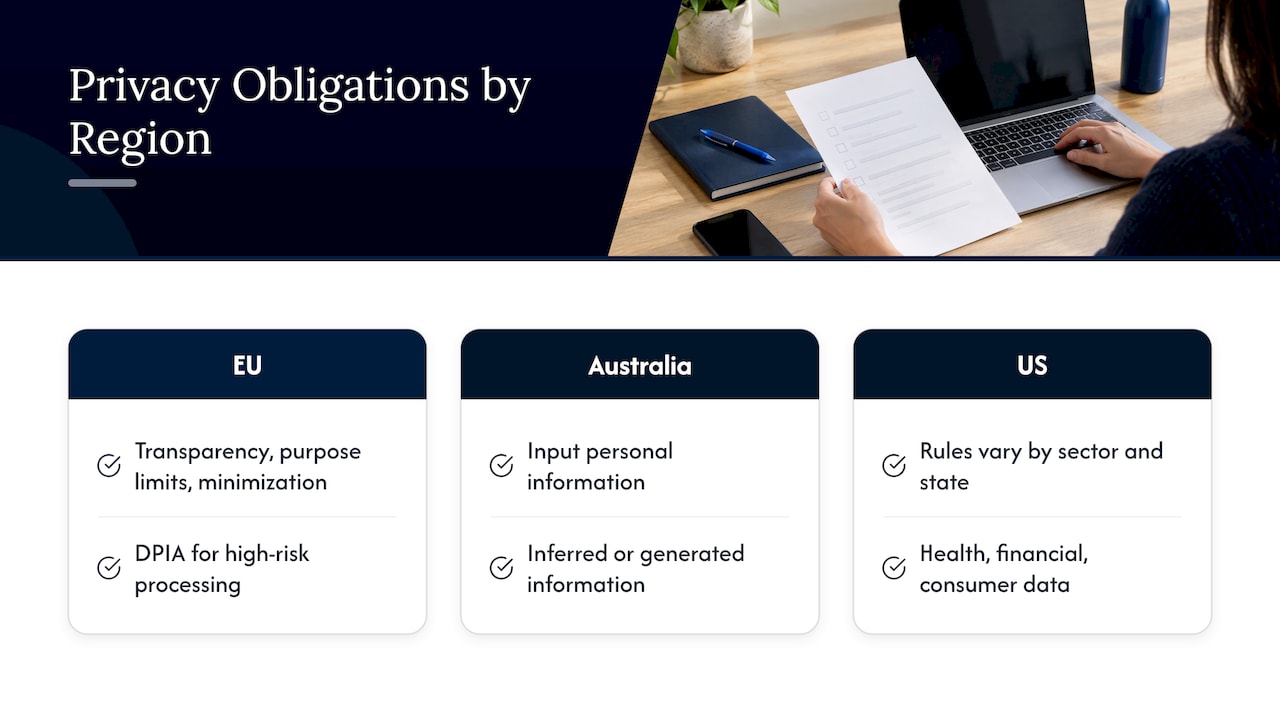
There is no single global rule. The EU’s GDPR is the best-known framework: according to a summary of AI and data privacy laws around the world, AI deployments processing personal data must meet obligations such as transparency, purpose limitation and data minimization, with a Data Protection Impact Assessment for high-risk processing. In Australia, the OAIC advises that privacy obligations cover both input data and personal information inferred or generated by AI models, such as hallucinations that name a real person.
In the United States, obligations depend on the sector and the state, and on whether the data is health, financial or consumer data. Check with counsel for the rules that apply to your data. If you handle protected health information, our guide on HIPAA AI compliance for privacy officers covers the procurement-to-deployment steps.
One principle holds across all of them: the less personal data leaves your control, the fewer parties you must account for.
Testing for PII leakage
Controls on paper are not evidence. Test them.
The OWASP AI Testing Guide (AITG-APP-03) provides test payloads for sensitive data leaks: direct queries for credentials, contextual leakage requests, metadata queries, obfuscated data requests and misleading-context requests. A vulnerability is confirmed when the model outputs sensitive information such as passwords, database credentials, PII or API keys.
A workable test routine:
- Seed your test environment with synthetic records that look like real PII.
- Run the payload categories above against the assistant as users with different roles.
- Check outputs, then check logs, caches and traces for the same synthetic values.
- Repeat after any change to the model, the prompts, the retrieval index or the connectors.
Using synthetic data means you can test aggressively without creating a new exposure.
What to do when PII leaks
Have the plan before you need it. Guidance from the non-human identity community says to contain the source connection, revoke or rotate exposed credentials, inspect the retrieval path, prompt history and output filters, and remove the data from training, embeddings or indexed context where possible.
Prediction Guard’s October 2026 guidance on responding to AI PII leaks adds the order of operations: stop the active exposure at once while preserving the minimum evidence needed to reconstruct the event (prompts, outputs, retrieval results, tool calls, configuration, and model and prompt versions). Then remove the exposed data from every place it was copied, including caches, vector stores, conversation histories and downstream systems, and confirm containment from an independent source.
Your legal and privacy teams decide on notification duties, which vary by state, sector and country. Loop them in at the start, not the end.
Our perspective: bring the AI to the data
Most advice on PII in AI is about managing someone else’s system: filtering what you send out, reading a provider’s retention terms, hoping the logs are cleaned. That works for low-stakes data. For regulated records, defense documentation, financial files or operational data, we think the better design is to remove the question entirely.
At Forge AI Deployment, we deploy and operate private AI inside infrastructure our customers control: enterprise data centers, edge sites and air-gapped networks. As an official webAI systems integrator, we bring webAI’s local-first platform into production. Prompts, documents, models and logs stay within the customer’s perimeter, so there is no outside provider holding copies you have to chase down after an incident.
Our leadership has more than 20 years in high-consequence and Fortune 100 environments, and that shapes how we work. We care about operational discipline: who can query what, what gets retained, what gets logged, and how all of it is validated for privacy and auditability. Our deployments are designed so that data, models and domain intelligence remain inside the client’s infrastructure.
The controls in this article, minimization, isolation, retention and testing, still apply inside a private environment. The difference is that you own every layer where they are enforced.
John
Private AI for teams that cannot send data out
If your PII or sensitive records cannot leave the building, the practical path is a private deployment. Forge AI Deployment designs, deploys and operates sovereign AI systems on your own infrastructure, including air-gapped networks. Our work covers private and air-gapped deployment, webAI Personas, webAI’s Intelligence Delivery Network and webAI Frontline, which gives frontline teams fast, source-backed answers from large technical document libraries, fully offline on a single device.
We also handle model integration, private assistant rollout, sovereign MLOps and ongoing operations. See the full list on our solutions page, or start from Forge AI Deployment to talk through your environment.
A starting checklist
- Inventory every place PII can enter or persist: prompts, retrieval stores, memory, outputs, logs.
- Decide which data classes may never go into public AI tools, and publish that rule.
- Minimize and redact before the model, and test the redaction on realistic samples.
- Apply role-based access and keep users’ contexts isolated from one another.
- Set retention for caches, traces and vector stores, not just databases.
- Mask PII in logs and error messages.
- Run leakage tests with synthetic data after every significant change.
- Write an incident plan that lists every copy location to purge.
- Choose an architecture where sensitive data never leaves your perimeter when the data demands it.
FAQ
Can you put PII into an AI tool?
Only if you have checked that you are allowed to share it and that the tool’s handling fits the data. Public AI tools are the wrong place for PII, since externally hosted models may retain inputs or use them for training. For PII workloads, use a system you control.
What does PII mean in AI?
It means any information that can identify a person, alone or combined with other data, that an AI system receives, stores or generates. That includes direct identifiers like SSNs and phone numbers, and combinations like name plus date of birth. It can show up in prompts, retrieved documents, training data and outputs.
How do you remove PII from LLM inputs?
First send only the fields the task needs. Then use named entity recognition or similar tools to redact identifiers from text before it reaches the model, and test those rules on realistic samples. Where the work needs the sensitive data itself, run the model inside your own environment instead.
Where does PII hide in an AI pipeline besides the prompt?
In retrieved documents, fine-tuning datasets, agent memory, KV caches, vector stores, logs and telemetry traces. Logs and traces often capture inputs and outputs by default. Each store needs an owner, a retention rule and masking.
What should you do if an AI system exposes PII?
Stop the exposure, preserve the evidence you need to reconstruct what happened, and rotate any exposed credentials. Then remove the data from every copy, including caches, vector stores and conversation histories, and bring in your legal and privacy teams about notification duties.
Sources
- PII Leakage, Arthur documentation
- Privacy and Personally Identifiable Information, Responsible AI Playbook
- Appropriate Use of Generative AI, University of Chicago Library
- AI privacy risks and mitigations in LLMs, EDPB
- How to Protect PII in AI Pipelines, Questa
- LLM02 Sensitive Information Disclosure, OWASP GenAI Security Project
- Sensitive Information Disclosure, Microsoft Learn
- Mitigating Privacy Risks, GovTech GTO Practices Portal
- OWASP GenAI Data Security Risks and Mitigations 2026
- OWASP AI Testing Guide, AITG-DAT-02
- Guidelines for secure AI system development, NCSC
- AI and Data Privacy: Key Laws Around the World
- Guidance on privacy and commercially available AI products, OAIC
- OWASP AI Testing Guide, AITG-APP-03
- What should teams do when AI outputs reveal secrets or PII?, NHIMG
- How to Respond to AI PII Leaks in Regulated Systems, Prediction Guard