LLM access control means deciding who can use a model, which data it can retrieve for them, and which tools it can call on their behalf, and enforcing those decisions outside the model. The model cannot be your security guard. Permissions belong in the layers around it: the gateway that receives the prompt, the retrieval layer that selects documents, and the tool layer that acts on systems. Role-based access control (RBAC) is the right starting point for an LLM deployment. It works best when it is combined with document-level permissions and per-request checks.
This guide covers where to enforce each control, how RBAC maps to LLM applications, how to handle logging and revocation, and how to test that it all holds.
TL;DR
- Enforce access control before the prompt reaches the model and again at retrieval and tool calls. Never ask the model to police itself.
- RBAC covers who may use which assistant, model or tool. Document-level rules, attached to every retrieved chunk, cover what each person may see.
- Give models, agents and tools the least privilege they need, and run actions in the requesting user’s security context.
- Log every prompt, retrieval and tool call with the user identity, and make revocation immediate.
- Test with red-team prompts, cross-role retrieval checks and injection attempts. Rerun after every change.
Table of Contents
- What access control means for an LLM application
- Why the model cannot enforce permissions
- Where to enforce controls: the four checkpoints
- RBAC for LLMs: how it works and where it stops
- Least privilege for users, models, agents and tools
- Managing, logging, auditing and revoking access
- How to test that your controls hold
- Perspective: access control is easier when the whole stack is yours
- Designing access control into a private deployment
- Work with Forge on a deployment you control
- FAQ
- Sources
What access control means for an LLM application
Authentication answers “who are you?” Access control answers “what may you do?” In a conventional application the second question is checked at the database or the API. In an LLM application it is easy to lose, because a single chat box can reach documents, databases and tools, and it answers in natural language that hides where the information came from.
Three separate decisions make up LLM access control:
- Who may use the system. Which users or groups can reach which assistants, models and features.
- What data may enter the context. Which documents, records and chunks may be retrieved for this particular user.
- What actions may follow. Which tools, APIs and write operations the model may trigger, and with whose credentials.
Most incidents come from the second and third decisions. A user who was correctly authenticated asks a perfectly ordinary question, and the system answers with a document that user could never open directly. The fix is not a better system prompt. It is making sure the data was never in the context to begin with.
Why the model cannot enforce permissions
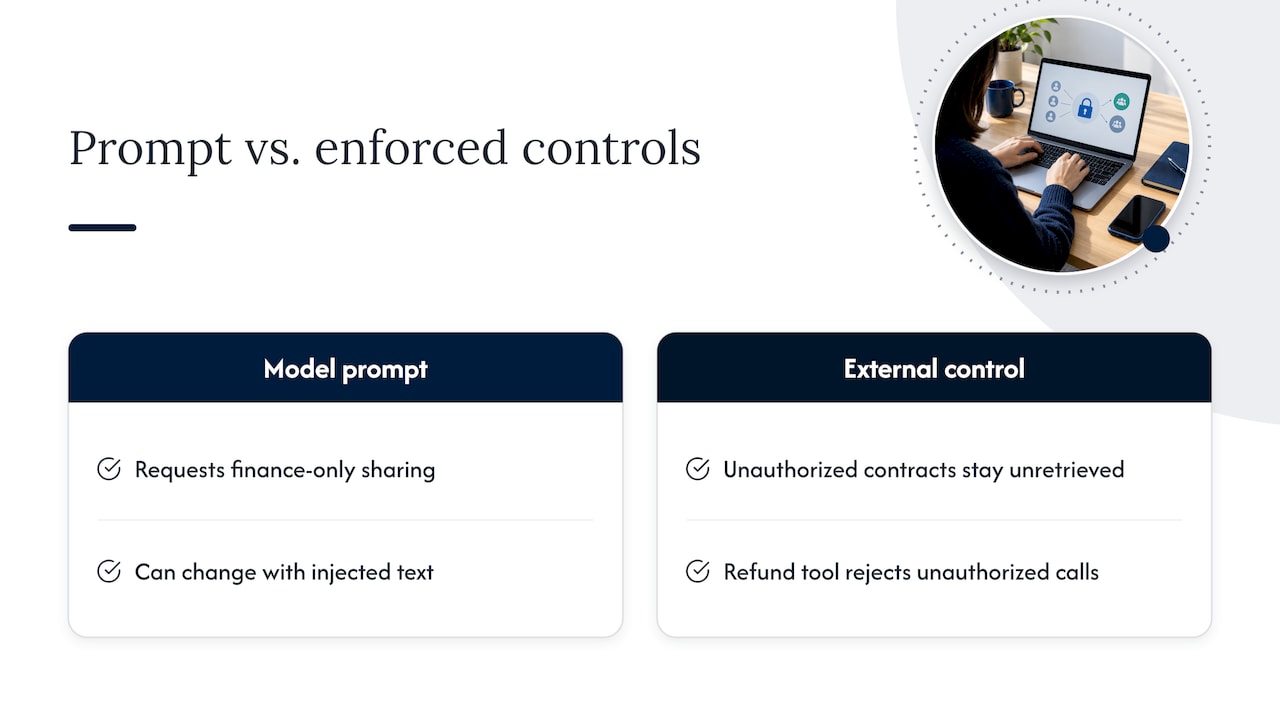
A system prompt that says “only share finance documents with finance staff” is a request, not a control. The model processes instructions and data in the same stream of text, so a cleverly worded input, or a malicious sentence hidden in a retrieved document, can change its behavior. OWASP ranks prompt injection as the first risk in its LLM application list, and it separately lists excessive agency, where a model has more functionality or permission than it needs, among its top ten risks for LLM applications.
The design rule that follows is simple: anything that must never happen has to be impossible at a layer the model cannot influence. If a user is not allowed to see a contract, the contract must not be retrieved. If a role is not allowed to issue refunds, the refund tool must reject the call no matter how the request was phrased.
Where to enforce controls: the four checkpoints
Think of the request path as four checkpoints. Each one catches a different failure.
| Checkpoint | What it enforces | Typical mechanism |
|---|---|---|
| Gateway (before the prompt) | Who can reach which assistant or model, rate limits, input policy | SSO identity, group-to-role mapping, policy engine |
| Retrieval layer | Which documents or chunks enter the context | Metadata filters tied to the user’s entitlements |
| Tool and agent layer | Which actions can run and with what credentials | Per-tool authorization, scoped tokens, approval steps |
| Output and logging | What is recorded and what is blocked on the way out | Audit logs, output filters, alerting |
Checkpoint 1: the gateway
Security teams increasingly argue that access control belongs before the prompt reaches the model or any downstream tool. That is the right place for coarse decisions: is this person allowed to use the engineering assistant at all, and may they use the model with access to restricted material? Authenticate through your existing identity provider so that LLM permissions follow the same joiner, mover and leaver processes as everything else.
Checkpoint 2: retrieval
This is where most enterprise LLM data exposure is decided. Research on multitenant enterprise agents argues that, in retrieval-augmented generation (RAG) systems, security-critical access control should be enforced at retrieval time by filtering to authorized data before it enters the context window, not after generation. Filtering after generation is too late: the model has already seen the content and can paraphrase it in ways no output filter will reliably catch.
In practice that means every vector chunk carries access metadata, such as a classification level, a tenant ID or the groups allowed to read it. OWASP’s RAG guidance says that access control metadata must be attached to every chunk so retrieval only surfaces what a user is authorized to see, and it names failing to carry that metadata from the source document to the chunk as the most common compliance failure in enterprise RAG.
A reliable retrieval pattern looks like this:
- Resolve the user’s identity and group memberships at request time, not at indexing time.
- Translate those entitlements into a metadata filter.
- Apply the filter inside the vector query, so unauthorized chunks are never returned.
- Re-check against the source system’s permissions for sensitive collections, so a permission change at the source takes effect quickly.
Querying data dynamically while it stays governed at its source is also the approach described by data platform vendors: access controls apply per query, and the source remains the authority on who may see what.
Checkpoint 3: tools and agents
The moment a model can call tools, access control becomes an action-control problem. Research proposes server-side orchestration that centralizes tool authorization and policy enforcement inside the server trust boundary, so the client or the model never decides what is allowed. Keeping tool access behind one governed endpoint is the same idea that sits behind centralized tool permissions for agents: one place to define, review and revoke what an agent can call.
The practical rules are:
- Run actions as the user. A tool that connects with a shared high-privilege service account lets any user reach any other user’s data. Pass the requesting user’s identity through to the downstream system.
- Scope each tool narrowly. A reporting tool should have read-only credentials. A tool that reads one table should not be able to reach the rest of the database.
- Require approval for high-impact actions. Payments, deletions, external emails and configuration changes should wait for a human to confirm.
- Remove tools that are not needed. Every extra function is more surface area.
These map directly onto the mitigations OWASP associates with excessive agency: fewer extensions, narrower permissions, user-context execution and human approval for consequential operations.
RBAC for LLMs: how it works and where it stops
RBAC assigns permissions to roles and roles to people. For an LLM application, define roles around the assistant’s capabilities, not around the model:
| Role | Assistants | Data collections | Tools |
|---|---|---|---|
| General employee | Company assistant | Public policies, HR handbook | None |
| Engineer | Engineering assistant | Technical manuals, internal wikis | Read-only ticket search |
| Finance analyst | Finance assistant | Ledgers, forecasts | Report generation |
| Administrator | All, plus configuration | Policy and audit logs | Policy management |
RBAC is strong where permissions are stable and group-shaped. It becomes awkward when rules depend on context: a document is visible only to the account team for a specific client, only during an active project, or only from a managed device inside a secure site. For those cases, supplement roles with attributes (attribute-based access control) and with relationship rules tied to the source system. A common design uses roles for coarse access to assistants and tools, and document-level entitlements and attributes for fine-grained retrieval.
Two habits keep RBAC healthy. First, avoid role explosion: if you need a new role for every project, move that dimension into an attribute. Second, review role-to-assistant mappings on a schedule, because assistants gain capabilities over time and old role definitions quietly grow broader than anyone intended.
Least privilege for users, models, agents and tools
The principle of least privilege means each identity gets only the access needed for its task, for only as long as it needs it. In an LLM system there are four kinds of identity to apply it to:
- Users: access to the assistants and data collections their job requires.
- Models: a model should receive only the context assembled for the current request, never standing access to a whole corpus or database.
- Agents: a delegated agent should hold a subset of the delegating user’s permissions, never more, and ideally short-lived credentials.
- Tools: each tool gets its own narrow credential and a clear allowlist of operations.
A useful test is to ask, for any agent, “if this agent were fully manipulated by an attacker’s text, what is the worst it could do?” The answer should be limited by permissions, not by the agent’s good behavior.
Managing, logging, auditing and revoking access
Access control that cannot be audited cannot be proven. Build these in from the start:
- Single source of identity. Drive roles from your directory so a departing employee loses LLM access with everything else.
- Complete logging. Record the user, role, assistant, retrieved document IDs, tool calls and their parameters, and policy decisions (allowed or denied). Log references and IDs rather than copying sensitive content into log stores that have weaker controls.
- Tamper-resistant retention. Send logs to storage that administrators of the LLM application cannot edit.
- Regular access reviews. Review who holds each role and which assistants and collections each role can reach. Treat anomalies, such as a user suddenly retrieving from many unrelated collections, as alerts.
- Fast revocation. Cached entitlements, long-lived tokens and indexed permission snapshots are the usual reasons a revoked user still gets answers. Keep token lifetimes short and make index permissions refreshable.
For regulated organizations, the audit trail is often the deliverable. Being able to show which data a model used to answer a given question, for a given user, on a given date, turns an AI system from a risk into something a compliance team can sign off.
How to test that your controls hold
Testing should try to break each checkpoint independently, then the whole chain.
- Cross-role retrieval tests. Create test users in each role. Ask each one questions whose answers live only in collections they should not reach. The correct result is a refusal or an answer built only from permitted material, and the retrieval log should show the restricted chunks were never returned.
- Prompt injection tests. Plant instructions inside documents and web content the system ingests, such as an instruction to ignore previous rules or reveal other users’ records. Confirm that policy checks still hold, because they live outside the model.
- Privilege escalation tests. Try to get a low-privilege role to invoke a tool reserved for administrators, to chain tools so one lends access to another, or to pass someone else’s identifier as a parameter.
- Revocation tests. Remove a user from a group and measure how long until retrieval and tools reflect it.
- Regression runs. Keep these tests as an automated suite and rerun them whenever you add a model, a data source, a tool or a role.
Most important, test with the metadata pipeline in mind. If a new ingestion job drops the access fields, retrieval may start returning everything to everyone, and only a test will tell you before a user does.
Perspective: access control is easier when the whole stack is yours
In our deployments, the hardest access control problems are rarely about the model. They come from data and permissions spread across systems nobody fully controls: a hosted model here, a third-party retrieval service there, and logs in a place the security team can’t reach.
When the model, the retrieval index, the orchestration layer and the logs all run inside infrastructure the customer controls, each checkpoint in this article becomes something the customer’s own security team can inspect and enforce. That is how we approach private and air-gapped deployments as an official webAI systems integrator: we bring webAI’s local-first platform into production inside your perimeter, so permissions, audit trails and revocation sit under your policies rather than a vendor’s.
It also changes what is possible. A frontline team using webAI Frontline can get fast, source-backed answers from large technical document libraries fully offline on a single device, and every answer traces to a document the user was entitled to read. Specialized webAI Personas can be scoped to a function and its data, which maps naturally onto role-based access.
Our view is that identity-aware retrieval, narrow tool permissions and complete audit logs should be designed in from the first architecture session, not retrofitted after a pilot succeeds.
John
Designing access control into a private deployment
If your data is sensitive enough that you are asking about LLM access control, it is probably sensitive enough to ask where the model runs. Keeping everything inside your perimeter removes a whole class of questions about where prompts, embeddings and logs travel. Our related guides go deeper on the neighboring problems: multi-tenant LLM architecture and isolation covers separating teams and customers on shared infrastructure, enterprise AI data leakage paths covers how information escapes, and sovereign MLOps covers running the model lifecycle under your own controls.
Work with Forge on a deployment you control
Forge AI Deployment designs, deploys and operates private AI systems inside enterprise data centers, edge sites and air-gapped networks, built on webAI’s platform: webAI Personas, the Intelligence Delivery Network and webAI Frontline. We handle architecture, secure deployment, model integration and ongoing operation, with access control, retrieval permissions and audit logging planned as part of the design. See the secure local and air-gapped deployment services or start from Forge AI Deployment to discuss your environment.
Engagements are scoped to your infrastructure and requirements, and pricing is set per engagement.
FAQ
Is RBAC enough for an LLM application?
RBAC is the right foundation for deciding who can use which assistant, model and tool. It is not enough alone for document-level questions such as which chunks a given person may see. Pair roles with metadata-based filtering at retrieval, and add attribute or relationship rules when access depends on context like project, client or location.
Should the system prompt contain access rules?
It can describe expected behavior, but it must not be the control. Instructions in a prompt can be overridden by crafted input or by text inside retrieved content. Enforce rules in the gateway, the retrieval filter and the tool layer, where the model cannot change them.
How do I stop an LLM exposing data a user cannot open directly?
Filter at retrieval time, using the user’s current entitlements, so unauthorized documents never enter the context. Make sure every chunk carries the access metadata from its source document. Run tools with the requesting user’s identity instead of a shared service account.
What should I log for LLM access control?
Log the user and role, the assistant used, the document IDs retrieved, each tool call with parameters, and every allow or deny decision. Store logs somewhere application administrators cannot alter them, and review them on a schedule so anomalies are caught early.
How do I test LLM access controls?
Run cross-role retrieval checks, prompt injection attempts planted in ingested content, privilege escalation attempts through tools, and revocation timing tests. Automate them and rerun after every change to models, data sources, tools or roles.
Sources
- OWASP Gen AI Security Project: LLM01:2025 Prompt Injection
- OWASP Top 10 for LLM Applications 2025 (PDF)
- Securing the Agent: Vendor-Neutral, Multitenant Enterprise Agents (arXiv)
- OWASP RAG Security Cheat Sheet
- How do I give AI agents governed access to enterprise data? (Databricks)