An INT4 LLM is a language model whose weights are stored as 4-bit integers instead of 16- or 32-bit floating-point numbers. That shrinks the memory the model needs, often enough to fit a larger model on the GPUs you already own. The cost is more quantization noise than INT8 brings, and that noise hits some models and tasks much harder than others. This guide covers how INT4 works, how it compares with INT8, and how to decide whether it belongs in a private or air-gapped deployment.
TL;DR
- INT4 stores each weight in 4 bits, so two weights share one byte. Weights take about half the space they take in INT8.
- Weight-only INT4 (W4A16) saves memory but does not automatically make inference faster. Speed gains need hardware and software built for low-bit math.
- INT4 is a strong fit for small-batch, memory-bound serving. For large batches, NVIDIA’s guidance points toward quantizing activations too, starting with FP8.
- Decoder-only LLMs are less forgiving of 4-bit than encoder models. Calibrate on data that looks like your production data and test on your own tasks.
- In a sovereign setup, the quantized model is only useful once you have validated it inside your own perimeter, on your own hardware.
Table of Contents
- What INT4 means in an LLM
- How INT4 quantization works in practice
- INT4 vs INT8 for LLMs
- Where INT4 costs accuracy
- Hardware and software that support INT4
- Choosing INT4 or INT8 for secure local and edge inference
- Perspective
- Put a private INT4 or INT8 model into production
- FAQ
- Sources
What INT4 means in an LLM
A trained language model is mostly a very large set of numbers called weights. In their original form, these are usually 16- or 32-bit floating-point values. Quantization replaces them with lower-precision numbers so the model takes less space and moves less data around.
INT4 quantization represents weights as 4-bit integers. A signed 4-bit integer can hold only 16 distinct values, running from -8 to 7, as Hugging Face’s quantization concepts guide describes. Because a byte holds 8 bits, two INT4 values are packed into one byte. That halves the footprint relative to INT8 and cuts the data bandwidth needed to feed weights into the compute units.
That last point matters more than it first appears. During text generation, many deployments spend most of their time waiting for weights to arrive from memory, not doing arithmetic. Smaller weights mean less to move, which is why 4-bit formats are popular for single-user and low-concurrency serving.
If you want the broader picture of how quantization fits into a production workflow, our guide on LLM quantization and reproducible shipping covers the pipeline around the format.
Why mapping to 16 values still works
Mapping billions of precise numbers onto 16 levels sounds destructive. It works because of scaling. Rather than using one scale for an entire tensor, practical methods compute scales per channel or per small group of weights, so each group gets its own 16-level grid fitted to its own range. Hugging Face’s guide notes that symmetric or affine schemes, combined with per-channel or group-wise scaling, are how quantization noise gets managed.
Symmetric schemes center the grid on zero. Affine (asymmetric) schemes add an offset so the grid can follow skewed value distributions. In the Wu et al. study of INT4 for language models, asymmetric quantization generally improved accuracy over symmetric.
How INT4 quantization works in practice
The term “INT4 LLM” covers several different setups. The distinction that matters most is what gets quantized.
Weight-only (W4A16)
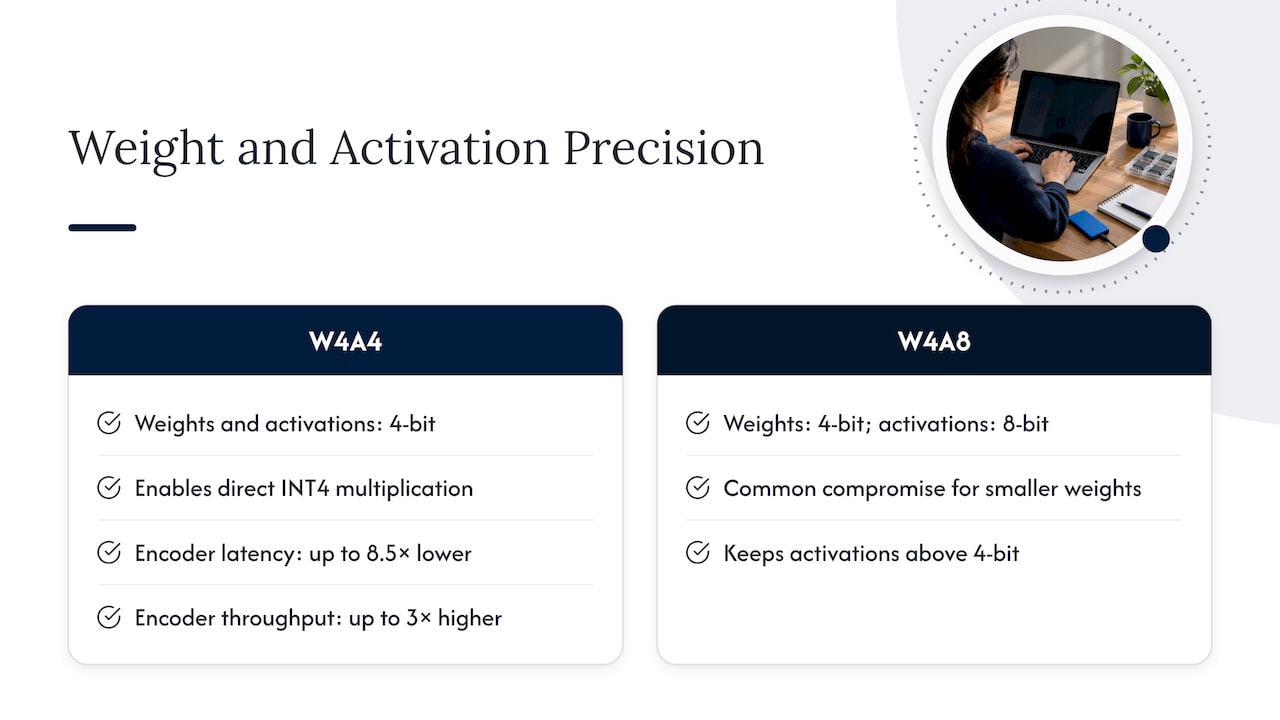
In weight-only quantization, weights are stored in 4 bits while activations, the intermediate values flowing through the network, stay in FP16 or FP32. The name W4A16 means 4-bit weights, 16-bit activations.
This saves memory, but it does not by itself speed up computation. The research literature is direct on this point: weight-only quantization saves memory but offers no latency improvement and can even run slower because of the runtime type conversion. The weights have to be expanded back to a higher precision before the math happens, unless the runtime has optimized kernels that do it efficiently.
Keras documents one common implementation. It stores weights in the [-8, 7] range, unpacks them to INT8 values, runs an INT8 by INT8 matrix multiply, and dequantizes the result using the input and per-channel scales.
Weights and activations (W4A4 and W4A8)
W4A4 quantizes both weights and activations to 4 bits. That is what lets the hardware do the multiplication in INT4 directly, which is where compute speedups come from. Wu et al. report that a highly optimized INT4 encoder pipeline reached up to 8.5 times lower latency in latency-oriented scenarios and up to 3 times higher throughput versus FP16. The same authors stress that realizing those gains requires a carefully optimized end-to-end inference pipeline to absorb the quantize and dequantize overhead. Those results came from encoder models on hardware with INT4 support, so do not read them as a promise for your decoder-only LLM.
W4A8 sits in between: 4-bit weights with 8-bit activations. It is a common compromise when you want smaller weights without pushing activations to 4 bits.
Calibration
Most good INT4 methods are not simple rounding. Techniques such as GPTQ and AWQ use a small calibration dataset to decide how to round weights so the layers’ outputs change as little as possible. The vLLM documentation for INT4 W4A16 tells you to prepare calibration data that matches your deployment data and to evaluate the quantized model in vLLM afterward. That advice is the single most useful habit for anyone quantizing a model for a specific business use.
INT4 vs INT8 for LLMs
INT8 gives you 256 levels per value instead of 16, so it introduces less noise. INT4 roughly halves the weight storage again. Here is how the two compare on the criteria that matter in a deployment.
| Criterion | INT8 | INT4 |
|---|---|---|
| Values per weight | 256 levels | 16 levels |
| Weight memory | Baseline for this comparison | About half of INT8 |
| Quantization noise | Lower | Higher, needs careful calibration |
| Speed benefit | Broad hardware support | Depends on kernels and hardware |
| Best fit | Quality-sensitive tasks, larger batches | Memory-bound, small-batch serving, tight VRAM |
| Main risk | Less memory saved | Accuracy regressions on some decoder models |
Hugging Face frames the core tradeoff plainly: quantization trades efficiency against accuracy, and INT4 gives deeper compression but more quantization noise than INT8.
The 4-bit versus 8-bit question is not settled by format alone. It depends on batch size, hardware, and the task. NVIDIA’s TensorRT-LLM team lays out a useful rule of thumb:
- For batch sizes of 4 or fewer, INT4 weight-only quantization is listed with high performance improvement. Methods such as INT4 AWQ and GPTQ are listed with low accuracy impact, while plain INT4 weight-only carries a high accuracy impact.
- For batch sizes of 16 or more, the same guidance recommends quantizing weights and activations, trying FP8 first.
In memory-bound, small-batch scenarios, W4A16 is often preferred for throughput. For large-batch scenarios, schemes like W4A8 or other joint quantization balance compute density against memory bandwidth. In short: INT4 shines when you serve a few requests at a time and the bottleneck is moving weights. It matters less when you serve many concurrent requests and the bottleneck is compute.
Where INT4 costs accuracy
The accuracy story varies by architecture. In the Wu et al. experiments, W4A4 showed no accuracy degradation on the tested BERT models, only negligible drops on BART models, and significant perplexity increases on the tested GPT-style decoder models. The Keras team gives the same warning in practical terms: 4-bit is more aggressive than 8-bit and may cause significant accuracy regressions in large autoregressive language models if not carefully calibrated. They add that encoder-only models tend to be more robust to aggressive 4-bit compression than large decoder-only ones.
Two cautions apply when you read those findings. First, the strongest W4A4 evidence concerns activations as well as weights, and weight-only INT4 with a good method behaves differently. Second, results on public benchmarks are an average. Your use case may sit in the tail.
Practitioners commonly report that INT4 holds up better on knowledge retrieval and summarization-style tasks than on multi-step reasoning and code generation. Treat that as a hypothesis to test, not a rule. Tasks that chain many steps can compound small errors, so a model that answers lookup questions well may still slip on a long calculation.
A quick way to think about risk
- Low risk: retrieval-backed question answering where the model quotes from supplied documents, classification, extraction.
- Medium risk: drafting and summarization where wording varies but facts come from the prompt.
- Higher risk: code generation, math, long multi-step reasoning, and anything where one wrong token changes the outcome.
For the higher-risk group, keep INT8 or FP8 as the fallback and compare the two on your own evaluation set before you decide.
Hardware and software that support INT4
INT4 is a storage format first. Whether it also runs fast depends on the stack.
GPUs. vLLM supports INT4 W4A16 on NVIDIA GPUs with compute capability above 8.0, which covers Ampere, Ada Lovelace, Hopper, and Blackwell generations. Its example workflow uses the llm-compressor library. Older GPUs may load 4-bit weights through other paths, but check kernel support before you plan around speedups.
CPUs and edge devices. Intel’s guide to quantizing LLMs makes the point that specialized runtimes such as OpenVINO or Neural Speed matter, because they provide optimized operators that avoid costly upscaling to high precision at runtime. A 4-bit model on a runtime without those operators can lose most of its advantage.
Inference engines. The engine decides which INT4 formats load, which kernels run, and how batching behaves. Pin the exact engine version, quantization library, and calibration set alongside the model, so the result can be reproduced. A model that benchmarks well on one engine release can behave differently on the next.
Before buying hardware, size your memory budget with the weight footprint plus the KV cache and runtime overhead. Our walkthrough on sizing GPU memory for LLMs shows how to do that, and why weights are only part of the total.
Choosing INT4 or INT8 for secure local and edge inference
Private deployments have constraints that cloud-first guides rarely discuss. You cannot call out to a hosted model if the answer is bad. You may have a fixed number of GPUs, no way to download a patched model on demand, and an auditor who wants to know exactly what is running.
With that in mind, a practical decision path looks like this.
- Define the serving profile. Estimate typical and peak concurrency. A single analyst or a technician on one device is a small-batch profile. A shared assistant for hundreds of staff is not.
- Start from the memory budget. If INT8 fits comfortably with room for context, you may not need INT4 at all. If the model you actually want does not fit, INT4 can be what makes it possible.
- Compare model size against precision. A larger model at 4 bits will sometimes beat a smaller model at 8 bits on the same memory budget. Test both, because the outcome depends on the model family and the task.
- Match the format to the hardware. Confirm that your GPUs and runtime have optimized kernels for the format you picked.
- Build an evaluation set from real work. Use real prompts from your domain, including the hard ones, and score outputs against your own quality bar.
- Measure speed and energy, not just size. Track latency, throughput, and power on the target machine. Our guides on tokens per second for LLMs and LLM performance tuning and joules per token explain what to measure.
- Freeze and document. Record the base model, quantization method, calibration data, library versions, and evaluation results, so the deployment can be audited and rebuilt.
If your assistant answers from a document library, retrieval quality usually matters as much as bit width. Chunking and embedding choices affect answers heavily, which is why we cover document chunking for RAG and offline embedding models separately.
Common mistakes
- Calibrating on generic web text when production prompts are technical manuals, contracts, or logs.
- Judging quality from one benchmark average rather than your own tasks.
- Assuming smaller weights mean faster output on every runtime.
- Skipping a regression test when the engine or driver version changes.
- Forgetting that cost includes engineering time, not only GPU hours. Our piece on LLM inference TCO breaks that down.
Perspective
In our experience, the interesting question about INT4 is rarely “does it fit?” It is “can you prove it still does the job inside your own walls?” A 4-bit model that scored well on a public leaderboard has told you very little about how it handles your maintenance manuals, your risk policies, or your engineering drawings.
That is why we treat precision as a deployment decision, not a download setting. When we bring webAI’s local-first platform into a customer’s environment, whether that is a data center, an edge site, or a fully air-gapped network, we evaluate the model on the customer’s own material, on the customer’s own hardware, with nothing leaving the perimeter. Format choices, whether 4-bit, 8-bit, or something else, get made against that evidence.
This is the operating discipline we bring from more than 20 years in high-consequence and Fortune 100 environments. Quantization is a tool. The goal is a system that is private, auditable, fast enough for the people using it, and stable enough to run for years. When a team gets that right, they can put capable models on a single device in the field, fully offline, and trust the answers because they trace back to source documents.
John
Put a private INT4 or INT8 model into production
Picking a bit width is the easy part. The harder work is validating it on your data, tuning it for your hardware, and running it for the long term without sending anything outside your perimeter.
Forge AI Deployment designs, deploys, and operates private AI systems inside infrastructure you control. As an official webAI systems integrator, Forge brings webAI’s platform into production, including specialized AI Personas, the Intelligence Delivery Network, and webAI Frontline, which gives frontline teams fast, source-backed answers from large technical document libraries, fully offline on a single device.

Our work covers secure local and air-gapped deployment, custom model integration and optimization, private assistant rollout, sovereign MLOps and orchestration, and ongoing performance tuning and operations. Explore the private and air-gapped deployment services, read about the webAI platform behind our deployments, or start a conversation about your environment at Forge AI Deployment.
FAQ
Is INT4 always faster than INT8?
No. INT4 always saves memory, but speed depends on the kernels, hardware, and batch size. Weight-only INT4 can run no faster than INT8, or even slower, if the runtime must convert weights back to higher precision on the fly. Gains are most reliable in memory-bound, small-batch serving on a stack with optimized 4-bit operators.
Is a 4-bit LLM much less accurate than an 8-bit one?
It depends on the model, method, and task. 4-bit introduces more quantization noise than 8-bit, and decoder-only LLMs are less forgiving than encoder models. Calibrated methods such as AWQ and GPTQ are listed by NVIDIA with low accuracy impact. Always test against your own evaluation set before committing.
What does W4A16 mean?
It means weights are stored in 4 bits while activations stay in 16-bit floating point. It is the common INT4 setup for LLM serving because it cuts weight memory without quantizing activations. vLLM supports it on NVIDIA GPUs with compute capability above 8.0.
Can INT4 models run in an air-gapped environment?
Yes. Quantized weights are ordinary files, and the inference engine runs locally with no outside connection. What you need is a repeatable process: pinned library versions, a calibration set from your own data, and a documented evaluation, all carried into the isolated network and validated there.
When should I choose INT8 over INT4?
Choose INT8 when the model fits comfortably at that precision, when your tasks involve multi-step reasoning or code, or when you serve large batches. NVIDIA’s guidance for batches of 16 or more favors quantizing activations too, starting with FP8. Choose INT4 when memory is the limiting factor and your tests show quality holds.
Sources
- Quantization concepts, Hugging Face
- Understanding INT4 Quantization for Language Models (arXiv)
- Understanding INT4 Quantization for Language Models (PMLR)
- INT4 Quantization in Keras
- Speed up inference with SOTA quantization techniques in TensorRT-LLM
- INT4 W4A16, vLLM documentation
- Hands-on guide to quantizing LLMs, Intel