Capacity planning for an LLM means turning a workload (users, prompt lengths, answer lengths, latency targets) into a GPU, memory and network budget, then adding headroom for growth. In a private or air-gapped environment you cannot burst into a cloud when the estimate is wrong, so the estimate has to be right the first time. The method below starts with the demand, sizes memory first, then throughput, then validates both against peak load. At Forge AI Deployment, this is the order we use when we design on-premises systems for regulated enterprises.
TL;DR
- Size against demand and service-level targets such as time to first token, not against raw compute. AWS guidance frames inference sizing this way.
- Memory comes first: model weights set the floor, and the KV cache (the per-request memory a model uses to remember the conversation so far) grows with context length and concurrency. It can exceed the weights.
- A latency limit lowers the throughput each GPU can deliver, so size for your p95 or p99 target, not for the average.
- On premises, plan growth before you buy: rack space, power, interconnect and a tested path to add servers.
- Validate the estimate with a load test that replays your real prompt mix before go-live.
Table of Contents
- Why LLM capacity planning is not ordinary server sizing
- Step 1: Write down the workload
- Step 2: Size GPU memory
- Step 3: Convert demand into throughput
- Step 4: Size the rest of the system
- Step 5: Validate against realistic peak demand
- Planning for growth inside your perimeter
- Where Forge’s perspective differs
- Get a sizing built for your environment
- FAQ
- Sources
Why LLM capacity planning is not ordinary server sizing
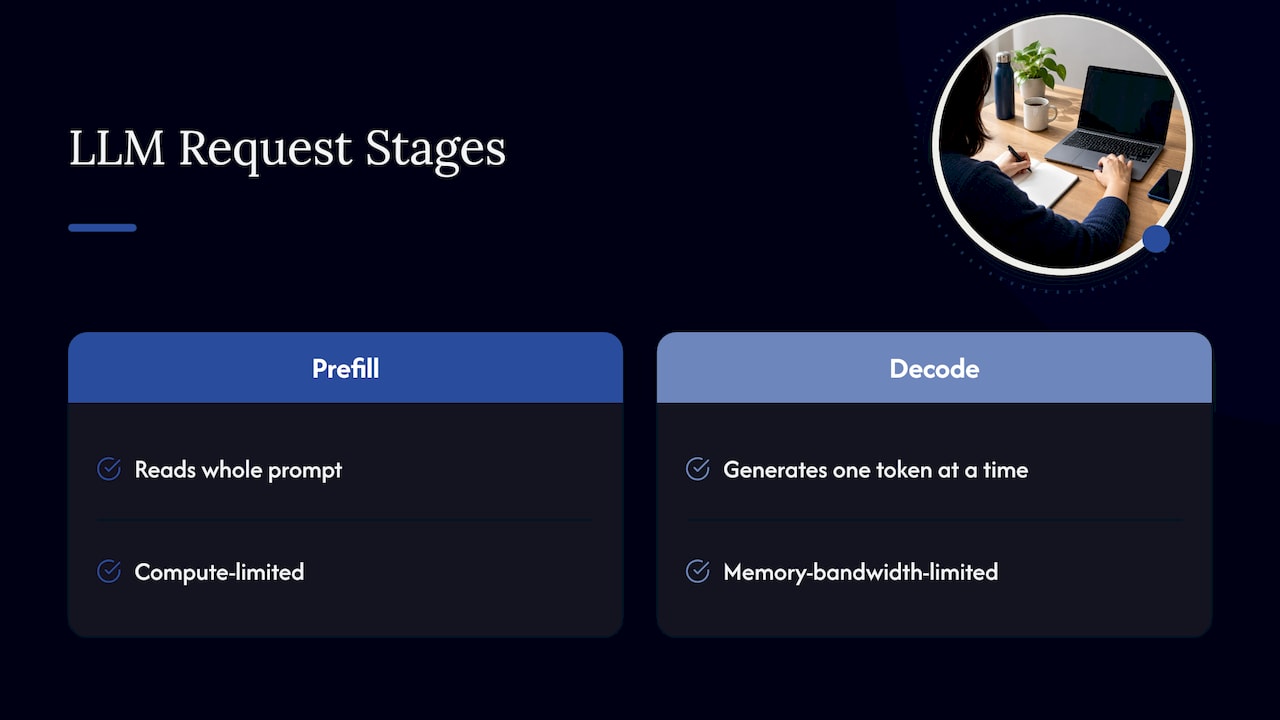
A conventional application server handles requests that cost roughly the same and finish in milliseconds. An LLM request is two different jobs. The prefill step reads the whole prompt at once and is limited by compute. The decode step then produces one token at a time and is limited by memory bandwidth. Prompt length and answer length vary wildly between requests, so the cost of one request is not a constant.
A 2026 academic survey on LLMs for AI infrastructure describes inference serving as the workload that must meet latency and throughput objectives under fluctuating demand. AWS Prescriptive Guidance adds that capacity should be sized against demand and service-level objectives such as end-to-end latency and time to first token (TTFT, the wait before the first word of the answer appears).
For a bank, a defense contractor or a manufacturer running models inside its own perimeter, the stakes are higher. Under-sizing means queues and timeouts for the people who depend on the assistant. Over-sizing means idle GPUs you paid for up front. Neither can be fixed by renting extra capacity from a public cloud, because the data is not allowed to go there.
Step 1: Write down the workload
Before touching hardware, collect the inputs. NVIDIA’s September 2026 sizing guidance says a capacity profile should include model choice, application scale, daily active users, concurrency, input and output token lengths, cache-hit rate, latency metrics and requests per user.
In practice, put these on one page:
| Input | What to record | Why it matters |
|---|---|---|
| Users and concurrency | Named users, daily active users, and how many are mid-request at the busiest minute | Converts per-request cost into sustained load |
| Input tokens | Prompt plus system prompt, retrieved documents and chat history, at the median and the 95th or 99th percentile | Drives prefill cost and KV-cache size |
| Output tokens | Typical and long answers | Drives decode time and how long each request holds memory |
| Latency targets | TTFT and time per output token, at p95 or p99 | Forces headroom and limits batching |
| Model and precision | Parameter count and numeric format | Sets the memory floor |
| Serving policy | Batching, streaming, caching, routing | Changes throughput per GPU |
One trap deserves attention. NVIDIA’s 2024 inference sizing study defines the context window as input plus output tokens, and warns that system prompts, retrieved documents and chat history all count toward input length. A document-search assistant that stuffs several retrieved passages into every prompt has a far longer effective input than the question the user typed.
If your team has no usage data yet, estimate token demand from the documents and tasks the assistant will actually handle, then treat the first month in production as a measurement exercise. Our LLM observability guide covers how to capture those token counts without sending traces outside your network.
Step 2: Size GPU memory
Memory is the constraint that decides whether a model runs at all, so size it before you size throughput.
Weights
The NVIDIA NIM documentation gives a simple heuristic: weight memory per GPU equals total parameters times bytes per parameter, divided by the tensor-parallel size (the number of GPUs the weights are split across). Bytes per parameter are 2 for BF16 or FP16, 1 for FP8, and 0.5 for INT4.
That gives, for example:
- Llama 3.1 8B at BF16 on one GPU: 16 GB of weights.
- Llama 3.3 70B at FP8 split over two GPUs: 35 GB of weights per GPU.
The same documentation lists what else needs room beyond weights: KV cache, activations, communication buffers, CUDA graphs and any LoRA adapters. Serving engines such as vLLM size the KV cache from whatever memory budget remains.
KV cache
The KV cache is where plans go wrong. AWS gives the formula: 2 × bytes per value × layers × KV heads × head dimension × context length × batch size. Every term on the right grows as you add users or lengthen prompts.
Here is the worked example. Take a 70B-class model with 80 layers, 8 KV heads and a head dimension of 128, with the cache stored at 2 bytes per value:
- Per token: 2 × 2 × 80 × 8 × 128 = 327,680 bytes, about 0.33 MB.
- Per user at an 8,000-token context: about 2.6 GB.
- For 100 concurrent users: 800,000 tokens, or 262.144 GB of KV cache.
Lenovo’s LLM Sizing Guide works through this same case (100 users, 8,000 tokens, 7,000 in and 1,000 out) and arrives at 262.144 GB of cache, for a 430.144 GB total once the model is added. The point is that the cache alone is larger than the weights. Doubling the context length doubles it again.
The NIM documentation also notes that lowering the maximum context length limits request size but does not necessarily shrink the cache pool the engine allocates, so confirm actual memory use rather than assuming.
For a deeper walkthrough of the memory arithmetic, see our guide to sizing GPU memory for LLMs.
A quick rule for first estimates
Lenovo’s guide offers a rule of thumb for inference: model size in billions of parameters, times bytes per parameter, times 1.2 for overhead. For Llama 3.1 70B at FP16 that is 168 GB before you add the cache for concurrent users. Use it to shortlist hardware, then replace it with the full calculation above.
Step 3: Convert demand into throughput
Once memory fits, ask how many requests per second the system can finish within your latency target.
The method has four moves:
- Convert request rate to tokens per second: input tokens per second for prefill, output tokens per second for decode.
- Estimate how long one model replica (one full copy of the model across its GPUs) needs for that work, using a benchmark of your own model on your own hardware.
- Divide by a utilization ceiling below 100%, so queues do not build when traffic spikes.
- Check that the batch the replicas run still fits in KV-cache memory and still meets the time-per-output-token target.
Step 3 is where latency targets bite. NVIDIA’s 2024 study says online serving must balance throughput against latency, and that a latency limit can significantly reduce the throughput you can count on. Dell’s performance guide makes a related point: larger batches may raise throughput, but they also raise latency. A vendor’s headline tokens-per-second figure is usually measured without your latency limit.
Peak, not average, sets the size. Lenovo’s guide recommends sizing on peak usage, using the 95th percentile of a Poisson distribution of average requests per second. If your staff all open the assistant at the start of a shift, your busiest minute may be several times your daily average.
Step 4: Size the rest of the system
GPUs get the attention, but the surrounding system can become the bottleneck.
- GPU interconnect. NVIDIA’s 2024 study recommends NVLink-enabled systems for models above 13 billion parameters when more than one GPU is needed. Tensor parallelism splits weights across GPUs, which frees memory for the cache, but it makes GPU-to-GPU bandwidth matter.
- CPU, RAM and storage. Retrieval-augmented generation (RAG, where the model answers from your documents) adds an embedding model, extra CPU and memory, and vector-database storage. Lenovo’s LLM Sizing Tool includes these in its recommendations, along with options for high availability (N+1 servers, minimum two) and estimated power draw.
- Cache tiers. NVIDIA’s Inference Reference Architecture says KV-cache ownership, transfer, eviction, recovery and observability should be explicit design concerns, with host memory, SSD and peer transfer planned as tiers that have defined failure behavior.
- Redundancy. Decide what happens when one server fails. If the answer is “the queue doubles,” that is a capacity decision, not an operations detail.
Sizing tools are a starting point. The Lenovo tool states that its results come from analytical models and benchmark data and are guidance for capacity planning, not guaranteed production performance. That is why the next step exists.
Step 5: Validate against realistic peak demand
An estimate becomes a plan only after it survives a test. A practical validation routine looks like this:
- Build a replay set. Use real or realistic prompts that match your measured input-length distribution, including the long tail and the system prompt and retrieved context your application adds.
- Ramp load to your peak and beyond. Drive concurrency up to your busiest expected minute and then to the multiple you planned for growth. Record TTFT and time per output token at p50, p95 and p99.
- Find the knee. Throughput climbs with load until latency crosses your target. The load just before that point, with a utilization margin, is your real per-replica capacity.
- Watch memory, not just speed. Track KV-cache utilization and any evictions or preemptions. Running out of cache under a burst of long prompts is a common cause of sudden latency spikes.
- Test failure. Remove one server or replica mid-test and confirm the remaining capacity still meets the target, or that you accept the degradation.
- Include hostile and malformed input. Adversarial or oversized prompts consume tokens too. A scoped LLM red teaming exercise can supply realistic abusive inputs to include in the load profile.
Repeat the test whenever you change the model, the precision, the context limit or the serving engine settings. Each of these moves the bottleneck.
Planning for growth inside your perimeter
NVIDIA’s 2026 guidance advises planning for 3x current load within 12 months in its sizing material on growth, because enterprise AI usage often grows faster than teams expect. Whatever multiple you choose, write it down and tie it to a trigger, such as sustained p95 latency above target or utilization above your ceiling for a week.
Growth options that work in controlled environments:
- Scale out replicas. Add GPU servers behind a load balancer. A peer-reviewed hybrid deployment study lists batching, multiple GPU servers and load balancing as the local scaling levers. Our guides to Kubernetes for LLM inference and on-prem LLM orchestration cover routing and scheduling.
- Reduce work per request. NVIDIA’s September 2026 guide notes that cache hits on long repeated input prefixes can skip prefill work, lowering TTFT and cost per request, and potentially the capacity needed for a given traffic level. Shared system prompts and standard document headers are good candidates.
- Match model to task. A smaller model for routine questions frees large-model capacity for hard ones. Our guide on choosing an LLM for on-prem deployment covers the trade.
- Expand the footprint. The same NVIDIA guide identifies colocation as a possible route when rapid growth or data-residency rules push needs beyond the existing on-premises footprint. It also says stable, predictable workloads may justify on-premises infrastructure, while volatile or experimental demand may suit flexible capacity. Air-gapped sites have only the first option, so they should plan power and rack space early.
Plan the physical limits as carefully as the compute: rack power and cooling, network ports and lead time on hardware often decide how fast you can grow, not the software.
Where Forge’s perspective differs
Most sizing failures we see described come from treating capacity as a one-time purchase. The model, the context window and the user base all change after launch, and in an air-gapped site there is no elastic cloud to absorb the miss.
That is why we treat capacity planning as part of operating a system, not a spreadsheet delivered before it. Forge AI Deployment designs, deploys and operates private AI inside infrastructure the customer controls, as an official webAI systems integrator. Architecture, deployment, model integration and ongoing operation sit with one team, so the numbers behind the estimate and the numbers from production stay connected.
For organizations that need document answers on a single offline device, webAI Frontline gives frontline teams fast, source-backed answers from large technical document libraries, fully offline. That changes the sizing question from a shared GPU cluster to a per-device footprint, and it is worth deciding early which workloads belong where.
Our approach comes from leadership with more than 20 years in high-consequence and Fortune 100 environments. We design so that all data, models and domain intelligence remain inside your infrastructure, and we plan capacity with that boundary as a fixed requirement.
John
Get a sizing built for your environment
If you are sizing a private LLM deployment for a data center, an edge site or an air-gapped network, Forge AI Deployment can take the work from architecture through secure deployment, model integration and ongoing operation, using webAI’s local-first platform, including Personas and the Intelligence Delivery Network. See the deployment and operations services to start a conversation about your workload.
We also work on access control for LLMs, which affects capacity because permission checks and retrieval filters add work before the model runs.
FAQ
How much GPU memory do I need for a 70B model?
Start with weights: at FP8 a 70B model needs about 70 GB, and at BF16 about 140 GB, using NVIDIA’s bytes-per-parameter heuristic of 1 and 2. Then add the KV cache, which depends on context length and concurrent users and can exceed the weights. Lenovo’s worked example for 100 users at 8,000 tokens puts the cache alone at 262.144 GB.
Should I size for average or peak load?
Peak. Latency targets at p95 or p99 force headroom, and a latency limit reduces usable throughput. Measure your busiest minute, apply a utilization ceiling below 100%, and then add your growth multiple on top.
How often should I revisit a capacity plan?
Whenever the model, precision, context limit or user population changes, and on a regular schedule in between. Track p95 latency, KV-cache utilization and tokens per request in production so the trigger for adding capacity is a measured number, not a surprise.
Can an air-gapped deployment scale like a cloud one?
It can scale out, but on a purchase and installation timeline rather than on demand. Plan spare rack space, power and network ports, keep a tested procedure for adding replicas, and size the initial system with your growth multiple in mind.
Sources
- Large Language Models for AI Infrastructure (arXiv, 2026)
- Right-sizing and auto-scaling an inference system (AWS Prescriptive Guidance)
- How to Size GPUs for AI Inference and TCO Without Overspending (NVIDIA)
- LLM Inference Sizing: Benchmarking End-to-End Inference Systems (NVIDIA, 2024)
- Troubleshooting GPU Memory Out-of-Memory Errors (NVIDIA NIM)
- Lenovo LLM Sizing Guide
- Lenovo LLM Sizing Tool
- Key performance metrics and factors impacting performance (Dell Technologies)
- NVIDIA Inference Reference Architecture
- Hybrid Cloud Architecture for Efficient and Cost Effective LLM deployment (2025)