On-prem LLM orchestration is the control layer that sits between your users or applications and the models running on your own GPUs. It decides which model answers a request, which GPU serves it, who is allowed to ask, what happens when a backend fails, and what gets logged. It is different from model serving, which only runs a single model efficiently. Once you host more than one model or serve more than one team, you need both.
This guide covers the components, the routing patterns, scheduling, GPU allocation, security and day-two operations. It draws on published production systems at universities and in open-source reference designs. It ends with a checklist you can take to your own infrastructure review.
TL;DR
- Serving runs a model. Orchestration chooses the model and the hardware, enforces policy, and keeps the whole fleet healthy.
- A working on-prem stack has five parts: a unified API gateway, a router, a scheduler, a model registry and lifecycle controller, and an audit trail.
- Plan GPU memory for weights, KV cache and overhead before you decide between MIG partitioning and tensor parallelism.
- Enforce identity, permissions and logging at the orchestration layer, so sensitive data never has to leave your perimeter.
- Plan for operations from day one: published case studies show that backend choices and memory behavior at peak load matter as much as the architecture diagram.
Table of Contents
- What LLM orchestration means when the models are yours
- The components of an on-prem orchestration stack
- How requests get routed, and what happens on failure
- Sharing GPUs fairly across teams
- Allocating GPUs and VRAM
- Security, access control and audit
- Operating the platform after launch
- Our perspective
- Where Forge fits
- A pre-launch checklist
- FAQ
- Sources
What LLM orchestration means when the models are yours
In a cloud API, orchestration is mostly invisible. The provider picks the hardware, queues the request and scales capacity. When you run models inside your own data center, edge site or air-gapped network, all of that becomes your job.
A useful way to separate the layers:
- Model serving loads weights onto a GPU and generates tokens. Engines such as vLLM and Ollama do this.
- Orchestration sits above one or many serving engines. It presents a single endpoint, picks the right backend, applies quotas and policy, and manages the lifecycle of the models behind it.
- Application logic (agents, retrieval, prompts) sits above orchestration and calls it like any other internal service.
A concrete example comes from the University of Idaho. Its open-source MindRouter project is an inference gateway for self-hosted AI services on institutional GPU infrastructure. It exposes one unified API, translates among OpenAI, Ollama and Anthropic client protocols, and routes requests across heterogeneous GPU backends. Applications talk to one address and never need to know which engine or card answered.
That protocol translation is more valuable than it sounds. Teams adopt different client libraries, and a gateway that accepts all of them lets you swap or add models without rewriting every application. If you are also thinking about how agents behave once they sit behind that gateway, runtime governance of agents is the natural next layer to plan.
The components of an on-prem orchestration stack
Published architectures differ in tooling but converge on the same functions.
| Component | What it does | Example from published designs |
|---|---|---|
| API gateway | One endpoint, authentication, protocol translation | MindRouter’s unified API layer |
| Router | Chooses a model or replica per request | llm-d Router and Endpoint Picker |
| Scheduler | Shares GPU capacity among users and groups | Weighted Deficit Round Robin fair-share |
| Lifecycle controller | Discovers nodes, allocates models, starts and scales instances | The SDAI controller in the AIvailable preprint |
| Load balancer and health checks | Removes unhealthy backends, adds redundancy | HAProxy in the AIvailable frontend |
| Audit log | Records who asked what and what came back | Full request and response logging in MindRouter |
The AIvailable preprint shows how small a first version can be. Its frontend uses HAProxy for load balancing and request routing with health checking, while a controller handles node discovery, model allocation and service lifecycle, generating the HAProxy configuration and a startup script that launches LLM instances with Ollama. You do not need a service mesh to begin. You need a clear separation between the part that routes and the part that manages models.
At larger scale, orchestration can also span clusters. The OpenTela research proposes a user-space overlay that unifies fragmented HPC clusters into one serving platform without root privileges or cluster reconfiguration. It uses a gossip-based service discovery layer that tolerates faults, plus a scheduler aware of hardware differences. This is relevant if your GPUs sit in several sites and cannot be merged into one Kubernetes cluster.
How requests get routed, and what happens on failure
Routing is where orchestration earns its keep. Two published patterns show the range.
Cache-aware routing for replicas of the same model
In the llm-d reference architecture, a Router provides LLM-aware load balancing, request queuing and policy enforcement. A proxy, typically Envoy, accepts the request and consults an Endpoint Picker. The picker scores candidate instances using real-time metrics, KV-cache affinity and configured policies.
The point: generic round-robin treats every replica as equal, but LLM replicas are not. A replica that already holds the prefix of a long shared prompt can answer faster and cheaper. Routing on that signal improves GPU efficiency without buying hardware.
Complexity-aware routing across different models
The Pick and Spin research describes a different job: choosing among models of different sizes. Prompts enter through an API gateway and reach a Router that estimates query complexity using keyword and semantic classification with DistilBERT. The router and a service registry keep a matrix of models with cost, load and health. An orchestrator handles lifecycle actions such as cold starts and scaling in a Kubernetes cluster.
In practice this means a short factual lookup goes to a small, fast model and a multi-step analysis goes to a larger one. Your largest GPUs stay free for the work that needs them.
Designing for the unavailable model
Whatever pattern you choose, define the failure behavior before launch:
- Health checks remove a backend that stops answering, and the router retries on a healthy replica.
- Fallback tiers name an acceptable substitute model for each workload, and the policy states when a substitute is not acceptable (for example, a regulated workflow that must use an approved model).
- Queueing with limits holds requests briefly during a cold start instead of failing them, then rejects with a clear error when the wait exceeds your threshold.
- Visible degradation reports to the caller which model answered, so downstream logic and auditors know.
In an air-gapped site there is no cloud fallback to hide behind. Every fallback has to exist inside the perimeter, which is why capacity planning and routing policy belong in the same conversation.
Sharing GPUs fairly across teams
Once several departments share a cluster, one heavy user can starve everyone else. MindRouter handles this with a Weighted Deficit Round Robin fair-share scheduler. User groups carry weights (the paper’s example runs from administrator at 10 down to student at 1), and burst credits accumulate during idle periods. Under contention those credits decay so that sharing returns to the configured weights.
The design idea transfers to any enterprise. Weight by business priority, such as a fraud-detection service ahead of an internal drafting assistant. Let idle capacity be used freely. Make the guarantee bite only when demand exceeds supply.
Allocating GPUs and VRAM
Orchestration decisions are constrained by memory. Three terms drive VRAM for any model you host:
- Weights, the parameters multiplied by bytes per weight.
- KV cache, which grows with concurrency and context length.
- Overhead, covering activations, the CUDA context and allocator fragmentation.
Sizing all three before purchase prevents the most common surprise, which is a model that loads fine in testing and runs out of memory under real concurrency. We walk through the arithmetic in our guide to sizing VRAM before you buy.
MIG or tensor parallelism
Datacenter GPUs give you two broad tools. Multi-Instance GPU (MIG) partitions one card into isolated slices, which suits several small models or many small tenants. Tensor parallelism splits one large model across several cards, which suits models too big for one GPU but needs fast links between cards, ideally inside a single node. Slower interconnects reduce its benefit.
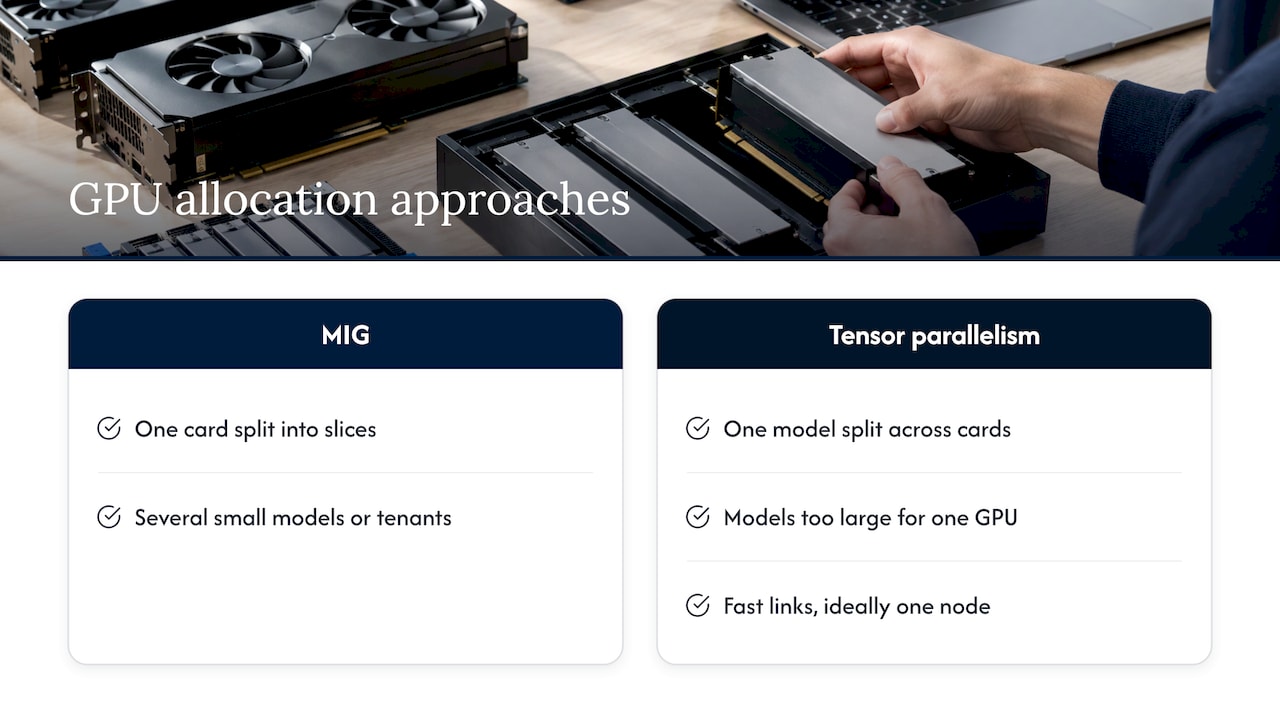
A mixed layout is common: partition some cards into slices for small, bursty workloads and keep other cards whole for large-context jobs. Your orchestration layer then needs to know the difference between a whole GPU and a slice, so a request is never placed on the wrong resource type.
Security, access control and audit
On-prem orchestration is where privacy promises become enforceable. The gateway is the one place every request passes through, so it is the right place for identity, permissions and logging.
MindRouter shows a complete set of controls in a production setting. It uses role-based access control, single sign-on, hashed API keys and passwords, non-root containers behind TLS termination, localhost-bound internal services and full request and response audit logging, and all data stays on campus.
For regulated enterprises, add two practices:
- Check permissions before the model sees data. If a retrieval step can pull documents the user is not cleared for, the model has already leaked them. Our piece on enforcing permissions before the model covers the pattern.
- Treat the audit log as a product. Decide who can read it, how long it is kept and how it is protected, because it now holds sensitive prompts and responses.
Operating the platform after launch
The hard lessons appear in operations reports, not architecture diagrams.
The uniGPT case study from a major German university covers nearly two years of on-premises operation, from May 2024 to February 2026. The platform grew from a simple chatbot into an API-first, multi-modal system on Kubernetes, built for GDPR compliance and digital sovereignty. Changes were managed through GitOps, with Helm, Kustomize and ArgoCD used to deploy and roll back, and deployments could land within days. The same report describes how the original serving engine hit severe VRAM exhaustion and KV-cache fragmentation at peak load, with persistent out-of-memory errors hurting throughput and availability, which led the team to switch to vLLM.
Two takeaways: keep the serving engine replaceable behind your gateway, and make every change reversible.
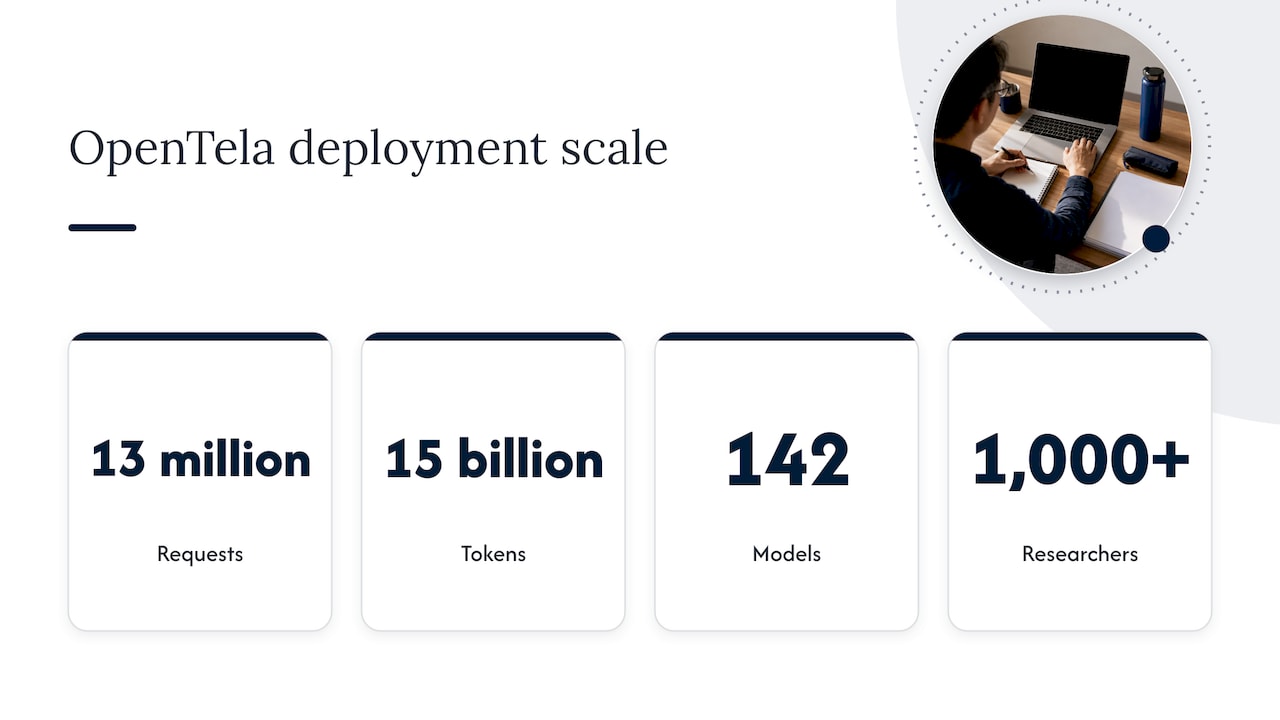
Scale is achievable on institutional hardware. MindRouter has run in production since early 2026 across 13 GPU nodes with 40 GPUs, serving 64 open-weight models on Ollama and vLLM backends. OpenTela reports more than 22 months of deployment, 13 million requests and 15 billion tokens across 142 models for over 1,000 researchers at multiple institutions.
Power is part of operations too. MindRouter’s telemetry reports about 9.4 kW in normal cluster operation, with a peak of 14.1 kW. Tracking energy per token alongside latency gives you a cost signal you can act on; see our guide to tracking joules per token and our inference cost model. For monitoring the surrounding infrastructure, teams often pair the model layer with bring-your-own-LLM operations tooling that watches Kubernetes and application health.
Our perspective
Most orchestration projects we see start with a router diagram and end with a procurement problem. The better order is to start with the perimeter: where the data lives, who may touch it, and what must keep working when the network is cut.
As an official webAI systems integrator, Forge AI Deployment brings webAI’s local-first platform into production inside infrastructure you control. That includes enterprise data centers, edge sites and air-gapped networks. We lead with private and air-gapped deployment, webAI Personas for specialized roles, the Intelligence Delivery Network for distributing intelligence across your sites, and webAI Frontline, which gives frontline teams fast, source-backed answers from large technical document libraries, fully offline on a single device.
Our approach to orchestration is operational discipline, not software resale. We design deployments so that data, models and domain intelligence stay inside your infrastructure, validated for privacy and auditability. Our leadership brings more than 20 years in high-consequence and Fortune 100 environments, and that shapes how we plan failure modes, access control and rollback before the first model is loaded.
We would rather you have a modest, well-governed stack that your own team can run than an impressive one nobody can audit.
John
Where Forge fits
If you are weighing how to put this into production, Forge AI Deployment designs, deploys and operates private AI systems inside your perimeter: architecture, secure deployment, model integration, sovereign MLOps and runtime orchestration, and ongoing operations. You can see the full list on our solutions page, and the platform behind our deployments on the webAI partnership page.
For the lifecycle side of the work, from model updates to rollback, read our guide to running sovereign MLOps inside your perimeter. To scope an engagement, start at forgeprivate.ai.
A pre-launch checklist
Use this list in your architecture review.
- Scope the workloads. List each use case, its latency expectation, its data sensitivity and the model class it needs.
- Size memory first. Calculate weights, KV cache at expected concurrency and context length, and overhead for each model.
- Choose the partitioning approach. Decide which workloads get MIG slices, which get whole GPUs and which need multi-GPU parallelism within a node.
- Put one gateway in front. Offer a single API, support the client protocols your teams already use, and authenticate every call there.
- Define routing and fallback. Write down which model answers what, which substitutes are allowed and when to reject a request.
- Set fair-share weights. Tie them to business priority and test behavior under contention.
- Enforce permissions upstream. Filter retrieved content by user entitlement before it reaches the prompt.
- Log and protect. Capture requests and responses, restrict access to the logs and set retention.
- Make changes reversible. Use version-controlled deployments with a tested rollback path.
- Measure continuously. Track latency, queue depth, memory headroom and energy per token.
FAQ
What is the difference between LLM orchestration and LLM serving?
Serving loads a model onto a GPU and generates tokens. Orchestration sits above it: it exposes one API, routes each request to the right model or replica, shares capacity among users, and manages the lifecycle of the models. A single-model pilot can run on serving alone, while a multi-team platform needs both.
Do I need Kubernetes to orchestrate LLMs on-prem?
Not to start. The AIvailable preprint shows a design built on HAProxy, a controller and Ollama. Kubernetes becomes attractive as you add models, nodes and GitOps-style change control, as in the uniGPT platform. Choose it when operational complexity justifies it.
How should an orchestrator handle a model that is down?
Health checks should remove the failed backend and retry on a healthy replica. Pre-approved fallback models should cover non-sensitive workloads, while regulated workflows should fail clearly instead of switching to an unapproved model. Short queues can absorb cold starts.
Can on-prem orchestration work in an air-gapped environment?
Yes, provided every component runs inside the perimeter: gateway, router, registry, model weights, logs and update path. Updates arrive through a controlled transfer process rather than live downloads. This is the type of environment Forge AI Deployment designs for.
Sources
- MindRouter: fair-share inference gateway paper, University of Idaho
- OpenTela: unifying decentralized computing resources, OSDI 2026
- AIvailable preprint, arXiv
- llm-d architecture documentation
- Efficient Multi-Model Orchestration for Self-Hosted LLMs, arXiv
- UniGPT Revisited, EasyChair
- Runtime governance of LLM agents
- Bring your own LLM, infrastructure operations