On-prem LLMs make sense when you have sustained high-volume inference, strict data residency or air-gapped requirements, or a real need to customize the model itself. Cloud APIs still win for bursty, low-volume, or exploratory work. As a rough guide, expect break-even in a few months at low usage, up to roughly three years at moderate usage, and a much longer runway for very large deployments, depending on utilization and which cloud price you’re comparing against.
TL;DR:
- On-prem LLMs are most cost-effective for large, consistent workloads with high customization, while cloud APIs suit bursty or exploratory tasks.
- Deployment complexity, operational overhead, and licensing restrictions heavily influence whether on-prem or cloud is the better choice.
- GPU memory, KV cache growth, and concurrency demands are the main technical considerations for sizing hardware and avoiding bottlenecks.
- Security and compliance require strict controls like air-gapping, audit logging, and signed model transfers, especially in regulated industries.
- Operational discipline, monitoring, and correct architecture design are critical for reliable, scalable, and compliant on-prem LLM deployment.
Table of Contents
- What Does On-Prem LLM Deployment Actually Mean?
- When to Choose On-Prem vs Cloud: Decision Criteria
- Cost and Break-Even Considerations
- Model Selection and License Checks
- Hardware and GPU Sizing: The VRAM Math
- Serving Stack Architecture: Gateway, Engines, and RAG
- Security, Compliance, and Air-Gapped Deployments
- Operations: Monitoring, Runbooks, and Model Lifecycle
- Integration Patterns: APIs, OpenAI Compatibility, and RAG
- Practical Getting-Started Checklist for a Pilot
- Performance Benchmarking Methods for On-Prem LLMs
- Backup and Disaster Recovery Strategies for On-Prem LLMs
- Scaling Strategies: Horizontal Scaling and Load Balancing
- Detailed Troubleshooting and Common Issues Resolution
- Power, Cooling, and Physical Infrastructure Requirements
- Author Perspective: Lessons From Enterprise Deployments
- How Forge AI Deployment Turns This Guide Into a Working Deployment
- Sources
- FAQ
What Does On-Prem LLM Deployment Actually Mean?
An on-prem LLM deployment means running a large language model on hardware you own or fully control, inside your own data center or a colocation facility you manage, instead of calling a hosted API like the ones OpenAI or Anthropic sell. The model weights, the inference engine, and every prompt and response stay inside infrastructure your team administers end to end.
That distinction matters more than it sounds. On-premises machine learning isn’t just “cloud, but local.” You take on the GPU procurement, the driver stack, the serving engine, the monitoring, and the security perimeter that a cloud vendor otherwise handles for you. In exchange, you get full control over where data lives, what the model was trained on, and how it behaves, none of which you can fully guarantee with a third-party API.
Enterprises researching on-premises LLM tend to lump three distinct scenarios under one label, and the differences change your architecture:
- Fully air-gapped: no external network connection at all, common in defense, classified government work, and some financial trading floors.
- Network-isolated but connected: the LLM runs on internal infrastructure with no public internet exposure, but the broader network still connects to email, patch servers, and monitoring tools.
- Private cloud or VPC: technically “cloud” hardware, but single-tenant and controlled entirely by your organization, often chosen when full physical air-gapping is impractical.
Each scenario changes how you handle model updates, patching, and even basic troubleshooting, so it’s worth naming which one you’re actually building before you size hardware or pick a serving stack.
When to Choose On-Prem vs Cloud: Decision Criteria
The decision rarely comes down to a single factor. Five axes tend to determine whether on-prem or cloud wins for a given workload, and most organizations end up somewhere in between rather than at a clean extreme.
- Sustained token volume. Cloud APIs price per token, so cost scales linearly with usage. On-prem has a large fixed cost up front and a low marginal cost per token afterward. If your monthly volume is predictable and high, the math tilts toward on-prem; if it’s spiky or uncertain, cloud is safer.
- Latency and SLA requirements. Applications with strict, sub-second latency requirements, or that need guaranteed throughput regardless of a vendor’s rate limits, often do better on dedicated local hardware where you control the queue.
- Compliance and regulatory constraints. Financial services, defense, healthcare, and government workloads frequently face data residency rules or contractual clauses that prohibit sending certain data to third-party infrastructure at all. This alone can make on-prem mandatory, independent of cost.
- Customization and fine-tuning depth. If you need to fine-tune on proprietary data, run continuous retraining loops, or modify model internals in ways a hosted API won’t expose, on-prem is often the only viable path.
- Existing infrastructure and ops skillset. A team that already runs Kubernetes, manages GPU fleets, or operates its own SRE function has a real head start. A team with none of that will underestimate the operational lift.
An SME running a pilot chatbot for internal document search, with a few thousand queries a day and no compliance mandate, almost always belongs on cloud APIs first. A regulated enterprise processing millions of tokens a day against proprietary financial or health records is a different animal entirely, and often has no real choice but on-prem or private cloud.
Hybrid patterns are common and usually pragmatic: keep regulated or sensitive workloads on-prem, and burst non-sensitive, unpredictable, or experimental traffic to a cloud API. This lowers the break-even threshold for the on-prem side because you’re only sizing hardware for the steady, predictable core of your traffic, not for the worst-case spike.
Cost and Break-Even Considerations
Total cost of ownership for on-prem LLM infrastructure breaks into five categories, and skipping any one of them is how cost estimates go wrong.
- Capital expenditure: GPUs, servers, networking, and rack space, either purchased or financed.
- Operating expenditure: power, cooling, and the staff time required to run and monitor the stack.
- Licensing: some open-weight models carry commercial-use restrictions or require a separate agreement above a certain revenue or user threshold.
- Model refresh cycles: newer, better open-weight models appear every few months, and staying competitive means periodically re-evaluating and redeploying.
- Integration work: connecting the model to internal tools, building the gateway, and maintaining the RAG pipeline if you have one.
An arXiv cost-benefit analysis of on-prem LLM deployment modeled break-even against commercial LLM API pricing and found the range varies enormously by model size and usage pattern.
Statistic callout: Small on-prem deployments can break even against commercial API pricing in a few months. Medium deployments typically take up to a few years. Large deployments can take a long time to break even, and the outcome depends heavily on utilization rate and which cloud price point you’re benchmarking against.
That spread is wide enough that a single “on-prem always pays off in X months” claim, the kind you’ll see in vendor slide decks, is almost worthless without stating the assumptions behind it. Two variables drive most of the variance: utilization rate (a GPU sitting idle 70% of the time never breaks even, no matter how cheap the hardware was) and the specific cloud API price you’re comparing against, since commercial LLM pricing has dropped substantially over the past two years and keeps moving.
As a rough planning heuristic, teams processing below the mid-volume range rarely justify on-prem hardware purely on cost, though compliance requirements can override that math entirely. Teams in the medium volume range start to see genuine cost advantages if utilization stays high and the deployment avoids frequent full hardware refreshes. At very high volumes above typical enterprise levels, on-prem economics usually favor local infrastructure, assuming the operational overhead is staffed properly rather than bolted onto an already-stretched team.
Three sensitivity factors deserve attention before you commit capital:
- Refresh cycles. GPUs depreciate and newer chips offer meaningfully better throughput per watt every 18 to 24 months; budgeting for a single hardware generation and expecting it to last five years is a common and expensive mistake.
- Utilization rate. A cluster sized for peak demand but running at 30% average utilization erases most of the cost advantage over cloud.
- Cloud price trajectory. Commercial API pricing has fallen sharply as providers compete; a break-even model built on last year’s cloud prices will look far less favorable when re-run against current rates.
Run the break-even math with your own utilization assumptions, not a vendor’s best case, and rerun it annually as both cloud prices and your own hardware age; for a detailed cost analysis service, consider using Cost Beacon.
Model Selection and License Checks
Picking a model for on-prem deployment starts with size, and size is a direct trade-off between accuracy and how easy the model is to serve.
Models in the 7B to 13B parameter range run comfortably on a single GPU, respond fast, and are cheap to serve at scale, but they lag noticeably on complex reasoning, multi-step tool use, and nuanced instruction-following compared to larger models. Mid-range models in the 30B to 70B range close much of that gap and are still serveable on a single well-specced node or a small cluster. Above 70B, and especially past 100B parameters, you’re usually looking at multi-GPU or multi-node clusters, and the accuracy gains have to justify a meaningfully larger infrastructure and operational footprint.
The practical rule: don’t default to the largest model available. Many internal use cases, document summarization, structured data extraction, internal support chat, run perfectly well on a well-tuned 7B or 13B model, and the savings in GPU count and inference latency are substantial. Reserve the largest models for tasks that genuinely need deep reasoning or long-context handling.
License review is not optional, and it’s the step teams skip most often. Before you provision hardware for a specific model, check:
- Hosting rights: does the license permit running the model on your own infrastructure for internal business use, or only for research?
- Commercial use restrictions: some open-weight licenses cap commercial use below a certain number of monthly active users or revenue threshold, above which a separate commercial agreement is required.
- Fine-tuning and derivative works: does the license allow you to fine-tune on proprietary data, and do you retain rights to the resulting weights, or does the base model’s license impose obligations on derivatives?
- Attribution requirements: some licenses require you to credit the base model in your product documentation or user-facing disclosures.
Quantization is how you shrink a model’s memory footprint without retraining it, and it directly affects both cost and quality. GGUF format is common for CPU and consumer-GPU inference and pairs well with llama.cpp-based stacks. GPTQ and AWQ are post-training quantization methods that compress weights to 4-bit or 8-bit precision while trying to preserve accuracy, and they’re the more common choice for datacenter-grade serving. In practice, 8-bit quantization is close to lossless for most business use cases, while aggressive 4-bit quantization can introduce measurable accuracy loss on reasoning-heavy tasks, so it’s worth benchmarking your specific use case before locking in a quantization scheme rather than assuming the vendor’s default is right for you.
Hardware and GPU Sizing: The VRAM Math
GPU memory is the single most common bottleneck in on-prem LLM deployment, and it’s driven by three components: model weights, the KV cache, and general overhead.
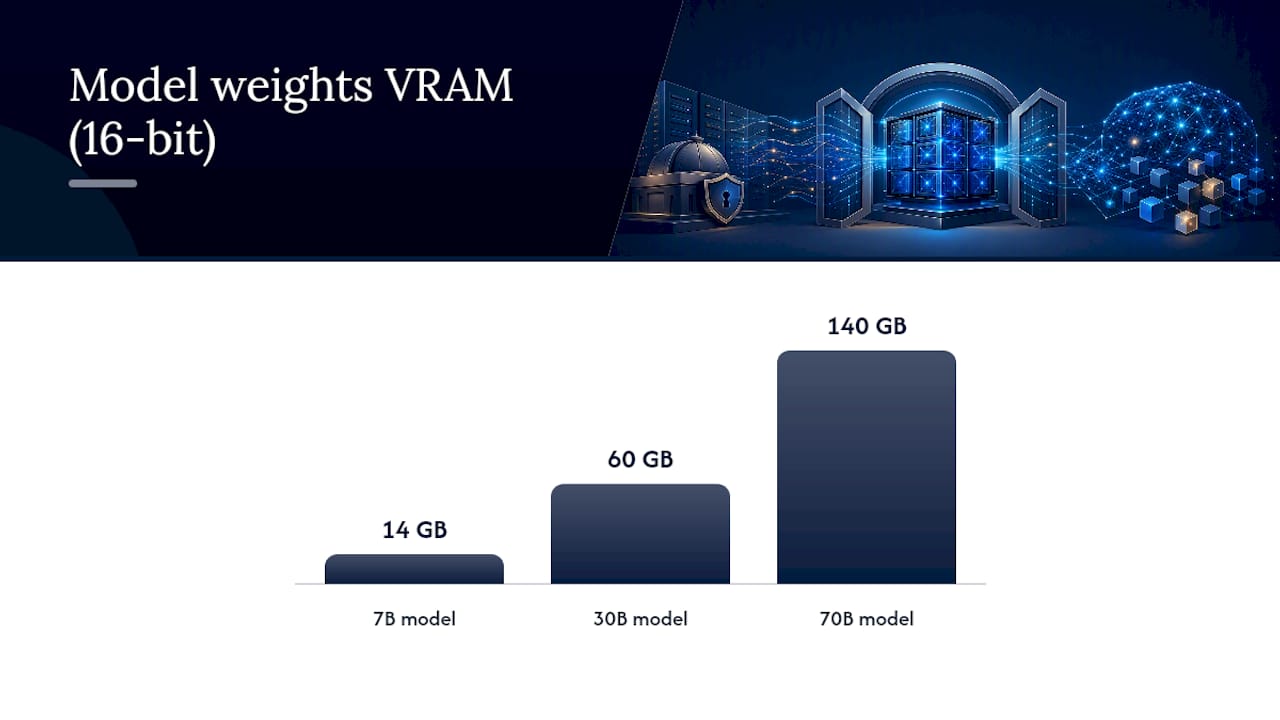
Model weights at a given quantization level consume a predictable amount of VRAM. A 7B model at 16-bit precision needs roughly 14GB just for weights; the same model quantized to 8-bit needs around 7GB, and 4-bit quantization brings it down to roughly 3.5 to 4GB. A 30B model at 16-bit needs around 60GB, dropping to roughly 30GB at 8-bit and 15GB at 4-bit. A 70B model at 16-bit needs around 140GB, which is why production 70B deployments almost always run quantized, typically landing between 35 and 70GB depending on the quantization method.
The KV cache is the part teams most often forget to budget for. It grows with context length and concurrent request count, not just model size. Serving a handful of long-context conversations simultaneously can consume tens of gigabytes on top of the model weights themselves, and this is exactly why a GPU that comfortably holds a model at rest can still run out of memory under real concurrent load.
Statistic callout: Consumer-class GPUs from the RTX 50xx and 60xx families can host models in the smaller parameter range at GGUF quantization for pilots and light internal use, according to the arXiv cost-benefit analysis. Production deployments serving mid-size model fleets at meaningful concurrency typically require datacenter-class GPUs with substantial memory, often using safetensors or advanced quantization formats for efficient throughput.
Rough GPU tier mapping looks like this in practice:
- Consumer RTX tier: single-user pilots, internal proof-of-concept work, 7B to 30B models, low concurrency.
- A100/H100-class datacenter cards: production single-team deployments, 30B to 70B models, moderate concurrency, RAG-augmented workloads.
- Multi-node Hopper or Blackwell clusters: enterprise-wide deployment, 70B+ models, high concurrency across many teams, or serving multiple models simultaneously.
Cluster sizing is where over- and under-provisioning both get expensive in different ways. Under-provisioning shows up immediately as queueing delays and timeouts under load, which is a fast way to lose user trust in an internal tool. Over-provisioning is quieter but just as costly: idle GPU capacity sitting at 20% utilization is dead capital, and it’s the single biggest reason break-even projections miss their target. Build in headroom for peak concurrency, but size that headroom against actual measured demand, not a worst-case guess, and revisit it quarterly once you have real usage data. Confirm your driver and CUDA setup against the PyTorch local installation guide before provisioning at scale, since mismatched CUDA versions are a common source of wasted GPU cycles during initial setup.
Serving Stack Architecture: Gateway, Engines, and RAG
A production on-prem LLM stack has four essential layers, and skipping the first one is the most common early mistake.
- Clients — the applications, internal tools, and end users making requests.
- Gateway — an authentication and audit layer sitting in front of everything else, handling identity, logging every request and response, and enforcing rate limits.
- Serving engine — the software actually running inference: Ollama, vLLM, or Hugging Face TGI are the three most common choices.
- GPU infrastructure — the physical or virtualized hardware executing the model.
An optional fifth layer sits alongside this stack for retrieval-augmented generation: an embedding model plus a vector database, feeding relevant context into prompts before they reach the serving engine.
The decision rule for serving engines is straightforward and well-supported by practitioner architecture guidance: start simple, migrate when you have to. Ollama is well suited to single-node pilots and lighter internal use, it’s easy to stand up and requires minimal tuning. vLLM is built for continuous batching and high concurrency, and it’s the right choice once you start seeing queueing delays or need to serve many simultaneous users efficiently. The migration from one to the other is typically a configuration and deployment change, not a rewrite, particularly if you’ve kept an OpenAI-compatible API layer at the gateway from the start.
Pro Tip: Build the gateway before you build anything else, even for a pilot. Retrofitting authentication, audit logging, and rate limiting onto a stack that’s already in production is far more expensive than including them from day one, and regulated industries will ask for audit logs the moment a pilot shows promise.
For RAG implementations, three practices consistently separate solid deployments from fragile ones. First, run your embedding model locally rather than calling an external embeddings API, since sending document chunks to a third party defeats much of the point of going on-prem in the first place. Second, self-host the vector database rather than using a managed cloud vector store, keeping the entire retrieval pipeline inside your controlled environment. Third, enforce permission filters at the retrieval layer itself, not just at the application layer, so a user’s query can never surface document chunks they wouldn’t otherwise have access to. Toolkits like OnPrem.LLM bundle several of these pieces, an OpenAI-compatible local endpoint, support for multiple backends including llama.cpp, vLLM, and Ollama, and a basic web UI, into a single package that’s useful for quick pilots before you build a custom production stack.
Security, Compliance, and Air-Gapped Deployments
Security controls for an on-prem LLM stack fall into five categories, and most audits will ask about all five.
- Egress blocking. The serving engine and any RAG components should have no route to the public internet by default, forcing all external communication through an explicitly reviewed and logged path.
- Gateway audit logs. Every prompt, response, user identity, and timestamp should be captured centrally, both for security investigation and for compliance reporting.
- Identity-based access. OIDC or SAML integration at the gateway ties every request to a verified user identity rather than a shared API key, which matters enormously when an incident review needs to trace exactly who asked what.
- SIEM integration. Feeding gateway logs into your existing security information and event management platform means LLM traffic gets the same monitoring rigor as the rest of your infrastructure, rather than living in a blind spot.
- Deliberate retention policies. Decide explicitly how long prompts and responses are retained, and for what purpose, rather than defaulting to “forever” or “never,” both of which create their own compliance problems.
Fully air-gapped deployments add a layer of operational discipline on top of these controls. Model artifacts need to be transferred via a controlled, offline process, physical media or a one-way data diode, rather than a network pull. Signed artifacts matter here: verifying a cryptographic signature on a model file before loading it prevents a tampered or corrupted model from silently entering production. Update procedures need to be just as rigorous as the initial transfer, with the same signature validation and a documented approval chain, since an air-gapped environment removes the convenience of a quick rollback via network pull if something goes wrong.
Pro Tip: Treat every model file crossing into an air-gapped environment like you’d treat a software supply chain artifact: hash it, sign it, log the transfer, and validate the signature again on the receiving end. This is the single control most teams skip under deadline pressure, and it’s the one that matters most when something goes wrong.

This is precisely the terrain Forge has built its practice around, drawing on two decades of experience securing sensitive operations in high-stakes environments before AI deployment was even part of the conversation. Forge’s air-gapped deployment work keeps all data and models inside client infrastructure by design, and its Entropy-Weighted Quantization approach is built specifically to keep models efficient without leaning on cloud dependence, a meaningful distinction from generic quantization schemes that weren’t designed with air-gapped constraints in mind.
Operations: Monitoring, Runbooks, and Model Lifecycle
Running an on-prem LLM reliably requires the same operational discipline as any other production system, plus a few metrics unique to inference workloads.
The metrics that matter most: GPU memory utilization (to catch capacity problems before they cause outages), queue depth (the earliest warning sign of concurrency trouble), tokens per second throughput, per-team or per-application volume breakdowns, and latency percentiles alongside error rates. Watching averages alone hides the problem; a P99 latency spike affecting 1% of users is often the first sign of an approaching capacity wall.
Runbooks need to cover the failure modes specific to model serving: how to restart the serving engine cleanly, how to roll back to a previous model version if a new deployment introduces regressions, and how to roll forward once a fix is validated. Documented incident playbooks and tested rollback procedures reduce time to recovery dramatically compared with ad hoc, improvised responses during an actual outage, when nobody wants to be reading documentation for the first time.
- Export core metrics to Prometheus or an equivalent monitoring stack from day one.
- Maintain a written, tested runbook for restart, rollback, and roll-forward procedures.
- Schedule model refresh evaluations on a fixed cadence rather than reactively.
- Define clear ownership: who owns SLOs, who owns MLOps pipeline health, who owns security response.
Staffing this properly means someone owns uptime and performance targets, someone owns the model lifecycle and retraining or refresh decisions, and someone owns the security posture of the whole stack. On a small team, one person can wear all three hats. At enterprise scale, these become distinct roles, and the handover from initial deployment to steady-state operations should include, at minimum, a current architecture diagram, the runbook, and a documented on-call rotation.
Integration Patterns: APIs, OpenAI Compatibility, and RAG
Exposing your on-prem LLM through an OpenAI-compatible API endpoint is one of the highest-leverage decisions you’ll make, because it means every internal tool, SDK, and integration built against the OpenAI API format works with a one-line configuration change rather than a custom integration. This is precisely the approach toolkits like OnPrem.LLM take by default, and it’s worth replicating even in a custom-built stack.
- Implement the OpenAI-compatible layer behind the gateway, never in front of it, so authentication and audit logging apply to every request regardless of client.
- For permission-aware RAG, filter retrieval results by user or team metadata before they ever reach the model, not after.
- Choose a self-hosted vector database, pgvector for teams already running PostgreSQL, or Qdrant for a dedicated vector store, based on your existing operational footprint rather than benchmark hype.
- Tie every API call to a verified identity through the gateway’s OIDC or SAML integration, and log enough detail to reconstruct exactly who asked what, when, for auditability.
Practical Getting-Started Checklist for a Pilot
A focused pilot can realistically go from kickoff to a working, secured endpoint within an engineer-week or two if scoped tightly.
- Define the exact use case and classify its data sensitivity level.
- Review the candidate model’s license for commercial use and fine-tuning restrictions.
- Select the model size and quantization scheme that fits your accuracy and latency needs.
- Size the GPU node based on weights, KV cache, and expected concurrency.
- Deploy the gateway first, then the serving engine behind it.
- Run a load test at expected peak concurrency before any real users touch it.
- Add monitoring and a written runbook before declaring the pilot complete.
Success criteria for a pilot: an authenticated endpoint with no anonymous access, working audit logs capturing every request, headroom for realistic concurrent load without queueing collapse, and a documented rollback procedure that’s actually been tested, not just written. Common pitfalls to check before rollout: unverified GPU driver compatibility, no load test at realistic concurrency, and a gateway added as an afterthought rather than built in from the start.
Performance Benchmarking Methods for On-Prem LLMs
Benchmarking an on-prem LLM deployment means measuring two different things: raw model quality and serving infrastructure performance, and conflating them leads to bad decisions.
For infrastructure performance, the core metrics are tokens per second under realistic concurrency, time to first token (which matters enormously for perceived responsiveness in chat interfaces), and how throughput degrades as concurrent request count rises. Run these tests with request patterns that mirror your actual expected usage, short queries and long-context requests behave very differently under load, rather than a single synthetic benchmark that doesn’t reflect real traffic.
For model quality, task-specific evaluation matters more than generic leaderboard scores. A model that scores well on general benchmarks can still underperform on your specific document types or domain vocabulary. Build a small internal evaluation set from real examples relevant to your use case, and re-run it every time you change model version or quantization scheme, since quantization can degrade quality in ways that don’t show up until you test against realistic inputs.
Load testing tools that simulate concurrent users against your OpenAI-compatible endpoint give you the clearest picture of where the serving engine’s limits actually are, well before real users find them. Run these tests at expected peak load plus a safety margin, not just average load, since average-case testing is exactly what leaves teams surprised the first time a real traffic spike hits.
Backup and Disaster Recovery Strategies for On-Prem LLMs
Disaster recovery for an on-prem LLM stack needs to cover three distinct assets: the model weights themselves, the serving configuration, and the audit logs, and each has different recovery requirements.
Model weights should be backed up to a separate storage location, ideally offline or air-gapped from the primary serving environment, with version tags so you can restore a known-good model quickly if a deployment goes wrong. Treat this the same way you’d treat a critical database backup: test the restore process periodically, not just the backup itself, since an untested backup is a hypothesis, not a plan.
Serving configuration, gateway settings, routing rules, quantization parameters, needs to be captured as code wherever possible, so a full environment rebuild doesn’t depend on someone’s memory of how the original deployment was configured.
Audit logs deserve special attention in a disaster recovery plan because, in regulated environments, losing them can be a compliance failure in its own right, separate from any service outage. Replicate audit logs to a separate system in near real time rather than relying solely on local storage that could be lost in the same incident that takes down serving.
For fully air-gapped environments, disaster recovery gets more deliberate: recovery media needs to be pre-staged and validated before it’s needed, since you can’t simply pull a backup over the network during an incident. A tested, written recovery runbook, including exactly how long a full restore takes, is the difference between a contained incident and an extended outage during exactly the moment your organization can least afford one.
Scaling Strategies: Horizontal Scaling and Load Balancing
Horizontal scaling for on-prem LLM serving means adding more GPU nodes running the same model behind a load balancer, rather than trying to make a single node handle ever-increasing concurrency. This is the standard approach once a single node’s queue depth starts climbing under normal peak load.
vLLM and similar production serving engines support this pattern natively, distributing incoming requests across multiple GPU instances and using continuous batching within each node to maximize throughput. The load balancer sits at the gateway layer, routing requests based on current node load rather than simple round-robin, since LLM inference requests vary enormously in cost depending on prompt length and generation length.
A practical scaling trigger: when P95 latency starts climbing during normal peak hours, or queue depth regularly exceeds a handful of pending requests, it’s time to add capacity rather than wait for user complaints. Reactive scaling, adding hardware only after users notice slowdowns, is a common and avoidable failure mode.
For organizations running multiple models or serving multiple teams, model-level sharding, dedicating specific nodes to specific models or use cases, often works better than one giant shared cluster serving everything. It isolates a problem with one model from affecting every other team’s traffic, and it makes capacity planning far more tractable since each pool has predictable, bounded demand rather than one unpredictable aggregate.
Detailed Troubleshooting and Common Issues Resolution
Most on-prem LLM problems fall into a handful of recurring categories, and recognizing the pattern quickly saves hours of debugging.
Out-of-memory errors are the most common issue, usually caused by underestimating KV cache growth under concurrent load rather than the model weights themselves. The fix is almost always to reduce max concurrent requests or context length, or to add quantization headroom, rather than assuming you need more GPUs outright.
Slow time-to-first-token despite adequate throughput usually points to a gateway or network bottleneck rather than the model itself, check the authentication and audit logging layer for unexpected latency before assuming the serving engine is the problem.
Inconsistent output quality after a model update is often a quantization mismatch, a new model version deployed with quantization settings tuned for the previous version. Always re-run your internal evaluation set after any model or quantization change, not just after major version bumps.
Queueing and timeout errors under load that weren’t present during testing usually mean your load test didn’t reflect real traffic patterns. Revisit load testing with actual production request shapes, not synthetic uniform requests.
Driver and CUDA version mismatches cause a surprising share of “it worked yesterday” incidents, particularly after any OS-level patching. Pin driver and CUDA versions explicitly in your deployment configuration rather than trusting whatever the base image currently has, and check compatibility against the PyTorch local setup documentation before any upgrade.
Power, Cooling, and Physical Infrastructure Requirements
Datacenter-class GPUs used for production LLM serving draw substantial power, often 400 to 700 watts per card depending on the model, and a multi-GPU node can easily draw several kilowatts continuously. This isn’t a detail you can defer until after hardware arrives; it needs to be part of the initial sizing conversation with facilities or your colocation provider.
Cooling capacity has to match that power draw, and it’s a common point of failure for teams retrofitting existing server rooms rather than building new capacity. GPUs running at sustained high utilization generate heat far beyond what a typical office server closet was designed to dissipate, and thermal throttling under inadequate cooling silently degrades throughput long before it triggers an obvious failure.
Rack density matters too: high-end GPU servers are often heavier and denser than standard compute racks, and older data center floors weren’t always built with that load in mind. Check floor loading specifications before committing to a rack layout, not after equipment arrives.
For organizations without existing datacenter capacity, colocation facilities with GPU-ready power and cooling are often more practical than building new capacity from scratch, particularly for a first production deployment. Whichever path you take, budget for redundant power feeds and cooling capacity from the start; a single point of failure in power or cooling takes down every model you’re serving simultaneously, which is a much bigger blast radius than a single failed application server.
Author Perspective: Lessons From Enterprise Deployments
The teams that struggle with on-prem LLM projects almost always underestimate the same three things: verifying model and GPU pairing before committing budget, treating the gateway as an afterthought instead of the first thing built, and assuming hardware bought today stays competitive for years rather than a single refresh cycle.
On-prem is an operational program, not a one-time project. The deployment is the easy part; the ongoing staffing, monitoring, and refresh decisions are where organizations either build lasting capability or quietly drift back toward cloud APIs eighteen months later, having underbudgeted for the operational reality. and would sit well here, drawn from real engagements rather than composite examples.
— John Ezzell, Founder
How Forge Turns This Guide Into a Working Deployment
Everything above, the GPU sizing math, the gateway-first architecture, the air-gapped supply chain discipline, describes best practices for regulated enterprises rather than DIY approaches. Experienced teams draw on long-term expertise securing sensitive operations to ensure models remain inside infrastructure and operational playbooks are tested before deployment.
A typical Forge engagement moves through four stages: an initial assessment of your workload and compliance requirements, a scoped pilot on right-sized hardware, full production deployment with the gateway and monitoring built in from day one, and an operations handover with a documented runbook your team can actually run. This fits financial services, defense, logistics, energy, and manufacturing organizations that need sovereign AI without hiring an entire MLOps team from scratch. The Entropy-Weighted Quantization approach keeps models efficient without any cloud dependence, and every engagement is built around Forge’s stated commitment to zero data exfiltration, with data, models, and domain intelligence validated to stay inside your infrastructure throughout.
If your organization is weighing a real on-prem deployment rather than another pilot that stalls at the proof-of-concept stage, explore Forge’s deployment solutions and request an assessment to see what a scoped, secured rollout looks like for your specific workload.
Sources
- A Cost-Benefit Analysis of On-Premise Large Language Model Deployment: Breaking Even with Commercial LLM Services
- On-Prem LLM Deployment Architecture: vLLM, SSO, and Logging
FAQ
What Is an On-Premise LLM?
An on-premise LLM is a large language model deployed and run entirely on infrastructure an organization owns or directly controls, rather than accessed through a third-party cloud API, keeping model weights and all data inside the organization’s own environment.
What Are the Top LLM Models for On-Prem Deployment?
The right model depends on your task and hardware budget rather than a fixed ranking; the practical approach is choosing the smallest open-weight model in the 7B to 70B range that meets your accuracy needs, since larger isn’t always better once serving cost and license terms are factored in.
Is ChatGPT an LLM or Generative AI?
ChatGPT is a generative AI application built on top of an underlying large language model; the LLM is the model itself, while ChatGPT is the product interface and service that gives users access to it.
How Do I Deploy an LLM On-Premise?
Deploying an LLM on-premise means selecting a model and license, sizing GPU hardware based on weights and KV cache requirements, and building a gateway-first serving stack, typically starting with a simple engine like Ollama and migrating to vLLM as concurrency grows. Organizations that want this handled end to end, including air-gapped setup and ongoing operations, often work with a specialist like Forge rather than building the full stack in-house.
How Much Does an On-Prem LLM Deployment Cost?
Costs vary widely by hardware tier, model size, and staffing needs, so there’s no single fixed number; Forge’s deployment and integration services are quoted per engagement based on your specific workload and infrastructure, with current details available directly on the site.