On-prem fine-tuning is feasible and often cost-effective once you have sustained training volume or data that cannot leave your walls. The right default is parameter-efficient fine-tuning, specifically LoRA, with QLoRA or AQLoRA when GPU memory or shared-hardware throughput becomes the bottleneck. The decision hinges on three signals: how sensitive your data is, how often you retrain, and how much GPU capacity you already own.
TL;DR:
- On-prem fine-tuning is most justified when handling sensitive or proprietary data that cannot leave secure environments, such as health records or defense-related documents.
- Using parameter-efficient methods like LoRA, QLoRA, QuAILoRA, and AQLoRA minimizes memory and speed costs, making large model fine-tuning feasible on a single GPU or modest multi-GPU setups.
- Infrastructure setup requires careful storage, checkpointing, version control, and orchestration with Kubernetes and security measures like private registries and audit logs to ensure reliability and compliance.
- On-prem costs become advantageous over cloud when training occurs frequently over 12-18 months, but infrequent experiments usually favor cloud renting due to setup time and resource variability.
- A structured pipeline involving data cleaning, labeling checks, environment pinning, calibration, and validation is essential to ensure effective, secure, and repeatable fine-tuning outcomes.
Table of Contents
- Which Enterprise Use Cases Justify Fine Tuning On-Prem?
- Which Methods and Memory Recipes Actually Work?
- How Do You Set Up On-Prem Infrastructure and MLOps?
- Is Fine Tuning On-Prem Cheaper Than the Cloud?
- What’s the Step-by-Step Pipeline for On-Prem Fine-Tuning?
- What Forge Sees Across On-Prem Deployments
- Get Help Deploying a Private Fine-Tuning Pipeline
- Sources
- FAQ
Which Enterprise Use Cases Justify Fine Tuning On-Prem?
Not every team needs a private training rig. On-prem fine-tuning earns its keep when at least one of these conditions is true, and it earns it fastest when several stack together.
Regulated data is the clearest case. Health records, financial transaction histories, and defense-adjacent documents often carry contractual or statutory restrictions that make sending them to a third-party API a non-starter. IP-sensitive workflows follow close behind: a pharmaceutical company fine-tuning on unpublished trial data, or a chipmaker training on proprietary design specs, has no interest in that data touching someone else’s inference cluster. Air-gapped environments (defense contractors, critical infrastructure operators) simply cannot use cloud APIs, full stop. Low-latency local inference matters for anything running on a factory floor or trading desk where a network round trip to a cloud region adds unacceptable delay. And offline or edge training scenarios, such as a research vessel or a remote mine site, need the whole pipeline to run without a live internet connection.
Before committing budget, run through this checklist:
- Data sensitivity: Would a breach or vendor subpoena cause regulatory, contractual, or reputational damage?
- Scale and cadence: Are you fine-tuning once a quarter, or retraining weekly against fresh production data?
- Ops maturity: Does your team already run Kubernetes, container registries, and GPU scheduling, or would you be building that from zero?
- Cost horizon: Are you comparing a one-time experiment against a 12 to 36 month amortization window?
If your data has no special sensitivity and your fine-tuning need is a one-off experiment, skip the on-prem investment entirely. Retrieval-augmented generation or careful prompt engineering against a hosted model will get you most of the accuracy gain in a fraction of the time, and you avoid provisioning hardware for a job you’ll run twice. Fine-tuning earns its complexity when the task requires the model to internalize style, structure, or domain vocabulary that retrieval alone can’t inject, according to Databricks’ fine-tuning lifecycle guidance, which frames RAG and fine-tuning as complementary rather than competing choices.
Which Methods and Memory Recipes Actually Work?
Start with LoRA. It freezes the base model and trains small low-rank adapter matrices instead, cutting trainable parameters by orders of magnitude while keeping quality close to full fine-tuning. Escalate to QLoRA the moment your model won’t fit in GPU memory at full or half precision.
QLoRA combines three techniques: 4-bit NF4 quantization for the frozen base weights, double quantization (quantizing the quantization constants themselves to shave off more memory), and paged optimizers that shuttle optimizer state to CPU memory during spikes instead of crashing the job. Together, these let you fine-tune a 65-billion-parameter model on a single 48GB GPU while holding performance close to a 16-bit baseline. That’s the difference between needing an 8-GPU node and needing one workstation card.
The catch: 4-bit quantization does cost you some accuracy, and that’s where newer variants come in.
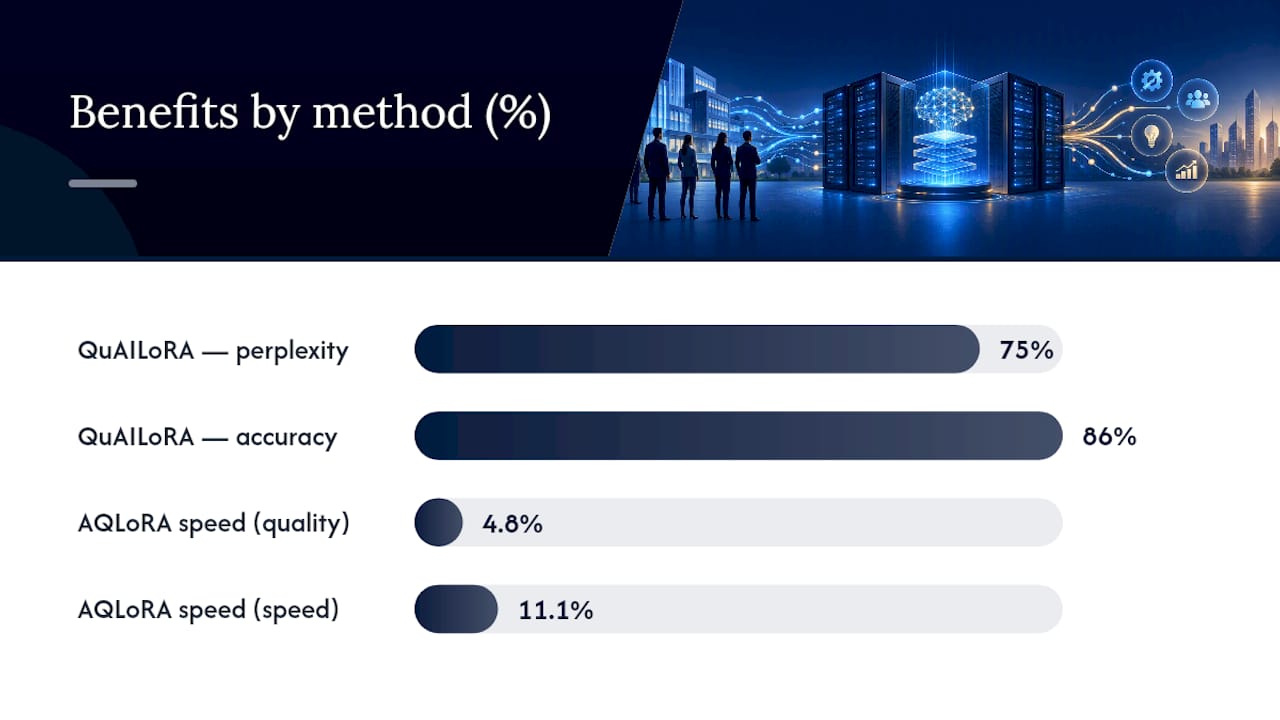
- QuAILoRA fixes the initialization problem. Standard LoRA adapters start from random or zero-initialized weights, which forces the model to spend early training steps correcting for the quantization error introduced by NF4. Quantization-aware initialization instead seeds the adapters to already compensate for that error, and it recovers roughly 75% of the perplexity gap and about 86% of downstream accuracy lost when you drop from 8-bit to 4-bit quantization, without adding any GPU memory overhead during fine-tuning.
- AQLoRA targets throughput rather than accuracy recovery. It identifies which layers accumulate the most quantization error and keeps those specific layers in higher precision, cutting down on the constant dequantize-then-compute cycle that slows 4-bit training. Depending on configuration, AQLoRA delivers roughly 4.8% faster training in a quality-preserving setting and up to 11.1% faster in a speed-optimized setting compared to a well-tuned QLoRA baseline.
Statistic to keep on a sticky note: on a single 48GB card, QLoRA gets a 65B model training at all; QuAILoRA claws back most of the accuracy that 4-bit quantization would otherwise cost you; AQLoRA claws back the speed. Stack all three when memory, accuracy, and throughput are simultaneously tight.
For hyperparameters, a reasonable starting point on a 7B to 13B model is a LoRA rank of 16 to 64, learning rate around 1e-4 to 2e-4 for the adapters, and gradient accumulation sized so your effective batch lands between 32 and 128. Push rank higher only if you see the model failing to capture task-specific nuance after a full epoch. Techniques like activation checkpointing and offloading can push memory savings further, with some configurations reporting more than a 25x reduction in peak memory for specific model and context length combinations, which matters if you’re trying to squeeze a large context window onto consumer-grade hardware.
Pro Tip: Run your QuAILoRA calibration pass once per base model checkpoint, not once per fine-tuning job. A small, representative calibration set that mirrors your downstream token distribution is enough, and the compute cost is small relative to the full training run.
How Do You Set Up On-Prem Infrastructure and MLOps?
A single high-memory GPU handles most LoRA and QLoRA jobs up to the 13B to 34B range comfortably. Beyond that, or when you need faster iteration, multi-GPU setups using Fully Sharded Data Parallel (FSDP) spread both model weights and optimizer state across cards. NVLink or a comparable high-bandwidth interconnect matters here: without it, the communication overhead between GPUs during gradient synchronization eats into the speed gains you’d otherwise get from parallelism.
Storage and checkpointing decisions matter more than most teams expect going in.
- Put checkpoints on NVMe, not network storage, if you’re saving frequently; to write latency difference compounds across a multi-hour run.
- Size your paged optimizer offload target (CPU RAM) to at least match your GPU memory footprint, or paging becomes a bottleneck instead of a safety valve.
- Version your datasets alongside your model checkpoints, using a simple content hash or DVC-style tracking, so a retrain six months from now points to the exact data snapshot that produced the original result.
- Containerize the training environment with pinned library versions. A drift in a CUDA, PyTorch, or bitsandbytes point release is a common source of silently different training runs.
For orchestration, Kubernetes paired with Kubeflow or MLflow is the standard pattern for on-prem ML hosting, and it’s the same architecture Ubuntu’s guidance on running AI on-prem recommends for teams weighing data gravity and compliance against cloud convenience. Infrastructure as code (Terraform or similar) keeps your GPU node pools and storage classes reproducible across environments, which matters once you have more than one training cluster.
On the security side, air-gapped or high-security deployments need a private container registry (no pulling base images from public Docker Hub), a secrets manager for API keys and credentials that never touches a shared vault, and audit logging on every training job that captures who ran what, on which dataset version, with which hyperparameters.
Pro Tip: Benchmark throughput over multi-hour runs, repeated at least twice, not five-minute smoke tests. Shared enterprise GPUs experience power-state throttling and background job interference that a short run won’t reveal, and that variance is exactly what you need to size provisioning correctly.
Is Fine Tuning On-Prem Cheaper Than the Cloud?
The honest answer is: it depends entirely on utilization, and most teams underestimate how much utilization they actually have. Four cost buckets determine the outcome.
- GPU CapEx: the upfront hardware purchase, which you own outright after the first job.
- Datacenter OpEx: power, cooling, rack space, and networking, ongoing regardless of how often you train.
- Staffing: the MLOps and platform engineering time to keep the cluster healthy, patched, and monitored.
- Software and maintenance: driver updates, framework upgrades, and the inevitable troubleshooting when a CUDA version breaks a dependency.
Cloud GPU rental wins for short, infrequent experiments; you pay for exactly the hours you use and walk away. On-prem starts winning once your training cadence turns sustained, weekly retraining, continuous fine-tuning against fresh production feedback, or multiple teams sharing one cluster. At that utilization level, the hourly-rental math that looked cheap for one experiment compounds into a number larger than the hardware you could have owned.
Provisioning and setup time is the honest cost on the on-prem side of the ledger: racking hardware, configuring drivers, and validating the training stack takes real weeks before your first job runs. Cloud has none of that friction. Where on-prem claws that gap back is sustained throughput, and this is where the quantization work compounds: if AQLoRA is buying you an 11.1% speed improvement on every job you run for the next two years, that adds up across hundreds of training cycles in a way a single-experiment cloud bill never has to reckon with.
A rough rule of thumb: if you’re running fewer than a handful of fine-tuning jobs per quarter, rent. If you’re running weekly or continuous jobs against a stable GPU estate you’d otherwise be paying cloud rates for anyway, model the breakeven at roughly 12 to 18 months of sustained use and compare it against your actual cloud invoice history, not a vendor’s list price.
What’s the Step-by-Step Pipeline for On-Prem Fine-Tuning?
Follow this sequence to move from raw data to a validated model without skipping a control that costs you later.
- Clean and dedupe your dataset. Near-duplicate examples inflate apparent dataset size without adding signal, and they skew validation splits if they leak across the train/test boundary.
- Audit label quality on a sample. A manual review of even 200 to 500 examples catches systematic labeling errors before they get baked into the model.
- Apply privacy-preserving transforms where required, redaction, tokenization of identifiers, or synthetic substitution, before data ever touches the training environment.
- Pin your environment. Lock BitsAndBytes, peft, and torchtune (or your framework of choice) to specific versions in a container image; Meta’s fine-tuning developer documentation has working recipes for both single-GPU and distributed setups worth starting from.
- Choose your PEFT variant based on the memory and accuracy analysis from earlier: LoRA if it fits comfortably, QLoRA if memory is tight, QuAILoRA and AQLoRA layered on top if accuracy or throughput need recovery.
- Set checkpoint cadence deliberately. Checkpointing too often wastes I/O; too rarely risks losing hours of compute to a crash. Every few hundred steps is a reasonable starting cadence for most jobs.
- Run early validation checkpoints, not just a final eval, so you catch overfitting or data leakage while there’s still time to adjust.
- Run safety and sanitization checks on model outputs before deployment, especially if the fine-tuning data included anything sensitive that could resurface in generation.
- Quantize and pack for runtime once training is validated, matching the deployment target’s memory budget.
- Set up drift monitoring and retrain triggers so a production model gets flagged for retraining when its output quality degrades against a held-out benchmark, not just on a fixed calendar schedule.
Pro Tip: Treat your quantization and initialization calibration data as a versioned artifact, the same way you version model checkpoints. If you ever need to reproduce a specific model’s behavior for an audit, you need that calibration snapshot, not just the training data.
What Forge Sees Across On-Prem Deployments
Some organizations build sovereign AI systems where fine-tuning, inference, and orchestration all stay inside a client’s own infrastructure, which means the memory and throughput trade-offs covered above are practical engineering challenges. An Entropy-Weighted Quantization approach addresses the core tension that QuAILoRA and AQLoRA target: keeping a model efficient enough to run without cloud dependence while minimizing the accuracy and speed cost of compression.
In managed engagements, service providers may handle the integration and tuning work described in this pipeline, along with the sovereign MLOps and ongoing operations layer, so an enterprise team doesn’t have to build that operational maturity from a standing start.
— John Ezzell, Founder
Get Help Deploying a Private Fine-Tuning Pipeline
Some providers offer alternatives to renting cloud GPU capacity by enabling deployments that keep data, models, and fine-tuning artifacts inside client infrastructure, air-gapped where required, with no dependency on an external API call.
That covers the same ground this article just walked through: choosing between LoRA, QLoRA, and adaptive-quantization variants, building the Kubernetes and orchestration layer around them, and keeping the whole thing audit-ready. Rather than assembling that stack piece by piece, Forge’s secure local and air-gapped deployment and model optimization services handle the integration, tuning, and sovereign MLOps end to end, backed by the webAI partnership that underpins the private model customization layer. Compliance and audit readiness are built into the deployment from day one, not bolted on after the fact. If your team is weighing an on-prem fine-tuning program, start with a conversation about your infrastructure and data requirements through Forge’s solutions page.
Sources
- QuAILoRA: Quantization-Aware Initialization for LoRA
- A Practical Guide to LLM Fine Tuning | Databricks
FAQ
How Do You Fine-Tune a Pre-Trained Model?
You start with a pre-trained base model, attach LoRA adapters (or use QLoRA if memory is limited), train on a curated task-specific dataset for a small number of epochs, and validate against a held-out set before deployment. Full fine-tuning, updating every weight, is rarely necessary; parameter-efficient methods get you most of the gain at a fraction of the compute.
How Much Does It Cost to Fine-Tune a Model On-Prem?
Cost depends on GPU hardware, ongoing power and cooling, and staffing time, and there’s no single fixed number since it scales with model size and training frequency. Teams running sustained weekly or continuous fine-tuning jobs tend to see on-prem costs level out below cloud rental over a 12 to 18 month horizon, while infrequent, one-off experiments usually stay cheaper on rented cloud GPUs. Forge’s deployment and optimization pricing is available on request through its solutions page.
What Are the Downsides of Fine-Tuning?
Fine-tuning risks overfitting to a narrow dataset, can degrade a model’s general capabilities if the training data is too narrow, and requires ongoing retraining as production data shifts. It also demands data preparation, validation infrastructure, and evaluation discipline that many teams underestimate going in.
Is LLM Fine-Tuning Dead Now That RAG Exists?
No. Fine-tuning and retrieval-augmented generation solve different problems: RAG injects fresh or proprietary knowledge at inference time, while fine-tuning changes how a model reasons, writes, or follows domain-specific instructions. Databricks’ fine-tuning guidance treats the two as complementary, and enterprises with regulated or IP-sensitive data still need fine-tuning specifically because RAG doesn’t address where that data can legally sit.
When Should You Choose On-Prem Over Cloud for Fine-Tuning?
Choose on-prem when your data is regulated, air-gapped, or IP-sensitive, and when your fine-tuning cadence is sustained rather than occasional. If you’re running a single experiment or your data has no special sensitivity, cloud rental or RAG against a hosted model will usually get you there faster and cheaper.